jerryy
-
Posts
1,926 -
Joined
-
Last visited
-
Days Won
304
Content Type
Forums
Gallery
Store
Everything posted by jerryy
-
I probably should mention I did wait for the green/amber light (saving image light) to stop flashing before I took the next set.
-
I tried this on my X-T30 doing the following: Go to the Shooting Setting menu, select Drive Setting, select BKT2 Setting, select BKT Select, select Film Simulation Bkt and then exit from this. A few menu choices below the BKT Select option, there is the Film Simulation BKT MENU, select it, then for FILM 1, I chose Velvia, for FILM 2, I chose Acros, and for FILM 3, I chose Pro Neg Hi. Push the DISP/BACK button to save the choices. After exiting from the menus, I set the top dial to BKT2 and took several photos, each time I got three image sets, the first and third are in color, the second one is in black and white. Did you set the sims, etc. for both BKT1 and BKT2?
-
How has your photography evolved since you started shooting
jerryy replied to Cynthiaa's topic in Newbie / Self Introduction
Welcome to the forum! -

-
It looks like there is roughly a six hour time difference. Barcelona is currently six hours ahead of U.S. right coast time due to daylight savings time, so the iPad may have tried to adjust for the GMT offsets.
-
HDR is what some folks are referring to when the DR (dynamic range) setting is changed from 100 to 200 or higher, the shadows are boosted and the highlights are lowered. As long as you stay at DR 100, the files will be regular sized and un-affected. The DR setting is what I believe itchy is asking about. p.s. Shooting in IR comes up every now and then, maybe your and @Ninon’s collaboration can pull together some info into one place (hope, hope).
-
Whether the DR setting affects raw files or not has been argued in many places, but it does affect the raw files, Adobe joins those saying it does: https://petapixel.com/2021/02/15/understanding-fujifilm-high-dynamic-range/ https://helpx.adobe.com/camera-raw/using/fujifilm-hdr-raf-support.html so, just to be safe, make sure to keep it set at the default unless you intend to use it. edit: p.s. I meant to say, There is an EXIF tag setting that tells you the DR setting that was in place when the shot was taken. If you do not have a tags reader/editor, there are several sites that will tell you what they are, I think @Greybeard still does this.
-
Oldham County, Kentucky, USA
-
Did you try to start the camera as @Ian1961 wrote, hold down the DISP/BACK button while turning the camera on? One thing to keep in mind, if you pull the main battery to reset the camera, you have to let the camera sit on the shelf, so to speak, for many days until the settings battery completely discharges, it can take quite a few days.
-
Local woodland in infrared - Drongengoed - Belgium
jerryy replied to Ninon's topic in Landscape & Travel
Wonderful! Welcome to the forum. -
-
The camera does use the main battery a little bit to keep the settings “battery” charged so your settings are ready when you turn the camera on. This does not take a lot of juice from the main battery, but you will notice it if you leave the camera off for many days in a row. Given your description, it is quite possible the battery you have is getting old, they do wear out and need to be replaced after a while, especially if they have been heavily used, i.e. discharged all the way before recharging, used with continuous focusing, things like that, etc. p.s. Welcome to the forum.
-
@Jef G. is the best one to answer in terms of his experiences, whenever he checks back in, but this thread may help a bit: https://www.dpreview.com/forums/post/65774215 There are many good bits of information there.
-
You beat me to it! Ilford was next on my list of paper suggestions 😄. p.s. Welcome to the forum.
-
Keeping your monitor calibrated keeps a lot of trouble from happening. Soft proofing with the paper’s ICC profiles is way easier than back in the old days: https://affinity.help/photo/en-US.lproj/index.html?page=pages/Clr/ClrProfiles.html?title=Color management https://www.photography-raw.com/affinity-photo-printing-soft-proofing/ It is pretty much download the paper’s profile, put it where the editor can import it and then use it throughout the editing to printing process. Keeping the shelves stocked with ink though is a whole ‘nother ball game.
-
Okay, from here I am going to give you a link to a page with comparisons between Canon and Epson, two of the bigger ink jet printer manufacturers. https://www.digitalcameraworld.com/buying-guides/best-photo-printer Some things need mentioning, the site is U.S. based and so are the printer model names. Many times, the EU and British versions will have slightly different names due to the different licensing issues. I am using this site because you should be able to get these models in England without any troubles, and because the manufacturers do make great photo printers. In reading the specs, keep an eye open for things like borderless printing and check on the prices for refillable cartridges. Your local camera store should be able to get these and may have some already setting there ready to go.
-
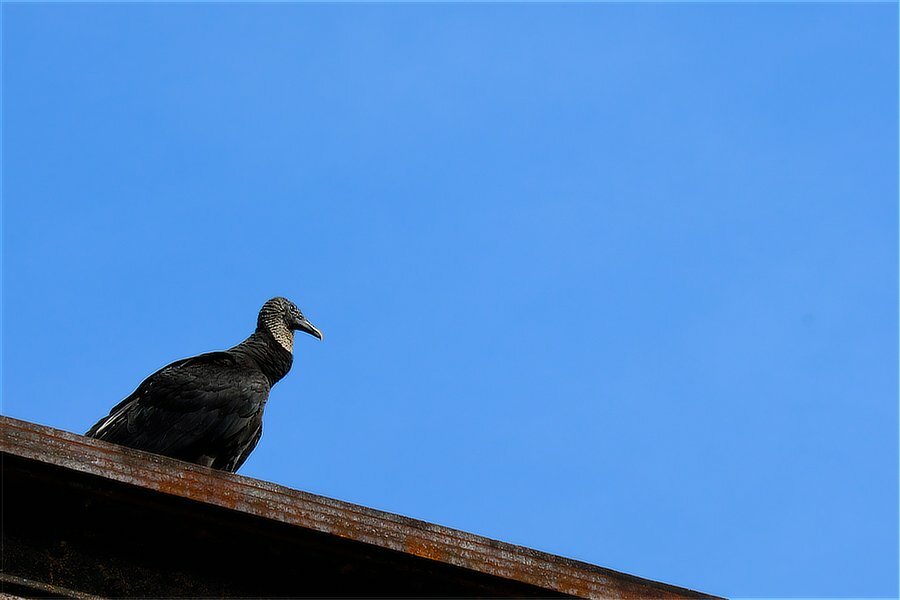
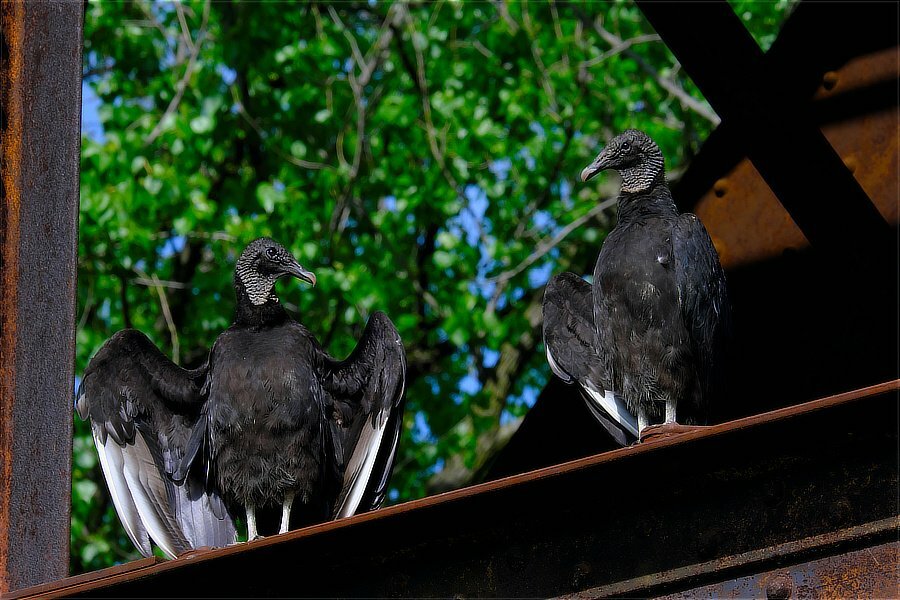
Yes, yes I am. I hope you enjoy your trip, Cuba is fascinating and has so many opportunities for great photography! Please show us some photos after you return home and have time to go through them. Keep an eye open for the vultures, the one on the first image was actually trying to sneak up on me when I turned and saw it. It flew up on the girder where I was able to get the image, They are more aggressive than other kinds.
-
Black Vultures: Coragyps atratus
-
I do not think you will be happy using a laser printer, those are useful for testing graphic design ideas before the final version is sent off to the commercial printers, they do not really do so well for printing photos. Okay, now to narrow technology a bit: https://www.systeminsight.com/dyesub-photo-printers/about-dye-sub-photo-printers/dyesub-vs-inkjet/ Ink jet printers still clog if they are not used on a regular basis (and sometimes even if they are). So they will have to be cleaned every so often --- this is not hard, one method is to use glass cleaner with a soft cloth on the print head. But they can print large and print very beautiful photos. One more thing to consider is the business practices some manufacturers engage in, vendor lock-in. Once you get the printer, you must, must use their ink refills, you are not allowed to use third party cartridges or refill the current cartridges on your own. The practice is very controversial so I am just going to leave it as only something you need to be aware of. Within the price range you listed, you can get very good quality printers from many different manufacturers. Of course there is online buying, but if you have local camera shops where you live, visit them. Many sell printers as well and have printer stations set up so that customers can try them. Here is another paper site to vist: https://www.hahnemuehle.com/en/index.html Once you narrow the tech a little, deciding on a company is easier.
-
That is a question, that on the surface, should be fairly easy to give some answers, but, well, you are starting down a path that could be really fun and neat or it could be frustrating, leaving you aggravated and bankrupt. Take a look at these two links and then let us know which is better suited to what you are wanting to do. Without knowing that, your question is so open ended, it is difficult to know where to start, on the same line as telling you what kind of transportation you should buy. https://www.moabpaper.com https://instax.com/printer/ These are really just dip-your-toe-in-the-water starts.
-
I have never seen a green and yellow focus frame / box before, that is a new one. As far as I have seen Fujifilm does use yellow in their displays, as an aid for manual focus (highlight blinking for example) or as a warning that the temperature limit is being reached (the camera is overheating) and it needs to cool off or it will shut down. Neither of these are tied into the focus frame / box. It sounds like you hit a very unusual glitch.
-
What was months in planning and prep came to fruition.
jerryy replied to Edp's topic in Fuji X-T5 / Fuji X-T50
Beautiful! -
The focus box moving around sounds like you accidentally enabled touch screen focusing: https://fujifilm-dsc.com/en/manual/x-h1/about_this_camera/touch/index.html
-
Quite a few places sell 49mm to 77mm reverse coupling rings. Have you considered trying a 43mm to 49mm step-up ring to complete the connection?