jerryy
-
Posts
1,926 -
Joined
-
Last visited
-
Days Won
304
Content Type
Forums
Gallery
Store
Everything posted by jerryy
-
Train Crossing, Boat Crossing... Ohio River, Kentucky & Indiana, USA

-
Not really, no. There are plenty of situations where using the camera is perfectly fine, but there can be some micro-climates where using the camera is more risky, but still can be managed, and some places where it is better to leave the camera in the bag until one gets more experience being in those situations in general. p.s. I wrote “he” by habit, but that should be “they”.
-
It is pretty clear what he is asking: “I'd like to know if anyone have been in such situation with the x100v”. The official specs list: Operating Humidity 10%~80% (no condensation) Operating Temperature 0°C~+40°C / 32°F~104°F https://fujifilm-x.com/en-us/products/cameras/x100v/specifications/ Humidity can cause all kinds of issues including things like fungus growing in the lenses. This site has some ideas that may help, especially the silica gel packs, put them in the camera case. https://www.photodoto.com/guide-camera-lens-humidity/ I have not used the 100V specifically, but I do use Fujifilm cameras in a lot of high humidity situations, you should be okay as long as you take good precautions. As a follow up, check on astrophotography sites for suggestions from the camera and lens users — usually this advice will go by the name ‘dew heater’.
-
Perhaps you hit the Display Mode button without realizing it, there are several options: https://fujifilm-dsc.com/en/manual/x-t2/about_this_camera/display/index.html#:~:text=Choosing a Display Mode Press the VIEW MODE,turns the viewfinder off and LCD monitor on. or if you prefer a video version: https://www.youtube.com/watch?v=hKdxhf7uY5Q
-
X-t30 no longer able to record video - Need help
jerryy replied to Somemorr's topic in Fuji X-T3 / Fuji X-T30
Does your SD card have the ratings listed? It should be UHS class 3 or better, or it may have a video speed rating, this should be V30 or better. -
X-T30 overheat after 50 minutes 4K shooting
jerryy replied to Marko1976's topic in Fuji X-T3 / Fuji X-T30
Fantastic! I know from your various postings you have been working on this for a while, it came together. So very well done. Oh yeah, great playing on the song as well 😀. -
-
X-T30 overheat after 50 minutes 4K shooting
jerryy replied to Marko1976's topic in Fuji X-T3 / Fuji X-T30
You are actually getting pretty decent times. As @andrei89 mentions, testing recording times until shutdown is now a regular issue. Here is one test: https://www.fujirumors.com/fujifilm-x-t4-vs-x-t3-overheating-tested/ Your time is holding up well against the X-T4. 😊 You might be tempted to slap a frozen gel pack on the bottom or wrap one around the body to keep it cool, but be careful because it will bring a lot of condensation and the water drops are not a good thing. Some third party manufacturers are building cooling cases based on using thermoelectric cooling (for go-pro stuff or smart phones, etc.), they may have something for dslr/mirrorless bodies as well or give you an idea that helps you build a diy case. Fujifilm’s X-H2s is going to come with an optional fan, which will not help you, but does show they are working to make things better. -
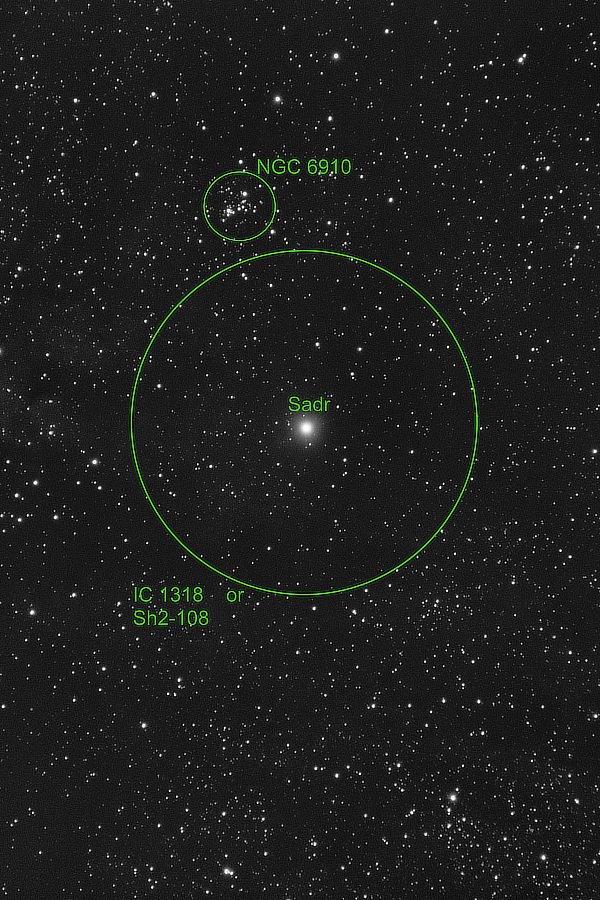
Sadr in Cygnus: Cygnus (the Swan) is easily visible this time of year even in some light polluted places. The brightest star in the constellation is Deneb. Sadr is at the base of the Cygnus' neck and is surrounded by some interesting dusty nebula areas. These are the equivalent of a just under 89 minutes exposure. https://www.star-facts.com/sadr/ https://en.wikipedia.org/wiki/Gamma_Cygni https://www.space.com/cygnus-constellation.html
-
Not having the menu option is a problem, especially when you need to use one or two of them. Here is the link to the firmware updates: https://fujifilm-x.com/en-gb/support/download/firmware/cameras/x-pro2/ This page also lists an overview of the steps as well as giving you more detailed instructions should you want to see them in step by step listings. However, since you mention you do not yet have a card reader, getting the update to your camera will be tricky, because the update is copied to the card and the the card is put back in the camera. Camera Remote App will not work to do this because, if I remember correctly, the X-Pro 2 does not have bluetooth which Camera Remote App needs for the transfer. So without the card reader things might be tricky. Do you know anyone that has one and will be able to help you?
-
If you get a pc card reader for your SD cards, you can pull the SD card from the camera, put it in the card reader (which attaches to your computer - usually via a USB port in your computer) and use your computer’s software to transfer the images. But I am curious about what you wrote, is the USB port in your camera damaged or is the menu option to set it up for image transfer not showing up? https://fujifilm-dsc.com/en/manual/x-pro2/menu_setup/connection_setting/ If you set the pc connection option to USB Card Reader, you should be able to connect your camera to your computer using a USB cable and move the images.
-
Recording 4K with Remote app - won't work? Big problem...
jerryy replied to Marko1976's topic in Fuji X Video
Will this work? https://camranger.com https://www.dronenerds.com/products/gimbals/dji-rs-2-series/dji-ronin-raveneye-image-transmission-system.html -
Recording 4K with Remote app - won't work? Big problem...
jerryy replied to Marko1976's topic in Fuji X Video
It does seem like there should be a simple way to do this, but it will take some serious wifi equipment upgrades to do that, at least so I believe. Here goes: First part: The wifi chip in the cameras support the b / g / n standards so it theoretically can send / receive data at up to 100 Mbps. In real world conditions, that will be considerably slower -- just like a home wifi router. The 4K Video Data Rate the camera supports is up to 400 Mbps which is already larger than the fastest possible wifi transfer speed. The lowest 4K Video Data Rate is 100 Mbps which might be feasible for transfer in ideal situations, but in practice, as noted, those ideal situations happen very seldom. Second part; So why not record 4K video to the card and send over 1080p video to the phone? This also seems like it should work. As an idea, sure, but in practice that is tricky. Think about converting some 4k video down to 1080p video on your computer. Most home desktop computers can do this, but it takes a while, even high end systems struggle when asked to do the conversions in real time, you need serious computing power to do the conversion on the fly, so to speak. That power is way beyond what is in the camera -- you would also need some serious cooling capabilities built in to handle the heat that comes rolling off of the chips while they are doing the task. This moves you up into the RED camera class -- very expensive. So i think the 1080p transfer to the smart phones, etc. is the best current option out there. -
I mostly use 20 seconds sub-frames at ISO 1600 in ten minute segments.
-
Recording 4K with Remote app - won't work? Big problem...
jerryy replied to Marko1976's topic in Fuji X Video
According to this video, the issue in the app has been there for a while: https://www.youtube.com/watch?v=6Us5o2jcqyA I suspect this may be due to trying to push 4K video over a wireless connection that, at best, is better suited to 2K data rates, but that is speculation on my part. -
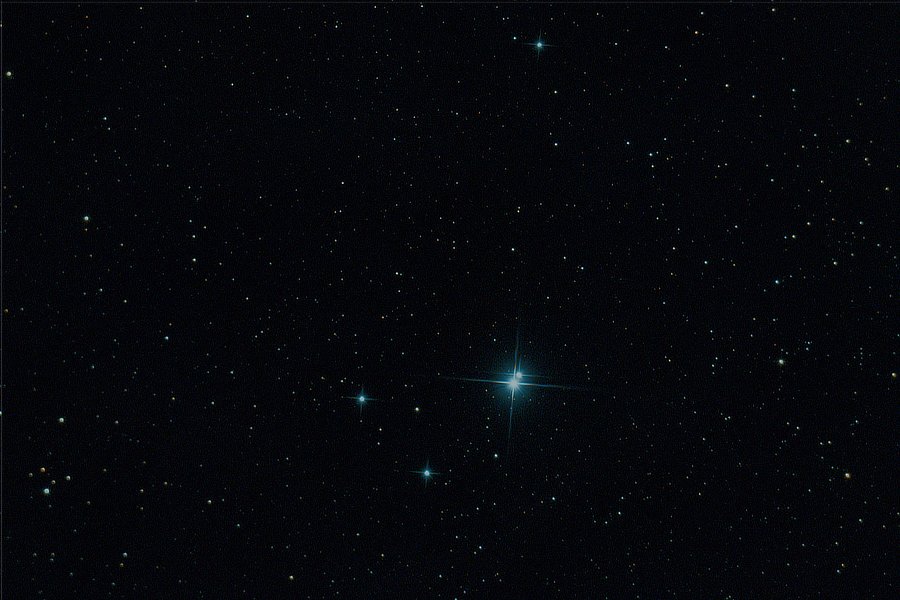
Eye of Croc or Eye of Cat: This is the equivalent of a just over 64 minutes exposure. https://www.messier-objects.com/messier-94-cats-eye-galaxy/ Messier Object M94 is called The Cat's Eye Galaxy by some and The Croc's Eye Galaxy by others. It is located in the general direction of the Big Dipper (Ursa Major)'s handle. 'Ol Cat's Eye has an unusual shape which may or may not be related to dark matter being in the galaxy. This video shows an over 550 minute exposure and explains some of the controversy about M94: https://www.youtube.com/watch?v=VsmTl7pn1vY Jabbah: The Horse's Blue Eyes This is the equivalent of a just over 78 minutes exposure. The big blue star is Jabbah. It is located in the Blue Horsehead Nebula (IC 4592) as part of the Scorpius Constellation. Jabbah also goes by the name Nu Scorpii Aa which is probably why some folks prefer to call it Jabbah. The color from this star group is reflected by the somewhat large nebula and gives the nebula its blue color. Seeing the stars is not too difficult, but you need very dark skies (and a "wide angle" telescope) to see the nebula. https://en.wikipedia.org/wiki/Nu_Scorpii https://www.constellationsofwords.com/jabbah/ https://science.nasa.gov/ic-4592-blue-horsehead-reflection-nebula
-
Any particular requirements for HDMI display?
jerryy replied to Astigmatism's topic in General Discussion
Make sure you are using the right cable, not just mini-HDMI to HDMI, but also the data rate needs to be supported, that is, the cable must be able to support 4K HDMI speeds if you are sending 4k video to the monitor. If you are sending the video to a TV instead of a monitor, the same stuff is needed for that as well, but you may need to go through the TV's menu system and find the over-scan setting and turn it on (some older TVs may need this to make sure the top and bottom portions do not go out of bounds. Note: this may not be needed, it depends on how old the TV is, it is a setting that let the TVs works with computers and some use it with camera video as well but many newer ones do not.)- 1 reply
-
- 1
-

-
Jefferson County, Kentucky, USA.
-
The f-stop is not changing, which is the ratio stays the same. Constant aperture is really constant f-ratio., which means effective or virtual ratio. A truly manual constant aperture lens operates differently than by-the-wire lenses, which is why the older ones are so large, they have to maintain that ratio over their range. Newer lenses do it differently which is why they are referred to as having virtual constant ratios. Btw, that Canon approach is pretty limited. Try that trick on a wterfall and you will see the waterfall change from falling water to shaving cream.
-
These discussions may convince you otherwise: https://photo.stackexchange.com/questions/121850/d7500-exposure-changes-when-in-m-mode-and-zooming-video https://www.youtube.com/watch?v=4h8rQlrWhNk These have been problems for a while, and folks are trying novel techniques to fix them.
-
Constant aperture lenses are the best you will find when trying to use lenses built for stills photography in a video / movie setting. If you want to use lenses built for video / movie setting, try these: https://www.fujifilm.com/us/en/business/optical-devices/cine-lens/mk Or go with some of the third party cine lenses. One quick way to know you are looking in the right place, is when the specs list t-stops instead of f-stops.
-
It is known as being a problem for variable aperture lenses regardless of who manufacturers them. Here is an short version using Canon cameras and various lenses: https://www.youtube.com/watch?v=_wQutJ16lgU The long-standing answer is to use constant aperture zoom lenses.