George_P
-
Posts
499 -
Joined
-
Last visited
-
Days Won
62
Content Type
Forums
Gallery
Store
Everything posted by George_P
-
Merlin, I would say these two are the best of your lichen series so far. Merry Christmas and all the best for the New Year to you and everybody else !
-
 Great, I like it. Congrats on your X-T2. imho: rotate the picture a little bit to make the horizon level.
 -
 I asked PhaseOne about Fuji film simulations for X-Trans sensor II (Fujifilm X-T10 etc.). They were very fast to respond in a nice way and they said they will file my post as a "feature request". But they said it depends also on their collaboration with Fujifilm and they asked me to make a similar request to Fujifilm also. So, Ladies and Gentlemen, everyone who wants the Fuji film simulations for older cameras than X-Trans sensor III, ask the nice people at PhaseOne and Fujifilm for it ! We love the "Kaizen", don't we.
 -
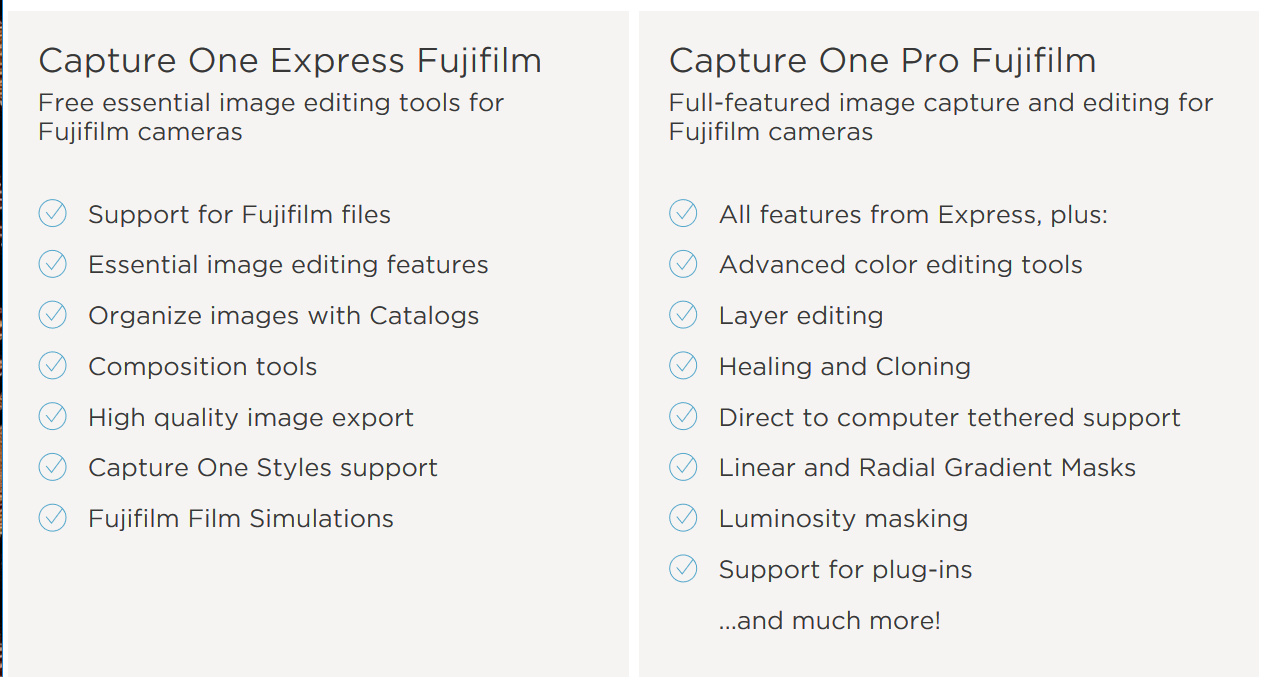
@plaidshirts: Yes, you are right, I bought v11 on Oct. 15th and now I activated v12 free of charge. @bergat: Yes, C1 is free of charge for Fuji users, but only the "C1 Express Fujifilm" version. I bought the "C1 Pro Fujifilm" version. The differences are as follows:

-
Sorry, I have never used the panoramic feature. Maybe your question is too open, try to narrow it down to some more specific issue. If there is an issue and you want me to try it out on my camera for comparison, tell. (Not that I consider myself smart, there some real pros here, I am not one.) To post photos here (not many lately, too busy) I would make a small version 1600pix wide, put it on my server that hosts my domains, post it here and link it to the full size version that I put on that same server. But you can use Flickr or similar sites just as well. I do not know if anything qualifies as the best and easiest, I suppose it depends on what people like to use.
-
It is a pity that only X-Trans III and upwards are supported for the film sims. Works fine with images from my X-T2, but I have lots of images from the X-T10 and it would be nice if it worked for them also. Anyway, I enjoy C1 very much. I have the Pro Fuji version and it is worth every penny I think. Upgrade from 11 went smoothly and was free as it had been promised. Just download the "trial" v12 and then activate with your code that you got for your V11.
-
Fuji sharpening on macbook retina screen
George_P replied to miguel's topic in Fuji X-T2 / Fuji X-T20
... and to come back to the C1 recipes, if you choose "Output sharpening for screen", I presume that is processed to match the "Resolution" and "Size" or "Dimensions" parameters that are to be found in the "Basic" tab of the "Process Recipe". But as opposed to "Output sharpening for print", you have no option to adjust for viewing distance, so it is still not ideally solved, although they have gone a long way, IMHO. Moreover, when you choose to print via the print dialogue of C1, there you can also adjust sharpening, but without specifying the viewing distance, so it is rather confusing. When printing, I prefer to make a TIFF and then print it from another program, because I can adjust for the "Viewing distance" and also because the print dialogue in C1 drives me crazy with having to set paper sizes and margins all over again each time. On the other hand, in C1 you can make the TIFF already in the colour space of the ICC profile of the paper on which you intend to print, but that is a whole another story. Sorry for wandering away from your topic, but I thought it may be of interest for some people reading this. To sum it up, for print I find the recipes in C1 useful and they make it easy to produce an appropriately sharpened image for the size/viewing distance of the print. (I use viewing distance 150% of the diagonal for a 5"x7" and 200% for an A3+). For screen, try out a setting that you like on the device that you target, which affects not only the resolution of the device but also the viewing distance from it (tablet/monitor/TV...). For the internet, when you do not know what the viewer will be using, it is a problem. I recall uploading images that looked beautiful on my 4K screen to this forum, them looking at the from a notebook with a HD screen I saw horrible mushy images. In most websites you do not even control the resolution of the image, they get resized on the server as they are published. I hope you are not going to throw away your camera into a bin after all this rambling of mine. Cheers, Miguel. -
Fuji sharpening on macbook retina screen
George_P replied to miguel's topic in Fuji X-T2 / Fuji X-T20
I would say yes, you have to adjust the sharpening for every device, be it screen or printer output, depending on the resolution of the device but also on the viewing distance. There is a difference if you survey, for instance, an A3+ print and you are standing a meter away from it or if you walk up to it and look at it from close up. If you want to perceive a print as ideally sharpened you have to take the viewing distance into consideration. For computer screens, you look at them from different distances too, depends whether it is, for instance, a 32 inch monitor or a 14 inch laptop. But to come back to your retina - non retina question, you have monitors in so called HD resolution (1920*1080) - most laptops have that, but also in 4K (3840*2160) - mostly bigger monitors & TVs, but already some laptops, as well as 5K - iMac, etc. (8K). Are you talking about a retina screen on a tablet that you hold in your hands or on a iMac 27" computer monitor ? I would say all this has an effect on the perception of the image. C1 has a nice way of dealing with the production of different versions of your image for different purposes - the so-called recipes, where you can adjust the so-called output sharpening. For "print" you can define the viewing distance as a percentage of the diagonal of the size of the image. You can define several recipes as you wish and then easily produce them for any image that is already "finished" and sharpened to your liking (before you apply the "output sharpening"). I would suggest to have a look at that and try it out. If you search on the internet you will find more qualified answers from people who know more about this than I do. Good luck. -
Sure it does ! It will fall eventually :-)
-
X-T2 / 4.30 - I have absolutely no problems, recommended. No feedback - I would say everybody is happy with it, otherwise there would be plenty od feedback for sure.
-
50-230: You are right. I got mine brand new from the best local shop for 170€. (!!!) Crazy. I would not mind if the other Fujinon lenses would go for such low prices every now and then.
-
Congratulations & Celebrations !
-
Hi Chard, welcome, Get the X-T2 and 18-55 for sure. That is a sure bet. The 18-55 is not to be considered a "kit lens" in terms of what you are used from the DSLR world. A "kit lens" used to be a medium quality lens. In Fujifilm world, the 18-55 is a high quality lens, most people would compare it to the quality of the "L-Glass" from Canon. The 16-55 even more so, but like milandro said, that is perhaps too big. And it has no OIS ! There is a big difference between the X-T2 and the X-T1. Asking "which camera" is a little bit like asking "which car" - for someone a Lamborghini and for someone a concrete mixer. Depends on what you plan to do with it. But with the X-T2 you are right in the middle and you get the best value IMHO. Reconsider the 35 f2. I have it and I love it. I use it on my X-T2, but mostly on my X-T10 to make a small package. But it falls within the focal range of the 18-55, so maybe you would benefit more from another focal length, e.g. the Samyang 12mm for landscapes and astrophotography, or a tele (the 50-230 is very good value for money). Or if your budget will increase in the future, go for the Fujinon wide angle lens or the more expensive tele lens. Good luck, let us know how you fared and share some photos !
-
😀 It is not often that I learn a new word in English but now I did.
-
X-T3 Set of ICC Profiles for Capture One 11.3 ?
George_P replied to Richard Bledsoe's topic in RAW Conversion Fuji X Photos
You have beautiful images on your Flickr, sir. -
Now this is something !
-
One from our garden. The nicer part of autumn still lasts. 90f2, C1.
-
What post-processing software for Fuji X-Trans?
George_P replied to suttle13's topic in RAW Conversion Fuji X Photos
Yes that should address the OP’s concern that C1 is too expensive. He didn’t bother to react to our efforts so he may not be reading this, but he most likely has heard this news anyway. You are right, C1 is very good. I will get the Pro version. -
You are welcome.
-
My friend, I have what I hope is good news for you. I took the lens off and the battery out of my brand new X-T2. I switched off the music. Here I am, shaking the camera mildly back and forth, I am pressing on the tilt screen while doing it to make sure that the tilt screen is fixed. I can definitely hear a mild clunking noise and feel something moving inside the camera. Whatever it is, I am sure it is not a fault and I think you can rest assured that it is normal. Perhaps the shutter assembly is dampened against vibrations or something like that. The noise is quiet but easily heard and distinct. I would say that is nothing to worry about. It is a fantastic camera, relax and enjoy. You need not have any regrets, unless you are a sports shooter or something like that. The X-T3 is faster but the IQ is the same.
-
Capture1 Express for Fujifilm version
George_P replied to Mb.kinsman's topic in Fuji X Rumors & News
Yes it is. What kind of "Kaizen" is that ? Fabulous or what. Have a read on their website, there is a comparison of all the versions. When you start your installed trial, click "More options" (bottom button) and from there you can access the Express version. -
My X-Pro2 Review.
George_P replied to adzman808's topic in Fuji X-Pro 1 / Fuji X-Pro 2 / Fuji X-Pro 3
Adam, Yes this is great news. I seem to be getting better results from it than from Silkypix, it is faster, more options, layers (in the pro version) etc. Looks good for the future. I wonder when the v12 will be out. As you said, no "can of worms" 🙂. But surely people will find plenty of things to complain about. That is the human nature. What I find interesting is that the perspective is a bit different from SP or SOOC, it seems a bit wider on all sides. I mean as if the SOOC jpg or SP processed RAF were a bit cropped compared to what you get in C1 or better put it this way: as if the image you see from C1 was a bit "less zoomed in". The image dimensions pixels x pixels is the same. I am not saying it is a problem, just wondering. Am I being daft and doing something wrong ? This was on images from the X-T10/35f2, did not try images from other lenses or cameras yet. Lens Correction in C1 says "Manufacturer's Profile". When I change it to "Generic", I see no difference. If I click "Show All", I can see Fujifilm lenses in the dropdown, but only GF lenses. Will XF lenses be coming later ? Also, I am looking forward to the official film sims that are due. -
When you say "body only", do you mean with no lens attached ? Or just without the battery ? Sorry for asking such a seemingly stupid question but sometimes there are language differences and misunderstandings. I mean, if you have a lens attached that would be just normal to hear a sound.
-
Very nice, thanks for sharing.