jerryy
-
Posts
1,926 -
Joined
-
Last visited
-
Days Won
304
Content Type
Forums
Gallery
Store
Everything posted by jerryy
-
Welcome to the forum! Some thoughts for you since you are considering camera body differences, IBIS is turned on and off in the camera body’s menu choices, but OIS is turned on and off via a switch on the lens. A lot of the menu choices operate the same across the various bodies so you can move between the bodies fairly easily. This is of course limited by what hardware features distinguish the different bodies, but overall the systems are close. If you quickly need a second backup body the X-T30 II is great for that, but if you are not in a big hurry, the rumored X-T5 is supposed to be out in the near future. Treat any rumors though with requisite heaping spoons of salt.
-
https://digitalcamera-support-en.fujifilm.com/digitalcameraengpcdetail?aid=000005639 Scroll down to the X-T30 section. You should be okay as long as it is 5v 1.5a and uses the standard USB-C cable.
-
Jefferson County, Kentucky, USA

-
Did somehow a function button get assigned to turning off or on the raw saving option? https://fujifilm-dsc.com/en/manual/x-t200/menu_shooting/image_quality_setting/index.html Scroll down to The Function Buttons part in the Image Quality section. If this is set to off, that will affect other settings. p.s. Welcome to the forum.
-
You have several options to do this: https://fujifilm-x.com/en-us/exposure-center/back-button-focusing-all-you-need-to-know/ https://fujifilm-dsc.com/en/manual/x-t10/menu_shooting/ae-af-lock_button/index.html Let us know if this works as to what you are wanting to do.
-
XT4 videos look darker and lower quality looking at it from my laptop
jerryy replied to Robert109283's topic in Fuji X-T4
You may be able to adjust the gamma setting if you have access to screen color calibraing equipment such as x-Rite, Spyder, etc. Apple laptops do not always display things as you might wish: https://community.adobe.com/t5/premiere-pro-beta-discussions/macbook-pro-m1-color-grading-gamma-shifting-washed-out-colors/m-p/12772897 -
https://fujifilm-dsc.com/en-int/manual/x-t3/menu_setup/save_data_set-up/index.html Scroll down to the Card Slot Setting (Still Image) section. In essence you need to have both raw and jpeg chosen as the kind of files you want to save (--- in the Image Quality menu---) and then this menu set to RAW/JPG.
-
-
X-H2s AF-C hunting on certain older lenses
jerryy replied to Admill's topic in Fuji X-H1 / Fuji X-H2s / Fuji X-H2
Hmm, how do these lens react using AF-S mode? If they are also grindingly slow in this mode that would be more evidence toward a resolution. If they respond fast enough, you may be able to use them until a better solution happens. That depends on your reflexes as well, being able to click the shutter button quickly to get the shot, or use the old, old method from before good AF came along of pre-focusing on a region, wait for the subject to arrive there, then snapping the shot — the AF would work okay in that short of a distance. Basically, until more is known, using the body’s faster speed in your favor. -
X-H2s AF-C hunting on certain older lenses
jerryy replied to Admill's topic in Fuji X-H1 / Fuji X-H2s / Fuji X-H2
You have tangled two different ideas into one, that one having little to do with the problem facing the original poster. How about moving the rant to a different thread so the original issue can be addressed toward / for the person asking for help. -
X-H2s AF-C hunting on certain older lenses
jerryy replied to Admill's topic in Fuji X-H1 / Fuji X-H2s / Fuji X-H2
The X-A1 was announced in 2013, launched in 2014 and discontinued in 2016. How long would you expect updates for a discontinued product? -
X-H2s AF-C hunting on certain older lenses
jerryy replied to Admill's topic in Fuji X-H1 / Fuji X-H2s / Fuji X-H2
Can you test another 16-55 lens with this new body? When new stuff is released, there usually are some things that go awry. If all of those same lenses have troubles, vs. just isolated instances of problems, then perhaps the overall issue can be addressed. These are, as one person put it after all, specialized computers attached to lenses, so upgrades to the body can cause the attachments to act strangely. -
How do you normally move images from your camera to your computer? It sounds like the camera thinks that somehow it has been told to automatically go into wireless file transfer mode to your pc. You may be able to get this turned off by a simple reset — in the menus or if that does not work then remove any pairing with your computer option you have put in place. Failing that, there is the hard reset, take the main battery out, leave the camera on a shelf or wherever for several or a few more days until the internal backup battery completely drains away. This restores all settings to the factory defaults, which should fix the issue, bur you will have to put all of your preferences back in.
-
x-t30ii or x-t4 (moving over from Nikon)
jerryy replied to Ntate Pule's topic in Newbie / Self Introduction
I use a X-T30 with a 150-600mm lens on a every so often occasion without any troubles, but I do make sure to hold / carry it by the lens bracket foot rather than the camera body. So you should be okay either way you chose. IQ-wise, they are similar, so if it is possible, try to get these side by side so you can hold them and make sure they fit your hands and the dials are easy to reach. The one that 'wins' there will be the one to get -- the idea is the camera you want to use is the best one to take with you. Keep in mind the X-T30ii can also have an L-bracket, etc. put on it if you need to use that for more balance. p.s. Welcome to the forum. -
Jefferson County, Kentucky, USA
-
Unfortunately, when using the AUTO modes, the maximum ISO you can set for your camera is 6400. https://fujifilm-dsc.com/en/manual/xf10/menu_shooting/shooting_memu1/index.html Scroll down to the AUTO sections. You can get the higher ISO values by manually setting them.
-
40 MP x-trans: file size & lens future
jerryy replied to AdrianoTellentano's topic in General Discussion
There certainly is a lot to wonder about as autumn starts getting ready to show up. But ... Fujifilm released a list of lenses that will work just fine with 40mp sensors -- a very long list. https://www.fujirumors.com/list-of-fujinon-xf-lenses-that-get-maximum-benefit-from-fujifilm-x-h2-and-x-t5-with-40-megapixel-resolution/ From the article: "Let’s be clear: more or less every single Fujifilm XF lens will perform better on the 40MP sensor. So even if an older lens can’t really resolve all the 40MP, they will still perform better than on the current 26MP sensor. Some might resolve 30MP, others 33MP, others more or less". If you look, Fujifilm has been letting you bin the files to smaller sizes for quite a while, even in your XE4 you can do this, look under the setting for recorded pixel sizes -- in your case you can drop from 6240 x 4160 down to 2080 x 2080. Sharpness is only one quite desirable aspect of an image, overall there are several other aspects the new sensors will give photographers, if an image is too sharp it can be softened. I do not think Fujifilm is going to just abandon the smaller sensor based cameras, after all they sell a whole lot of the Instax line, those are not XH2(s). -
Clark County. Indiana, USA
-
Just about every raw convertor nowadays, even Raw Therapee, is using the in-camera created embedded preview / review as the initial start for their process. RT used to start with the linear raw data, but they have changed. If I recall correctly, you can use it to see how the linear — actual raw data appears. There are other apps that you can use to get at that raw, linear data if you wish. What you are seeing could be from how Capture One wants to present its starting place with its version of how the non-linear tone curves, etc. should look. Try with other raw convertors — many of them are also ‘well known, even friendly’ with Fujifilm and see if you get similar results. How are you testing to come up with the differences you perceive?
-
The film.recipes page has a sort of long list at the bottom of the page of other recipe sources, you may find something there.
-
There are quite a few places out there offering recipes, here are a couple: https://film.recipes https://www.ivanyolo.com/fujifilm-recipes/ When you go looking, remember to take in account which sensor the recipe is designed to work with, you mention using a X-T4, so your camera should be okay to use a very large number of the ones offered.
-
How are you comparing them? What you see from jpegs depends entirely on the in-camera jpeg settings you have active when you press the shutter button, while the raw image simply records the sensor data as applied from things like ISO, f-stop, shutter speed etc. (raw data does contain a small jpeg that it uses for in-camera review, or for processing software to use as a starting point — this also uses the jpeg settings). It is quite easy to get different looking jpegs vs raw images right out of the camera.
-
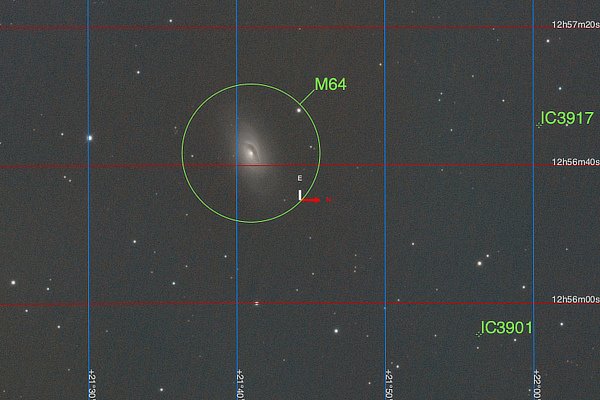
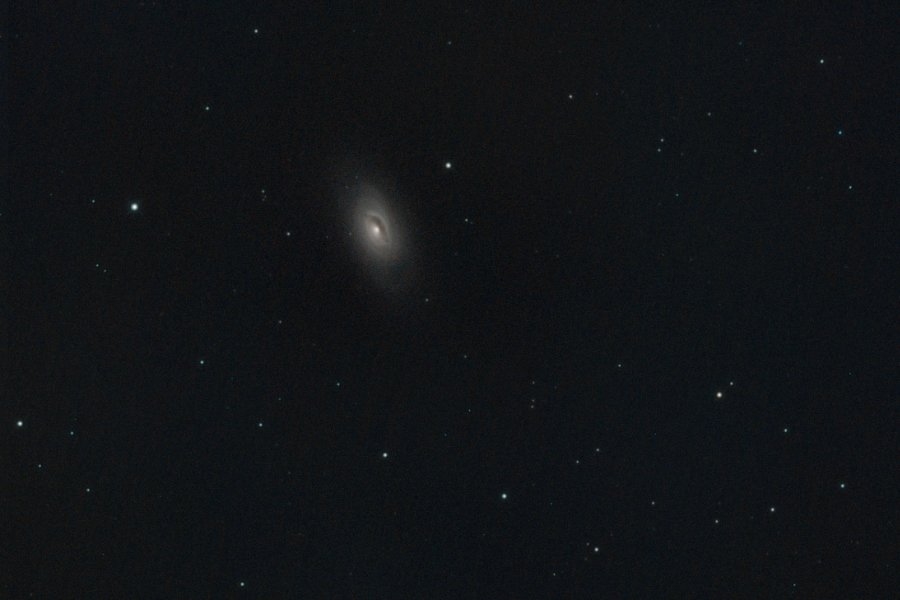
An evil eye watches ... Messier Object M64, the Evil Eye Galaxy also known as the Black Eye Galaxy. This is an equivalent of 101 minutes exposure. https://science.nasa.gov/m64-evil-eye-galaxy https://freestarcharts.com/messier-64
-
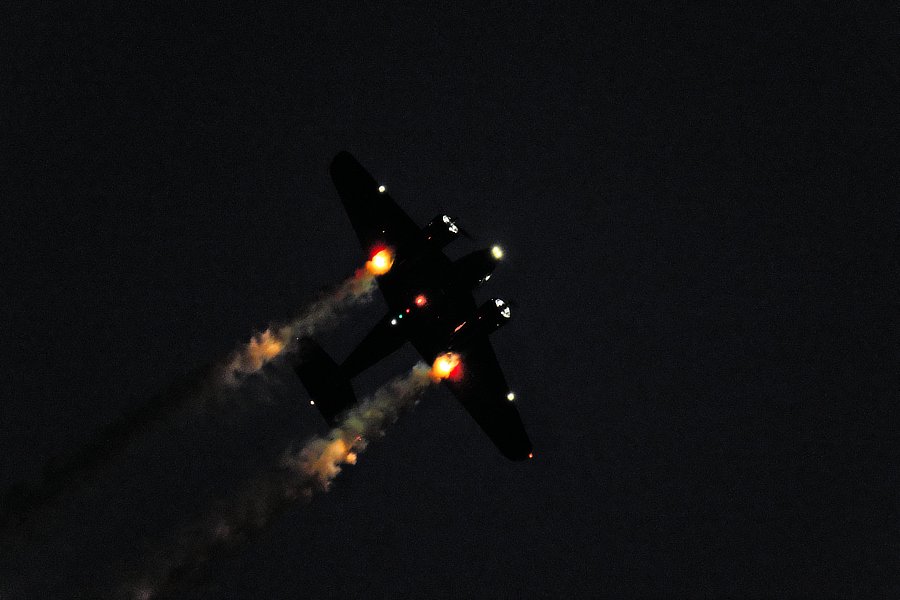
The air show continued through the day, folks watching got their moneys' worth. The sun set, the show went on ... The lights turned into kaleidoscopes: And then it finished.
-
You should be okay at f13, It could be the lens sample, if it is possible, rent or borrow a similar brand of 35mm lens, put the camera on a tripod, with a remote release connected to rhe camera, and shoot a same scene using both lenses at the same settings, as well as trying an entirely different lens to use as a means to eliminate the brand as having sample issues. Sometimes lenses are soft, sometimes the sensor in the camera is a slight bit tilted which throws things off, sometimes weird stuff happens. You should be mostly be okay until around f16 - f22 before noticing artifacts in pixel peeping, depending on the lens. Of course if you are photographing window screens or things like that, you can get issues at f1.2.