jerryy
-
Posts
1,926 -
Joined
-
Last visited
-
Days Won
304
Content Type
Forums
Gallery
Store
Everything posted by jerryy
-
When you click (double-click) on a data type of file, your computer’s operating system tries to decide which program should be ran to work with that data. If the system cannot decide, it starts up a program it thinks may be able to use the data. In your case, the computer squinted at the file (the name ends in .dat, meaning it is some kind of data file) crossed its fingers and toes, muttered under its breath and opened an editing program hoping that would be okay. Usually, in the now-a-days computer world, clicking (double clicking) a file will be all you need to do to get an attached device to work. Cameras are standalone devices, so getting them updated from a computer would be tricky because there are so many different computer operating systems out in the world, Linux, macOS, Windows, etc., etc. Having update installers for each computer type is a lot of work. It may seem clunky to use the ‘put the data on a card, and let the camera do the work’ approach, but the approach is much easier and less error prone overall.
-
Because of time zone differences, @Greybeard might not be seeing your post until later. You do not need to click on the file, doing that will not cause it to update your camera. The basic idea is you put the sd card in the card reader which is connected to your computer, copy the file to the card (drag and drop it onto the card icon). put the card back into the camera, turn the camera on while holding down certain buttons. Doing that sequence will start the process going. Here are specific instructions: https://fujifilm-x.com/global/support/download/procedure-x-interchangeable-ver2/ And with that, @Greybeard should eventually be back, I believe there is some sort of holiday going in in his home country at the moment, so see if the instructions make sense. p.s. Welcome to the forum.
-
Which flash for XT-4 to home artwork photography?
jerryy replied to Michael Molina's topic in Fuji X-T4
In that case, there are plenty of camera shops selling flash units that work with the X-T4, if you decide to use one in your project. KEH, Adorama, MPB, BHPhotovideo, etc, etc. Your local camera shop should be able to help you as well.- 4 replies
-
- 1
-

-
- flash
- speedlight
- (and 2 more)
-
December 22, Winter Solstice Day. Winter is getting ready to make the days longer, the nights shorter and presumably both colder. Autumn was seen at a postal office trying to take care of a forwarding address issue.

-
For astrophotography, you may be taking many hundreds or thousands of images at a time depending on what you are doing. That puts a lot of stress on mechanical shutters, they wear out fast under those conditions. Dedicated astro-cams pretty much are ES only. Also, once the focal length gets past 100mm or so, in long exposures, any kind of ‘camera shake’ ruins an image, blurring fine details, — mechanical shutters do have some shake, ever so slight as it may be. It would be fantastic if Fujifilm would give us longer ES times, maybe a minute or so.
-
Which flash for XT-4 to home artwork photography?
jerryy replied to Michael Molina's topic in Fuji X-T4
Welcome to the forum. You do not mention which country you live in, so you may not be able to find some commercially sold flashes that are available in other places. I believe you will be able to get better results using a light tent with constant lighting than you will get using a flash. They are relatively inexpensive as well. But here goes: https://www.cameraegg.org/best-flash-for-fujifilm-x-t4/ https://www.bhphotovideo.com/c/accessories/Flashes--Accessories-for-the-FUJIFILM-X-T4-Kit-Silver/1602231-REG-48200 For some tips: https://www.iphotography.com/blog/flash-photography-tutorial/ https://shotkit.com/flash-photography/ Please read this next one: https://digital-photography-school.com/photographing-artwork-tips/- 4 replies
-
- 1
-
-
- flash
- speedlight
- (and 2 more)
-
Field monitor doesn't work wit my X-T3
jerryy replied to john giskes's topic in Fuji X-T3 / Fuji X-T30
I may have missed something, but after reading through the settings listing, I do not think it is possible. Eight-bit HDMI is an older standard, I am guessing newer cameras dropped support for it. You may have some good results with a converter: https://www.reddit.com/r/FilmDIT/comments/rukd94/does_anyone_have_a_recommendation_about_devices/ But, …., it may be less expensive to upgrade to a recently released field monitor that supports newer standards. edit: HDMI v2.0 is the minimum standard that supports 10-bit bit-depth, so avoid monitors that only support HDMI v1.4. -
-
-
Field monitor doesn't work wit my X-T3
jerryy replied to john giskes's topic in Fuji X-T3 / Fuji X-T30
This is just a guess, but the specifications for that monitor say it only supports 8-bit bit-depth. Most of the video outputs for the X-T3 are set to support 10-bit bit-depth. Try using the H.264 codecs, with the same frame rates, etc. and see if you get an image. edit: https://fujifilm-dsc.com/en/manual/x-t3/technical_notes/spec/index.html H.264: SD card, 4∶2∶0, 8-bit/HDMI output, 4∶2∶2, 10-bit edit, edit: Welcome to the forum. -
-
This is essentially a brand new lens, it has only been out for just over a year. There might not be enough reported issues to need an update yet.
-
Unable to download uncompressed raw XT5 files to Lightroom
jerryy replied to ehrooney's topic in RAW Conversion Fuji X Photos
I believe you need to give more information about what you are doing so that you can get some help. Such as: What computer system are you trying to download the images to, which version of its operating system? Which version of Lightroom? How are you connecting the camera to the computer? Have you tried to put the card in a card reader that is attached to the computer? Information like that. A sad smiley emoji just is not enough. p.s. Welcome to the forum. -
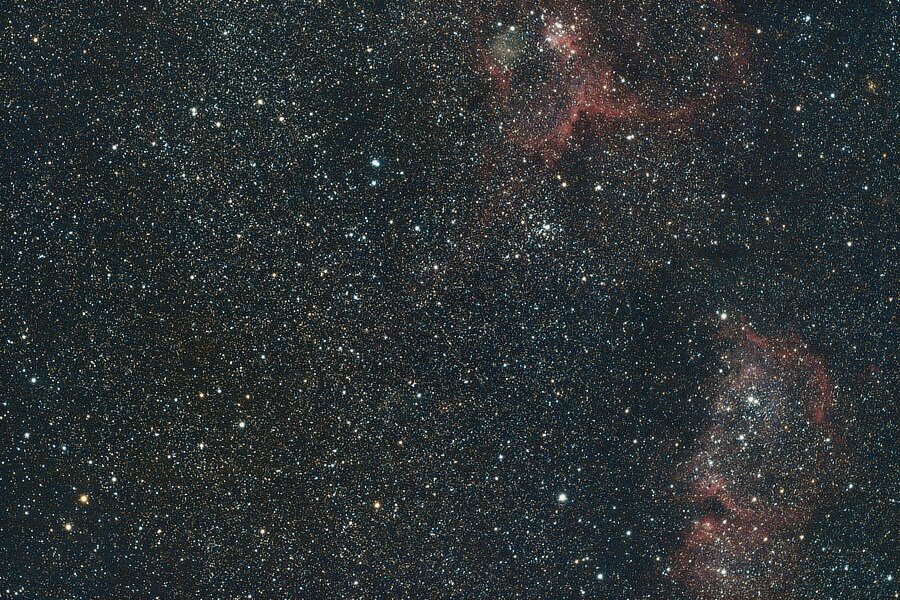
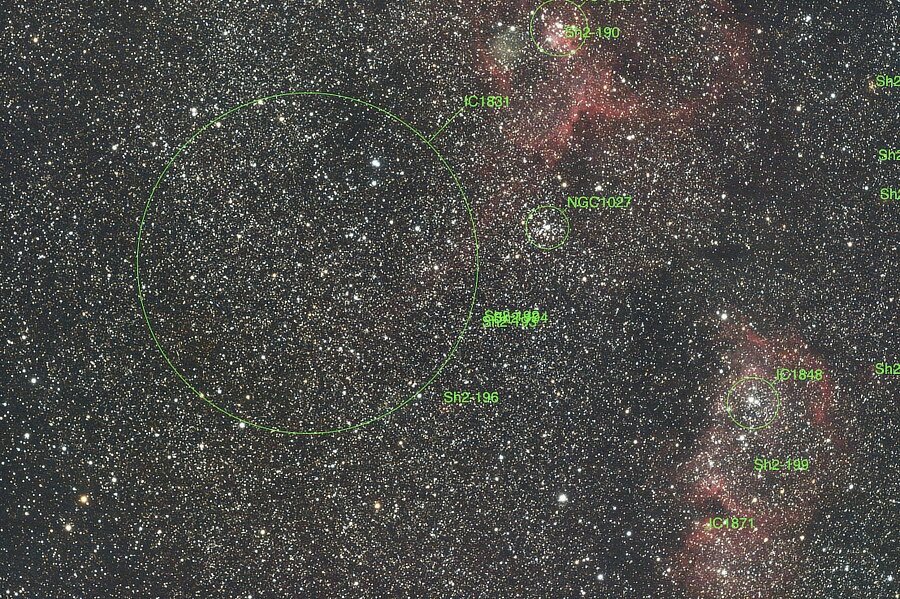
Back on Page 2 of this thread, there is a posting for NGC 896, the Fishhead Nebula, 'Ol Fishhead juts off from the beautiful Heart Nebula, IC 1805. On the other side of the Heart is IC 1831 (also attached to the Heart Nebula). IC 1831 is a faint Diffuse Nebula in Cassiopeia's Constellation. The brighter nebulas get more attention, but IC1831 has its own merits. This is the exposure equivalent of 80 minutes, 25 seconds. The nebula in the lower right hand side is the Soul Nebula, IC 1848. Heart Nebula: https://apod.nasa.gov/apod/ap190911.html Soul Nebula: https://apod.nasa.gov/apod/ap160228.html
-
Assuming the in-camera conversion from raw to jpeg works, it sounds like the software was updated before the firmware. It might be time to contact the Fujifilm offices in your region (lookup Fujifilm contact in your search engine) and see if they know more information.
-
Do you have the same issue with the Raw Converter software? https://fujifilm-x.com/en-us/products/software/raw-file-converter-ex-powered-by-silkypix/ If so, then you may have an unusual issue from the firmware update that others are not seeing.
-
Fujifilm updated this software a few days ago. I do not know one way or another if the new version will fix the problem you are seeing, but .... https://fujifilm-x.com/en-us/support/download/software/x-raw-studio/ p.s. Welcome to the forum.
-
You may have touched the display mode button. https://fujifilm-dsc.com/en-int/manual/x-t30-2/about_this_camera/display/index.html#choosing Scroll down to the section called Choosing A Display Mode. p.s. Welcome to the forum.