jerryy
-
Posts
1,926 -
Joined
-
Last visited
-
Days Won
304
Content Type
Forums
Gallery
Store
Everything posted by jerryy
-
Yup, computers beyond the “get you in the door entry level” are expensive. It is even worse for the computers game-players use, believe it or not. The entry level disposable ones that are limited in what you can use them for beyond reading email and watching videos go on sale every other day though. Right now, the time of this posting, you can get the 14 inch MacBook Pro M3 - 24GB ram - 512GB SSD for US $1999 directly from Apple or maybe a little less from one of the resellers, guessing you are close to where $US have meaning. The USB-4 or Thunderbolt 4 NVME enclosure @George_P mentions is a very good add-on. You can put a pretty large SSD in them, and use that as your main storage.
-
Cassie's Knees... Some sky objects are seasonal, only appearing as signs of spring or summer or fall or winter. Others, depending on your location are circumpolar, meaning they are visible year round, never dropping below the horizon or drifting out of view. Cassiopeia is circumpolar for many folks in the Northern Hemisphere. It also has a lot of neat clusters and nebulae. It is fairly easy to find, even in light polluted areas, it is the “W” shaped constellation, not far away from the Big Dipper. This, just under 12 minutes equivalent exposure, is the region around Cassie’s knees. There are several Messier Objects here as well as the bright star Gamma Cassiopeia nicknamed ‘Navi’ by the astronaut Virgil Ivan “Gus” Grissom. The famous Perseid meteor showers come from this constellation’s region. https://www.constellation-guide.com/constellation-list/cassiopeia-constellation/ https://en.wikipedia.org/wiki/Gamma_Cassiopeiae Screen capture using Stellarium: http://stellarium.org/ Later Edit (A closer look at Navi):

-
Get as much ram as you can afford. It seems just about all of the manufacturers are soldering the ram onto the motherboard these days instead of giving you slots and letting you make the choice later. sigh. If you going with a MacBook, there is not much difference between the M2 and M3 cpu versions, (some seconds of processing speed-up instead of many minutes). The ram amount still matters a whole lot, things slowdown once the ram gets used up and the working files are subsequently swapped back and forth to the hard drive. There is a rumored M4 version that will be out any day now, 😀. An underrated factor is the fan, as to whether or not it has one, the Air version does not have one, the Pro version does have one. When you start messing with large files, the computer generates a lot of heat, so if it lacks a fan, it will slow things down to keep from cooking itself to death. (The ones with fans will also slow things down after a while if the heat does not dissipate fast enough.) How much slowdown depends on what you are doing. Best wishes.
-
If you can play the entire clips back in your camera, they are not lost. Well, as long as there are no future accidents. Try the card reader approach discussed in the postings above H. Smith’s. You will need to pull the separate files over to your computer and use a movie editor to stitch them back into a being a single file. Oh yeah, make backups. p.s. Welcome to the forum.
-
New to Fujifilm system - user or camera/lens error?!
jerryy replied to LeSweez's topic in Fuji X-T3 / Fuji X-T30
Can you can put the cameras on a tripod and take similar shots again? This should reduce any camera shake. Also, does your local camera store rent lenses? The exif data say these were taken pretty close to the same time, but the view in the window shows whomever is doing the landscaping moves really, really quickly.😀 -
Azalea
-
GFX 100s not connecting to Mac via USB-C
jerryy replied to jmm123's topic in Fuji GFX 100 / GFX 100S / GFX100S II / GFX 100R
I am glad to read you are able to get this up and running. Pretty much as long as you connect the camera and turn it on and wait a few moments for the computer to register the connection, you can then use Image Capture (which actually is a very decent program with a lot of options for transferring images from cameras to the computer) or Lightroom or other programs to move the images to your library. There are some drawbacks; connecting to the computer while it is in sleep mode will waste your time, the connection will not get recognized— you will have to unplug the camera, wake the computer and start over. Trying to connect while the screen saver is running may work, it may not, often not. If the computer goes into screen saver mode while the camera is connected and sitting idle, it usually stays connected when coming back out of screen saver, but if the computer mputer goes into sleep mode, the connection gets dropped and you have to unplug it and start over. I suggested having the camera turned off while connecting, this is to lower the possibility of static electricity discharges frying either the camera or the computer or both. A lot of times you can connect while the camera is turned on, but not always, sometimes you have to unplug, turn it off, reconnect and turn it back on. A lot of this comes from Apple’s approaches towards keeping USB devices from hijacking your computer, some is just hubris and some is from the vagaries of chance. p.s. Your laptop should be able to connect to the camera. -
GFX 100s not connecting to Mac via USB-C
jerryy replied to jmm123's topic in Fuji GFX 100 / GFX 100S / GFX100S II / GFX 100R
Hopefully these will help some. For quite a while now Apple has put stuff into their operating system so that you cannot yourself open the connected camera’s card and see the images, you have to use their or third party software to do that. -
GFX 100s not connecting to Mac via USB-C
jerryy replied to jmm123's topic in Fuji GFX 100 / GFX 100S / GFX100S II / GFX 100R
Okay, just for completeness sake: 1. The camera’s menu connection setting is USB CARD READER. 2. The computer is turned on, booted and nicely operational. 3.. With the camera turned off, connect the camera to the computer using a known-to-be-good USB C data plus power cable (a data only cable should work as well, a power only cable will not work). 3. The camera’s charging light may turn on. Turn the camera on. The back screen probably will show the USB symbol as well as the USB letters. 4. Start up the Image Capture app and see if the camera’s name appears in the devices list. 5. In the Apple menu, select ‘About This Mac’, click on the ‘More Info…’ button, and on the right hand side of the window that opens, at its bottom is a button called ‘System Report…’, click on it. A new window should open, the left hand side has collapsible dropdown listings, the first is called “Hardware’, within it is the USB listing, select that. The right side pane should give you listings of all the USB devices connected at that moment, one of them should say something like USB PTP Camera. Does either 4. or 5. work? -
GFX 100s not connecting to Mac via USB-C
jerryy replied to jmm123's topic in Fuji GFX 100 / GFX 100S / GFX100S II / GFX 100R
A while back Apple put a security update in its operating system that requires users to give permission for USB C or Thunderbolt connected devices to transfer data back and forth between the device and the computer. If the user did not give permission, the device could only use the USB or Thunderbolt port for battery charging. Initially, this update was only for laptops, they may have brought it over to desktop computers later. As far as I know, if the user accidentally does not give access permission, there is no easy way to reset this for a single device, but there is sort of a work-around described in the release notes: https://developer.apple.com/documentation/macos-release-notes/macos-13-release-notes Does this help? -
It is really easy to find out if the wifi is on. Your computer or tablet or cell phone will have a network settings dealing with wifi, bluetooth, ethernet or “other”. Open that up and go into the section for wifi, and take note of which networks are listed. Turn on the camera and keep watching the list of networks. If your camera’s wifi is turned on, a new network should suddenly show up in your computer/tablet/phone’s network listings. Now go into the camera’s menus and start a wireless connection (the x-app or camera remote app can help you with this). You should see a network show up now. It is not hidden because it has to be visible so that your computer/tablet/phone can join the camera’s network to transfer images. Turn the camera off and that network should disappear. Turn the camera back on and see what happens.
-
I do not use Flickr, so I do not know what their BB code is. All I did was copy the second link you provided, (starting at https: and ending at _k.jpg — leave off the [img] and [/img] tags) and pasted it into the message. After a moment, a message popped up asking if I wanted to paste it as the image or as a plain link. I did this twice, the first time I had it paste in as the image and the second time as a link. Nothing fancy or tricky.
-
Daffodils (Appalachian) Eastern Red Bud
-
Experiencing very long storage times to SD cards
jerryy replied to Klaus Pedersen's topic in Fuji X-T3 / Fuji X-T30
It would be nice if this had an easy to point to cause and say ‘do this instead’ as an answer, but this quickly gets complicated the more you look into it. Fujifilm does recommend the 2000x series instead of the 1667x series you are using even over the next in line 1800x series. This link may give you some idea of what to expect (use the 128GB and 256Gb tabs to thin the results table a bit). Your card is not explicitly tested, but the much faster 2000x series is as well as other Lexar cards that are similar to yours. The “all” tab includes results for the 1800x series. https://www.cameramemoryspeed.com/fuji-x-t3/fastest-sd-cards/ It does get more complicated after that. If you are modifying any of the settings that require the image to be highly processed before saving, this will affect saving speeds, for example changing the Clarity setting can dramatically slow things down regardless of which card you are using, Another factor is whether or not you are using cards in both slots, in which backup mode, etc. as well as are the cards the same size, rated at the same speed, how old are they, how full are they, how fragmented are they, etc. ??? p.s. Welcome to the forum. -
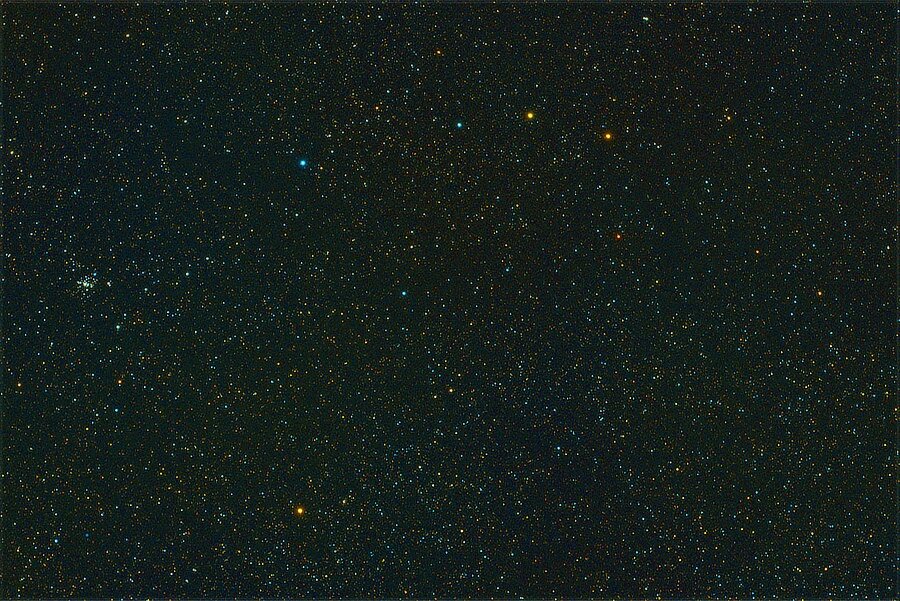
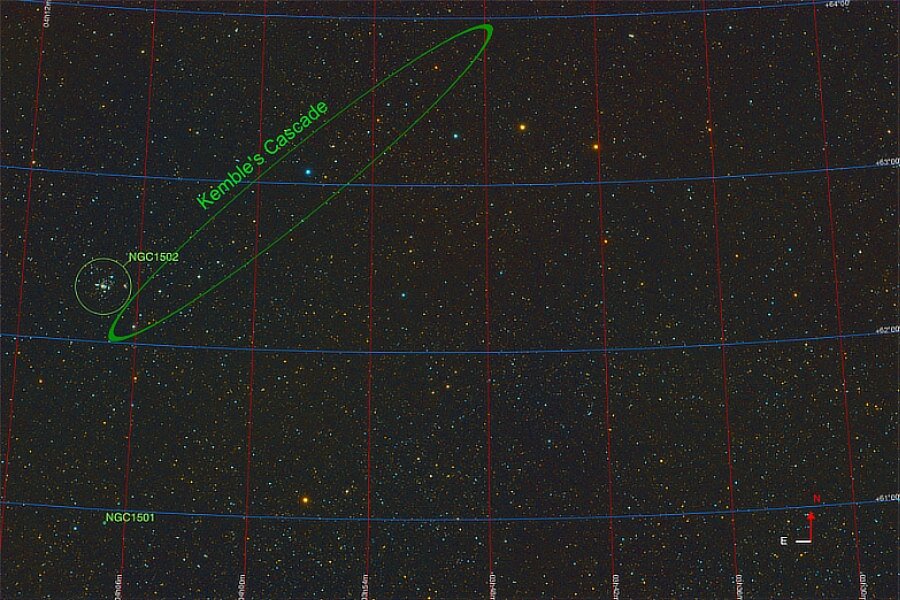
Ahoy ye hearties! Hoist ye yon Jolly Roger and Cascade away. NGC 1502 The Jolly Roger Cluster: This is the equivalent of 43 minutes, 40 seconds of exposure. NGC 1502 is a neat little cluster located in the Camelopardalis Constellation. This region of space was thought to be fairly empty by early astronomers, but as you can see, there is a lot there. Kemble's Cascade (a.k.a. Kemble 1) is named for Father Lucian Kemble, a Canadian Franciscan friar who wrote about it to Walter Scott Houston, an author for the Sky And Telescope magazine. Houston named the asterism for Fr. Kemble and the name "stuck". NGC 1501 is the Oyster Nebula. A longer focal length telescope is needed to bring this one into good viewing range, but it is well worth the effort. NGC 1502: https://skyandtelescope.org/online-gallery/ngc-1502/ Camelopardalis Constellation: https://en.wikipedia.org/wiki/Camelopardalis Kemble's Cascade (and NGC 1501: The Oyster Nebula): https://www.constellation-guide.com/kembles-cascade/ Arrrrrr Matey.
-
Welcome to the forum. Here is your image: If you copy the link and paste it in to your posting, you will be given the choice of having the link show up as the image (as above) or as just a link that can be clicked. https://live.staticflickr.com/65535/52678730517_54489efae3_k.jpg Great photo! Blue Jays are tricky to get good photos like you have, they tend to fly away as soon as the lens cap comes off 😀.
-
display unsatisfying
jerryy replied to abevanancum's topic in Fuji GFX 100 / GFX 100S / GFX100S II / GFX 100R
Your camera has three different auto white balance settings, you may be using one that is not suitable for the lighting you have to deal with. Some of the reviews mention this, I have listed two for you to read, the fstoppers one uses an old approach to deal with this: a quick custom white balance, essentially it is the old ‘put a bright white coffee filter over the lens, use the menu to set a custom white balance with a single shot and use that as white balance until the lighting changes’ trick but you can read their version in the article, or try the other auto white balance settings. https://www.photoreview.com.au/reviews/medium_format/fujifilm-gfx-100-ii/ https://fstoppers.com/education/tips-shooting-fujifilm-gfx-100-405452 The blurry screen image … do you have another camera to get an image so that you can compare that to the image in the file? p.s. Welcome to the forum. -
Hello, If you look in the top right-hand corner of each posting, there should be three dots in a row, like this —> … <—, click on them and after a moment or twelve, a small menu should drop down from the dots, the last entry in the menu is ‘Edit’. Choose that and after a moment or three you should be in edit mode for that entry. Note: Only you can edit your entries.
-
That is considerably different than the regular dogwoods. Where is this one located?
-
Dogwood
-
Filter adapter
jerryy replied to Vlad_ARS's topic in Fuji X100VI / X100 / X100S / X100T / X100F / X100V / Fuji X70
Are you referring to step-up rings? https://www.bhphotovideo.com/c/product/1068071-REG/sensei_surpa_4952_pro_49_52mm_aluminum_step_up.html There are plenty of different sizes available, most camera supplies stores either have them in stock or can get them for you. As a note, get the brass ones if you can, they work better in cold weather, but cost a bit more. p.s. Welcome to the forum.




-900.jpg.ab87058116f44ad9e56e354b051b358d.jpg)