jerryy
-
Posts
1,926 -
Joined
-
Last visited
-
Days Won
304
Content Type
Forums
Gallery
Store
Everything posted by jerryy
-
You mentioned being a bit technophobic, but if you are wanting new lenses, and you want to stick with using auto focus, look for lenses that use linear motors, these help auto focus faster than other lens motor types, the drawback is that they cost more money.
-
You are using the XC 15 - 45mm f3.5-5.6 lens? In spite of how frenetic stage shows get, they mostly are confined to one area in darker venues, (stadium shows excluded) pretty much the same as weddings. Likewise, lenses that are good for weddings in confined spaces work well for these events. While nowadays it might seem like one has to use f0.001 or brighter lenses, a lot of great concert images were shot using f2.4 or f1.8 lenses, many with even darker lenses. Just as in great wedding photos. Ehh, enough history. Do you know from the previous shots you have, what focal length works best for most of your shots? Over on the X-T5 sub-forum, the Xf50mm f2 is getting some good recommendations for using in weddings. A new one is going for around US-$450, used ones are easy to find, but if that focal length is too tight, then back to brighter zoom lenses. Do you like manual focus lenses? Those are usually less expensive than the auto focus ones. [This seems odd to be mentioning since you obviously have been shooting for some time.] As far as settings goes, with your current lens or your “new” one, just keep the three main ideas in mind; shutter speed, iso and f-stop. Try getting someone to stand and move for you in a darkened room and practice a little. Start with an ISO of 3200 going up to ISO 6400, f-stop wide open and various shutter speeds until you get the look you are wanting. Then do the same with the aperture. Maybe have another person standing by turning a flashlight on and off at intervals. While that may sound like just goofing off and messing around, it is similar to what you get in the venues. Trying to juggle f-stops and shutter speeds and ISO settings while the performers are bouncing around is tricky, so your camera has some settings that can help. Set your ISO to Auto with a minimum and maximum setting — you can easily get clean files up to ISO 6400 and often higher. Try to leave the f-stop for your lens open, but keep in mind if you are close to the performer, the DOF will go back to being shallow. Set shutter speeds to the minimum to freeze the scene’s motion enough to suit you — this is where the playing practice comes in handy. Then after that, it is back to the regular stuff for getting special effects and trick shots. https://fujifilm-dsc.com/en/manual/x-t100/menu_shooting/shooting_memu1/index.html#iso
-

-
GIMP is somewhat similar to Adobe’s PhotoShop, in that it works best if you import the image a raw converter creates (PS uses Lightroom). This may help: https://expertphotography.com/open-raw-images-gimp-ufraw/ Affinity Photo and the PixelMator/PhotoMator programs are low cost, but do have built in raw converters.
-
Venice Carnival 2023
jerryy commented on Giampaolo Masserano's gallery image in Members Albums Category
 This one has the makings to be an iconic image. It is excellent in color, but have you tried converting it to black and white or tinted?
 -
Welcome to the forum. I cannot tell you about the focus peaking history on the XE series, but from my experience with other bodies, it gets better with each newer body. As far as lenses go, keeping in mind your thoughts regarding your budget: Used Fujifilm lenses are usually really good, they can be operated in manual mode as well as in auto focus mode. Your local camera store may have some you can try, if not, there are plenty of online stores that sell them. Some stores sell them with a xx-day warranty so that you do not get a bad copy. Rokinon (Samyang) and Viltrox make some great mf lenses for x-mount cameras, you can get these directly from them or from resellers. https://rokinon.com/collections/fuji-x https://viltroxstore.com/collections/x-mount Editing software will depend on which computer platform you have, Linux, Mac, Windows or “other”. Free or low cost editors include programs such as GIMP, Affinity Photo, Pixelmator, etc. You may want dedicated raw converters such as RawTherapee or DarkTable or Fujifilm’s Raw Converter (Silky Pix). Adobe has a line of subscription based editors that you may like.
-
It is thought about that way, I mentioned that in the first rambling paragraph. JPG still has the ability to use more color spaces, while heif does not, so the only value in heif is smaller files being sent over cell networks to older phones. It (heif) unfortunately is not a good replacement for storing and using versus full jpg files in place of raw files as some do. For storing, either raw or tiff or full jpg is much better. edit: DNG should be in there for the Adobe fans. edit 2: Hopefully to make that more clear, if you set your camera to use AdobeRGB or ProPhotoRGB (for those cameras that support things like that) but save the file as something other than raw, be careful about using HEIF, if you do use it thinking you will save space, the colorspace in the saved file will be sRGB, because that is how the format is engineered. If you want to use that file for printing or for video work, weeellll, best wishes.
-
HEIF was introduced a while back as a new format, some folks thought it would be a good replacement for JPEG for images on the internet and whatnot. It does indeed take up less space. So far, so good. Initially, there was not much support from hardware makers, but nowadays, it is gaining in popularity, more and more hardware makers are including it as an export option along with raw, tiff, jpg, etc. Be very careful about using HEIF as an export option for storage, it has a problem, it is engineered so that the only color space “you” can use is sRGB. “You” cannot override this and use AdobeRGB or DCI-P3, or any other color-space. So, what is the problem? Most of the web-sites and email and all of that internet stuff uses sRGB, right? Not really, there are a lot of places that use other color spaces. Printing and video for example. Without getting into a massively distracting sidetrack on color spaces and how to deal with differences, some things that can happen if you try to move between them is color saturation is destroyed or banding happens. Color space issues make for long hours at work and sometimes cannot be resolved to everyone’s satisfaction. It is looking like HEIF is a short term solution for sending images over the internet to older cell phones. Older phones have screens set up in the sRGB space, newer ones are using the DCI-P3 space, a wider space similar to AdobeRGB. So be cautious about using HEIF as a storage format, you may want to keep the raw image around as well.
-
What happens if you use the Finder or Image Capture to move the images from the card over to the drive? Both of these should show you image previews for files on the card, the finder should show you file previews for images on the drive as well. The thumbnails can take a minute or five to generate depending on how many files are on the card. It could be that there are so many large files that LR is having a hard time generating previews as you are scrolling around that it cannot keep up and you see the black background instead of the image thumbnail. The next time it happens, use the Finder to go into the library where the files are stored and see if the Finder will let you take a look at the image. If the image is complete, then your image is safe, but may require fiddling with LR to get it displayed. A lot of apps use Apple’s built-in operating system procedure to generate their thumbnail previews, rather than make them theirselves. If the os gets bogged down trying to generate a lot of thumbnails for large files, the app bogs down in displaying them. And GFX files are large. p.s. Welcome to the forum.
-
I think the first one is a different approach (of course) than the next two. The background city is much more actively participating. The next two show the effort you put into them rather nicely, picking between them comes down to taste preferences. It would be easy to choose one over the other from elements in each one appealing to those preferences. All three shots are 🤙.
-
Best program for editing Fuji jpegs
jerryy replied to DFF635's topic in RAW Conversion Fuji X Photos
You seemed to veer towards not wanting to do any kind of raw conversion work in your original posting, so I did not mention this then, but since @Ektachrome has given you some tips to consider, it might be worth your time to consider a powerful tool built in to your camera’s playback menu, the ability to turn any raw shot into a jpeg — in camera, no external processing needed with a simple button push. I have tried it for various settings and went deep into pixel peeping the result and found no differences between the result and the same image shot as jpeg (the one from raw + jpeg). You could save space on your card by just shooting raw and only converting the “good” shots, all done in camera no fuss, no muss. Of course you can explore more options if you want: https://jmpeltier.com/fujifilm-in-camera-raw-converter/ -
Two heads are better than one, or so says the saying. The Twins ... Castor and Pollux, the heads of the Gemini Constellation. These two are really active in mythologies, I guess being so easy to see in the night sky gave story tellers easily findable point-to visuals for their wild tales. Some tales have the two being called Hercules and Apollo, other tales have them helping Hercules. Some tales claim these two are Romulus and Remus, founders of Rome, while yet others claim these two are associated with the Chinese ideas of yin and yang. Some claim these two are responsible for a phenomenon called St. Elmos Fire, sailors tend to like it appearing during storms. Busy days indeed for a pair of pretty lights in the night sky. These are the equivalent of 37.3 minutes of exposure. https://skyandtelescope.org/astronomy-news/meet-castor-six-stars-in-one/ https://skyandtelescope.org/astronomy-news/meet-pollux-red-giant-exoplanet/ http://www.ianridpath.com/startales/gemini.html https://www.constellation-guide.com/constellation-list/gemini-constellation/
-
Best program for editing Fuji jpegs
jerryy replied to DFF635's topic in RAW Conversion Fuji X Photos
You could continue to use Photos to take care of your file management and use something such as Pixelmator or Photomator (both programs are from the same company) to make the edits. https://www.pixelmator.com/support/guide/pixelmator-pro/634 https://www.pixelmator.com/photomator/ Essentially any image editor will let you edit jpegs as well as supported raw files. These two may give you a step up from what you are doing now. -
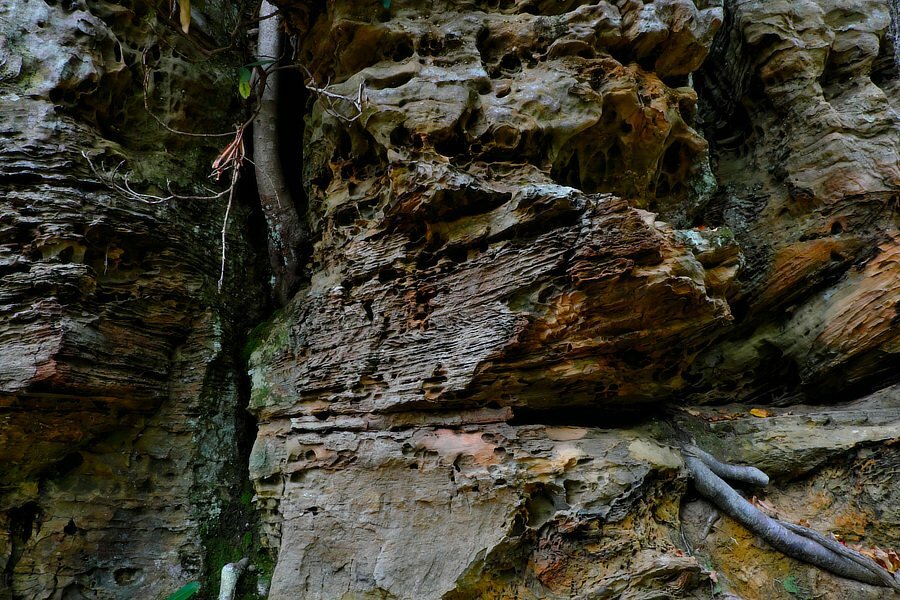
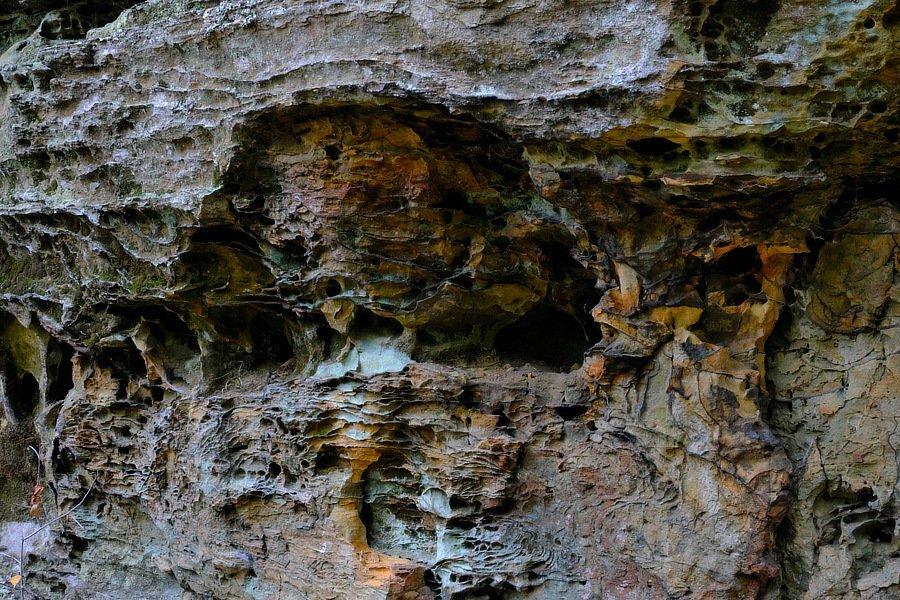
Another round in the ongoing struggle between tree and rock.
-
Your computer needs Ventura or newer to be able to see the files. https://support.apple.com/en-us/101627 Apple quit releasing the standalone raw camera updater awhile back, the updates now only get installed along side the os updates. Note: the prores video updates are still standalone though. p.s. Welcome to the forum.
-
Which lenses is perfect for whale watching?
jerryy replied to PingPingPing's topic in General Discussion
There are quite a few considerations. Birders will often use 6 x mm or 8 x mm binoculars over others because they are “bright” and lightweight. Bright lets you see things quickly in the same way a f1.4 lens will before a f8 lens does. Lightweight is obvious. Tamron’s superzoom is supposed to be a good lens according to the reviewers, but it is not parfocal. You will have to re-focus every time you do any zooming. @PingPingPing says they are going to Monterey, which I am guessing is the one in the U.S. which means since whales are a protected species, the tour may not be getting close to the critters swimming out there. Various laws restrict and/or prohibit boats’ activities. So essentially, longer lenses will help more than shorter ones. Nikon has a nice explanation: https://www.nikonusa.com/en/learn-and-explore/a/tips-and-techniques/tips-for-taking-great-whale-and-dolphin-photos.html -
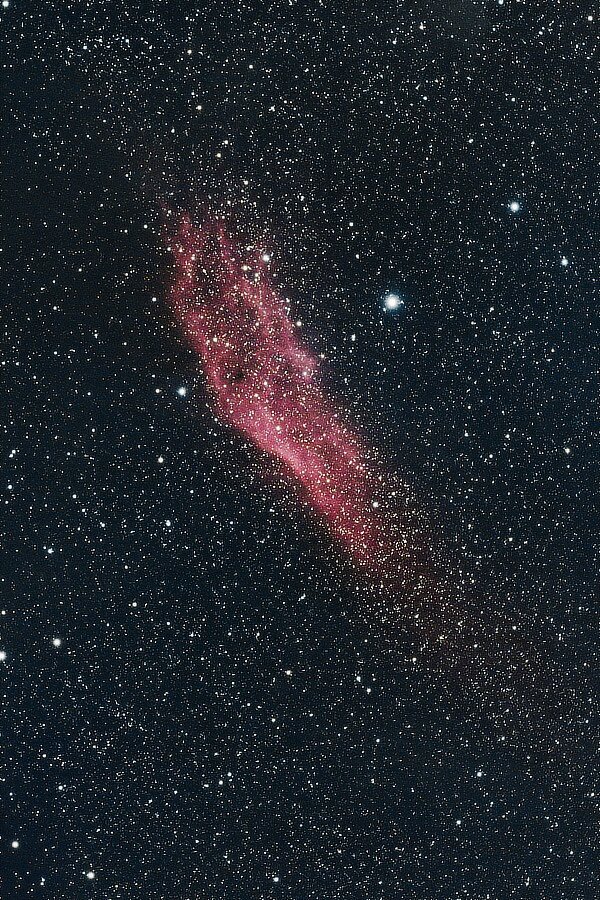
Eureka! The Golden State. NGC 1499 is called the California Nebula, it has roughly the same shape as does the (US) state California. (California's motto is "Eureka!", its nickname is 'The Golden State'.) In spite of being listed as a 'bright' nebula, NGC 1499 can be tricky to see even in very dark skies. A type of filter called a Hb, or H-beta filter can be really helpful if you hold it up to your eye while observing the nebula. Of course, you have to look in the right space-region. https://apod.nasa.gov/apod/ap210310.html https://apod.nasa.gov/apod/ap190823.html https://www.constellation-guide.com/california-nebula/ This exposure equivalent times in at 69 minutes, 35 seconds.
-
Which lenses is perfect for whale watching?
jerryy replied to PingPingPing's topic in General Discussion
Welcome to the forum. Unless the boat gets very close to the whales, wider angle lenses probably will not be all that useful. For the choices you listed, that 70 - 300 mm gets a lot of good reviews and as you note, can be used with the 1.4x tc. Do you think you may be able to get the 100-400mm or the 150-600mm in the near future (assuming good weather and bright skies)? Another option is to rent or borrow another body, put a wider angle lens on it and keep it close by while you use the longer lens. Then, if you want some landscape style shots or the whales do get close, you have it ready to go. -
Help with Fujifilm X-T3 and Webcam 2 on macBook Pro
jerryy replied to concentratedcuriosity's topic in Fuji X-T3 / Fuji X-T30
From your description it sounds like this problem has not been completely fixed yet. https://fujifilm-x.com/en-us/global-news/2023/1122_4235161/ Apple made some changes, and fixes to those changes are taking a (long) while to get out to the public. The article has a link that lists some pssible work-arounds. Possible means they also may not work. p.s. Welcome to the forum. -
-
For what it is worth, welcome to the forum. I do not know any menu setting that flips the view-mode upside down like you are showing here. Your local camera store may be able to repair this for you. Best wishes.
-
The new approach from SmallRig and soon-to-be-released by Viltrox of putting a USB-C connector in the battery and plugging the charge cable into the battery looks like it is catching on. It sounds like it might be holding up long term. FujiRumors has an article about batteries, but only in-directly touches on the approach. https://www.fujirumors.com/viltrox-np-w235-orders-available-now/
-
Aperture ring not working (XF 18-55mm) PLEASE HELP!!
jerryy replied to AdamVN800's topic in Fuji X Lenses
On the lens there is a switch that has one side marked with an “A”, the other side marked with a ‘circular’ graphic that is supposed to represent setting the aperture by way of using the lens’ aperture ring. Make sure the switch is not set to the “A” side. You might need to move the switch back and forth a few times to make sure it is not stuck. Next make sure the camera is not in Program Mode and not in Shutter Priority Mode, that is, set it to be in either fully Manual Mode or Aperture Priority Mode — your manual should be able to help you do this. Rotate the aperture ring and you should see the f-stop number change in the display. If this does not work, you may have a dirty contact that is not letting the ring pass information back to the camera, while these are easy enough to clean, maybe have the dealer take a look to make sure nothing else is wrong. p.s. Welcome to the forum.- 1 reply
-
- 1
-

-
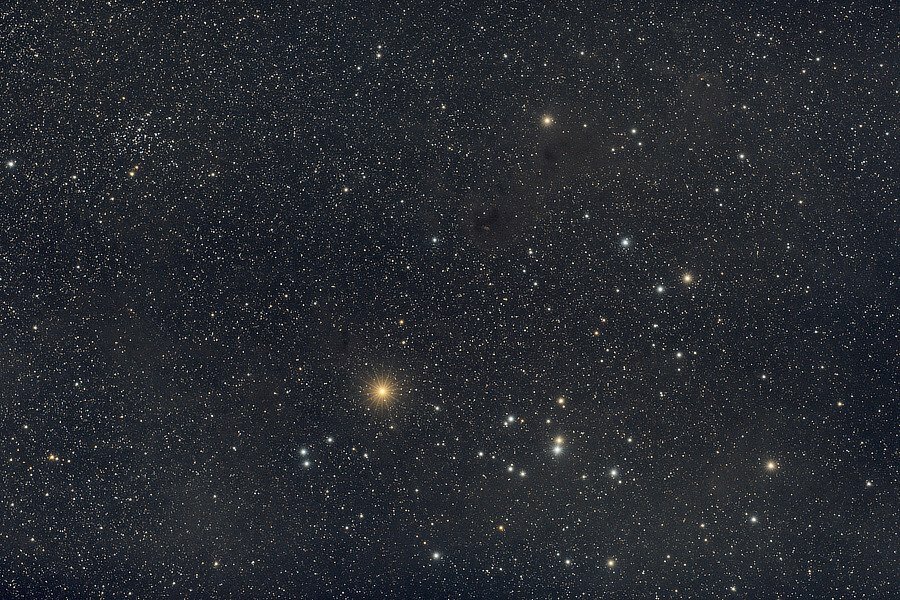
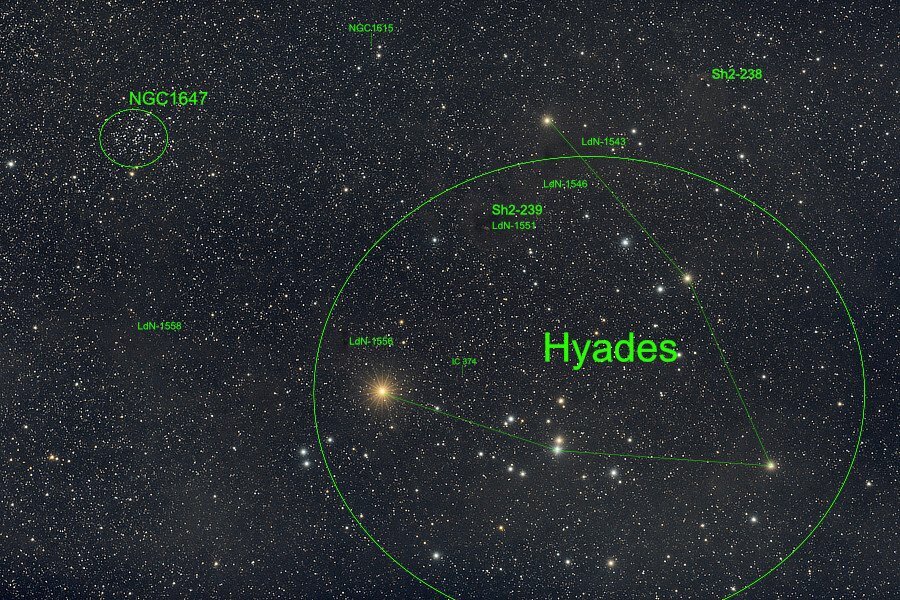
That is Some Bull! The Hyades and More. The Hyades Cluster are up in the Northern Hemisphere's night sky, this time of year. Their v-shape usually is easy enough to find, not just in binoculars, but by looking up in the night sky, not too far away from their sisters in the sky and mythology, the Pleiades. Greek mythology has different tales about the Hyades, one sad. one happy. Other cultures tell different tales. The v-shape seen here is called the Face of the Bull, Taurus, the big yellow-orange-red star Aldebaran is the Eye of Taurus. Aldebaran, though, is not actually part of the Hyades, it is much closer to the Earth and just visually lines up in photos. NGC 1647 is called the Pirates Moon Cluster. The LdN- listings are from (Beverly) Lynds Catalog of Dark Nebulae. The Sh2- listings are from (Stewart) Sharpless' Catalog of Emission Nebulae. The nebulae shown here, are all part of the Taurus Molecular Cloud, the star forming region - a stellar nursery, that is closest to the Earth. This is the exposure equivalent of 51 minutes, 15 seconds. Taurus: https://www.space.com/17101-taurus-constellation.html Aldebaran: https://earthsky.org/brightest-stars/aldebaran-is-taurus-bloodshot-eye/ https://earthsky.org/favorite-star-patterns/v-shaped-hyades-star-cluster-easy-to-find/ https://skyandtelescope.org/observing/happy-nights-with-the-hyades/