Leaderboard
Popular Content
Showing content with the highest reputation on 10/11/2024 in all areas
-

Church in autumn colors !
Golden Oxen reacted to Jakani for a gallery image

From the album: FUJI X PRO III
1 point -
Thanks for the link 🙂 Have a nice day!1 point
-

Has ON1 lost the plot in 2024?
SPB-007 reacted to Paul Szilard for a topic
I've been an avid ON1 licensed use since LR went subscription. I had update to the latest every time and thus I have ON1 Photo Raw 2024 MAX license at the current moment. I am running on a Mac Studio M1Ultra with 128 GB ram and 4 TB SSD connected to 2x 5k LG Ultrafine monitors. So should have enough grunt. I now find that SOME of my X-H2 raw files cannot be opened by Photo Raw 2024. BUT other raw files taken seconds apart and in the SAME FOLDER with the SAME settings, can open fine. Also Photo Raw 2023, as well as a bunch of other photo editors CAN open the these files with no problem. On1 support had not been able to fix this, to date. The sent me a link to a Beta version of 2024, admitting that the last shipped version has major bugs, which were fixed by this beta - but alas, it is exactly the same. Here is a screen grab of both v2023 and 2024 side by side: Open for comments, but please refrain from telling me to just use LR or Photoshop, or C1, etc.! Thanks for your understanding. 1 point
 -
Digging more into it the app still struggles at times if the setting to combine jpeg and raw together is on. Had all working after separating the two file types. Appears only Raws matched with Acros BW simulation were the problem. What I found further is the app is still "confused" by only some Jpegs shot with the Fuji Acros BW simulation. Even after is was working by all for a bit. The app is struggling with some of the Jpegs. I think that was the root of the issue. There is some bug that needs to be addressed with this situation. I do have a ticket open with support. We shall see if that goes anywhere.1 point
-
Has ON1 lost the plot in 2024?
SPB-007 reacted to Paul Szilard for a topic
Hmmm. Thanks for getting back. Next thing to try. Quit ON1 Create a temp folder Use Finder (on Mac) or Explorer (Windows) to copy the image files that have the problem, to the temp folder Start ON1 and browse the copied files IF they wok, then from inside ON1, drag them to their original location and when prompted, select Replace Report back!1 point -
Has ON1 lost the plot in 2024?
SPB-007 reacted to Paul Szilard for a topic
Try this: Quit ON1. Delete any XML or .ON1 file with the same name as the photo. Start ON1 and see if you can open the file. Report back on the results, please.1 point -
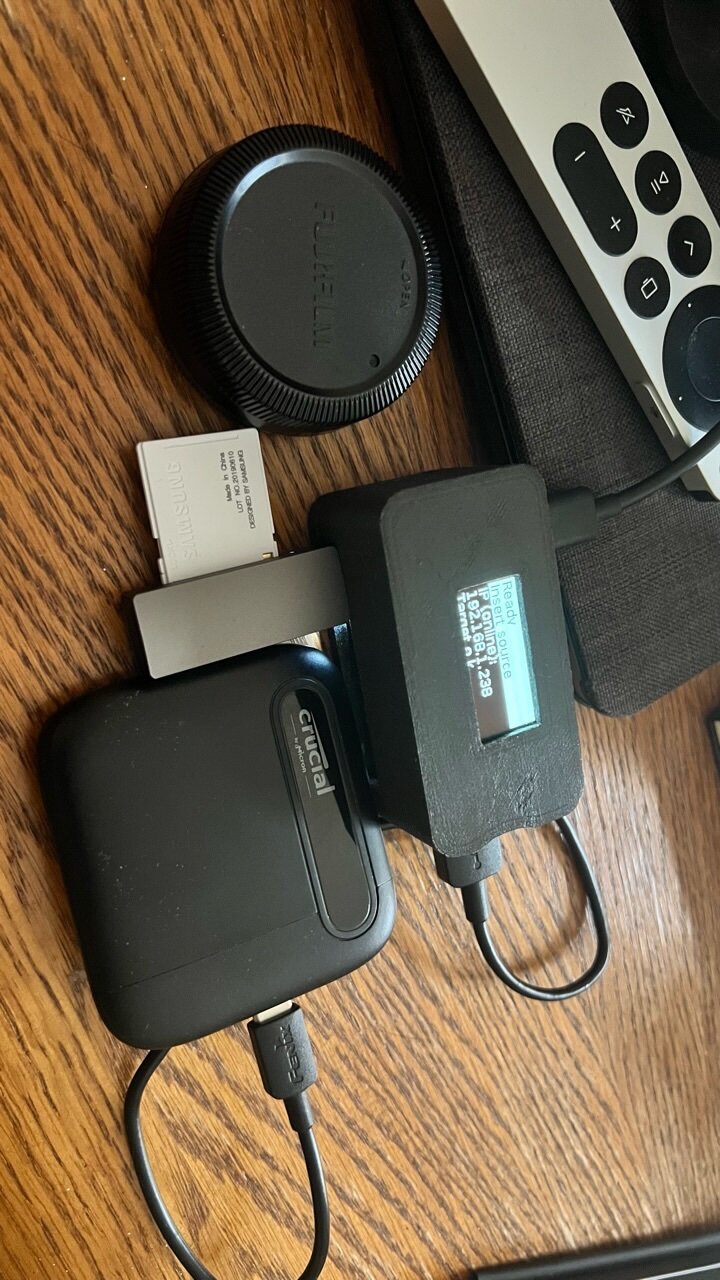
Since I’m going to Spain soon, I wanted a light and effective way to back up my SD cards every day during the trip. There were some old and no longer available devices on the market, but all had limited capacity and rather expensive... or bulky. I came across a neat project that uses a Raspberry Pi zero 2 (this is a much faster version of the old Pi zero) and also supports Wi-Fi. I made one, designed a custom case for it that I 3D printed (I have files for anyone that wants to to this project), and can say it works extremely well. The device is extremely simple, plug in a target storage device (in the pictures I have an extremely tiny crucial 4 terabyte ssd drive - the square thing), plug in a card reader (in the picture it’s that very compact usb stick so no cables needed), and it will automatically back up what’s on the SD card. It won’t overwrite files, only add new ones, and recognizes different SD cards so it makes separate folders for each unique SD card. It has a screen that shows transfer status, and while idle shows you the ip address so you can log into it with a phone and web browser. The thing is, with a portable battery, you can do this without even being near an outlet, and entirely in the field or on the go. pics Lens cap for scale here’s some screen shots if you want to log in You can also get thumbnails of images, but that takes way too long to generate, so I leave that function off the project can be found here - https://github.com/outdoorbits/little-backup-box the hardware portion isn’t entirely concise, if if people make this for themselves I can share what I got and from where. The main parts list are: raspberry Pi zero 2 four port usb hat - https://www.adafruit.com/product/3298?gclid=Cj0KCQjwlPWgBhDHARIsAH2xdNdICMYNwWVgb1i4BRLETI_8Mrep_RZf8hiQgtu4lT8W80hEM3GsQvEaAlU1EALw_wcB and the OLED display (make sure if you get it from adafruit to get the pigtail connector) - https://www.adafruit.com/product/938 the best thing is, you can use any low power ssd storage drive, and if you need more space, just get more drives. for the usb card reader, I got this, that’s in the image - SD Card Reader, uni USB SD Card... https://www.amazon.com/dp/B087QG75L7?ref=ppx_pop_mob_ap_share for the large storage I am using this - Crucial X6 4TB Portable SSD – Up... https://www.amazon.com/dp/B08W1KDM9K?ref=ppx_pop_mob_ap_share I hope this helps someone looking for an on the road backup solution, and is a tinkerer like me.
1 point
-

Introduce Yourself
Manthos Koukakes reacted to JaviDiaz for a topic
Hi everyone. New to the forum, I am Javier from Spain (Madrid). Amateur photographer with many things to learn yet. I use Fuji XH1 and XT2 with several lenses and adapters, AF and manual (legacy). My interests are on landscape and street photography. Very glad to be here.1 point -

Introduce Yourself
Manthos Koukakes reacted to paulo.maxim for a topic
Hello Everyone, i hope you are doing fine. My Name is Paulo Pereira and i from Portugal. I came from Dpreview and hope to participate in the forum. currently have one Fuji X-t4 and several Lens. all the best! Paulo1 point