jerryy
-
Posts
1,914 -
Joined
-
Last visited
-
Days Won
304
2 Followers


Recent Profile Visitors
109,637 profile views


jerryy's Achievements






-
 jerryy reacted to a post in a topic:
Unmarked government installation
jerryy reacted to a post in a topic:
Unmarked government installation
-

-
-
-
-
-
Ahh, the infamous brick wall photos… 😀 According to internet lore, if the dng converter does not properly apply the corrections, you can have it apply custom profiles that should work for you. How to do that is waaaaaay outside of this comment’s scope, but there are plenty of sites listed in the search engines that step you through the processes. Best wishes.
-
Typically you need to make sure the lens is compatible with the camera, i.e. check the lens compatibility charts for your camera, then make sure the respective firmwares are updated so older issues are resolved. After that, each lens has a manufacturer’s profile which will be embedded into the raw file meta data for the images captured using that lens. From there, it is up to the raw conversion software to apply the lens correction to the image. Different converters do that differently, some automatically, some only if a setting is turned on. For in-camera jpegs, the on-board converter does the corrections automatically, assuming the camera recognizes the lens, it applies a generic profile otherwise. I do not know if that can be turned off or not.
-
 MARRIEDGUY9 reacted to a post in a topic:
Astro-photography (open thread)
MARRIEDGUY9 reacted to a post in a topic:
Astro-photography (open thread)
-
MARRIEDGUY9 reacted to a post in a topic:
Astro-photography (open thread)
-
MARRIEDGUY9 reacted to a post in a topic:
Astro-photography (open thread)
-
-
-
jerryy reacted to a gallery image:
Torino - Palazzo Reale
-
jerryy reacted to a gallery image:
Torino - Palazzo Reale
-
jerryy reacted to a gallery image:
Torino - Palazzo Reale
-
jerryy reacted to a gallery image:
Torino - Palazzo Reale
-
jerryy reacted to a gallery image:
Torino - Palazzo Reale
-
jerryy reacted to a gallery image:
Torino - Palazzo Reale
-
jerryy reacted to a gallery image:
Torino - Palazzo Reale
-
jerryy reacted to a gallery image:
Torino - Palazzo Reale
-
-
jerryy reacted to a gallery image:
Autumn fogs
-
-
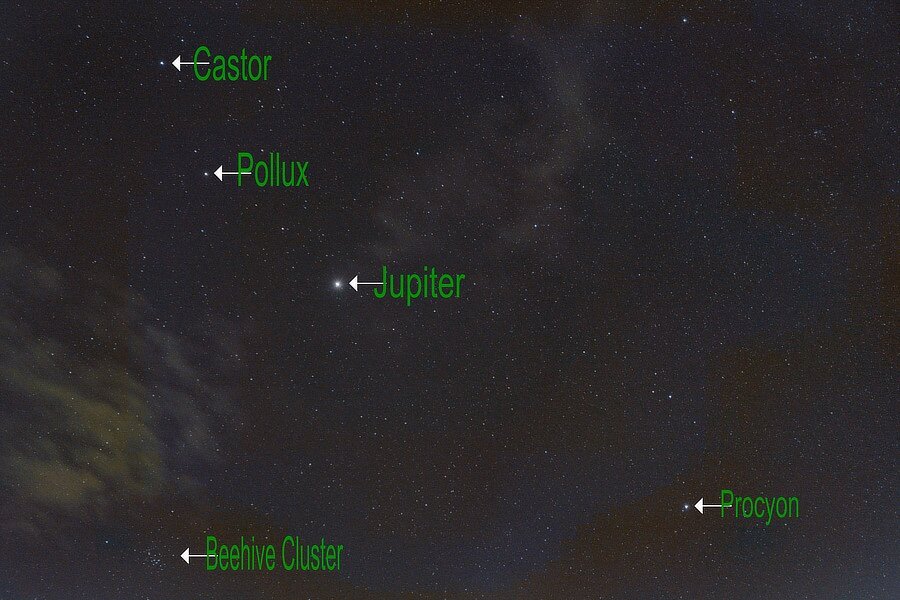
Back on page three of this thread is an image and mention of those mythological and astronomical twins, Castor and Pollux. They are back for your viewing pleasure in the night sky with Jupiter joining them, an added bonus this year. At least for those stargazing in the Northern Hemisphere anyway. For right now, you will need to wait until late at night, Very Late. or Very Early in the morning if your clock works that way. A little after midnight. Look a little to the left of Orion and there these three will be forming an arc. Procyon is along for the arc ride... As long as the clouds are not too much, the arc is visible even in cloudy, light polluted skies like the one shown here. This is the equivalent of a just almost but not quite ten minutes stars exposure with a five seconds clouds exposure.
-
-
XF 18-120mm F/4 for video: parfocal? Stepping aperture?
jerryy replied to Claudio Monelli's topic in Fuji X Lenses
This review may be able to answer some questions: https://www.dpreview.com/news/3492623346/fujifilm-xf-18-120mm-f4-lm-pz-wr-lens-is-parfocal-weather-sealed-and-will-cost-just-899 The review seems oriented toward using the lens for video work. Note: If you are working outside of Europe, keep 1/60 in mind as a shutter speed. The line frequency is often 60 hz rather than 50hz. -
thelostkiwi reacted to a post in a topic:
Tamron 150-500mm lens opinion?
-