AZWolf
-
Posts
48 -
Joined
-
Last visited
Content Type
Forums
Gallery
Store
Everything posted by AZWolf
-

ON1 Released 2017.0.2 today- Nice X-Trans Improvements
AZWolf replied to AZWolf's topic in RAW Conversion Fuji X Photos
Hi Torturro, Thanks for reading my post. Not sure why it is slow on your MacBook. I have a 2014 MacBook with 8GB RAM and it's quite speedy. I don't think there's a significant difference between the 2 model years. Can't explain that one. ON1 says the fuji film profiles are coming this year though not sure when. I agree that detail is slightly better in Iridient. I just find the workflow to be the advantage in Photo Raw. But as we know, ask 2 photographers and get 3 opinions What ever works best for you and your workflow is the best one to use. Cheers, Joel -
Leica vs Fuji vs Sony
AZWolf replied to AZWolf's topic in Fuji X-Pro 1 / Fuji X-Pro 2 / Fuji X-Pro 3
I've got my eye on it...not literally...yet Thanks for reading the post and glad you liked it. I like the lag time!! -
Leica vs Fuji vs Sony
AZWolf replied to AZWolf's topic in Fuji X-Pro 1 / Fuji X-Pro 2 / Fuji X-Pro 3
Excellent points Adam. I hadn't thought tht much about the split image aspect, mainly because the framelines are the key thing for me for RF use. With my Leicas I liked using the DOF scales to zone focus in which case I wasn't using the split focusing, mainly only the framlines. Similarly I like the framelines on the X-Pro2 even when using AF. Using the focusing scale in MF on the Fuji has to be done through the viewfinder or on the back. Although I own two Fujinon lenses with clutch MF and DOF scales (14, 23 1.4), the scales are not that useful. But still possible to do MF/Zone focus. -
Leica vs Fuji vs Sony
AZWolf replied to AZWolf's topic in Fuji X-Pro 1 / Fuji X-Pro 2 / Fuji X-Pro 3
One of the beautiful things about Leica M is the simplicity. You do have to log more hours on the X-Pro2 to figure out what aspects to use and which to ignore mainly because it has so many more features, bells and whistles. But once you do that it can be a natural (and simple) extension of yourself. I think because I was weaned on mechanical film cameras the physical controls seem simple to me on the Fuji. So once you set it up the way you work and eliminate all the extraneous stuff it can be just as pleasureable to use as a Leica rangefinder. I know my article says that for now the Fuji XP2 is my new Leica. BUT if I end up selling my Sony system, who knows, perhaps a Leica M is in my future? -
Adam, Well said! (everything- I just quoted beginning and end to be efficient) Cheers, Joel
-
Hi Adam, I like many things about Lightroom. Because you can use ON1 in different ways you don't have to give up Lightroom. LR is still the best database out there and has great key-wording capabilities. I may be one of the few that uses modules besides Develop and Library but I happen to like using most of the other modules and use the Slideshow and Web modules often. It also has a great print engine. As we all know, on the downside, it is very slow (and not just with Fuji files) and right now doesn't do a great job with Fuji raw files. If this is of any help- here's an overview of my workflow integrating LR, ON1, and Photo Mechanic: • I import my images in LR making use of import presets and keywording on the fly. I was using Photo Mechanic (PM) but LR import got faster recently • I use PM to cull and rate the shoot I just imported becuase PM is super fast when you zoom to check detail. As this point I've narrowed the shoot down to a handful of top picks. • I use ON1 PhotoRaw to process the select RAF files. This is when I intend to make prints. If I am only going to the web with low resolution and am in a hurry I may just use SOOC jpegs or quick conversions in LR I will note that once I've processed the raw files I'll save them as TIFF and sync the folder in Lightroom. So LR is in a sense, still my hub because I have over 120K images cataloged and keyworded and it allows me to find any image out of the 120K+ in a second or under. Also this workflow is dynamic. I've already changed it a couple times since I bought my X-Pro2 about a year ago. I do my best to keep up on new software so I am continuously trying to improve the efficiency of my workflow while maintaining print quality. Hope this helps. Joel
-
Hi All, Coming from the film age and being an avid Leica (and other rangefinders) user over the years I decided to write an article on how Fuji might be my new Leica and where my Sony A7R II and Zeiss glass fit into all of this. Is Fuji My New Leica? What About My Sony?, Fuji vs Leica vs Sony I always appreciate comments and your insights. Enjoy, Joel
-
I just saw that this morning. It's difficult to say if it's isolated or not. Essentially each of us is looking at sections of one photo with completely different subjects. So between our two articles there is an N of 2. As I tried to get across in my post, the comments section, and the forums, I look at the big picture (no pun intended). For the moment I am picking Photo Raw as my first choice. As I mentioned, strictly from a quality standpoint and viewing at 100 percent which is really just for comparison purposes and may or may not apply to real world scenarios, Iridient has the edge. From an overall perspective though Iridient has other issues such as having to adjust color and workflow. I mentioned in another comment response that it was difficult to get the color of the sky to look natural with Iridient and it took some time to try and get it to match LR, ON1, and AfPh all of which provided good looking files with only the normal raw optimization adjustments. BOTTOM LINE: You need to try these processors on the types of images that you shoot and the results based on how you use them (prints, books, online, etc.) This is why my article says "Take a look at the crops and make your own decisions." I plan to look at some more types of images but in the meantime I hope this helps.
-
Hi All ON1 released 2017.0.2 today for immediate download. It includes much improved raw conversions and support for lossless-compressed. Below is a blurb they sent me with some info about future releases and what they will include. In the meantime enjoy the new release. Blurb from ON1: “ON1 Isn’t Done Yet ON1 has adopted a new development process with ON1 Photo 2017. This will allow for continuous updates and new features approximately every 4-6 weeks. Several free updates to ON1 Photo are scheduled for the first half of 2017. These include: automatic lens correction, workspaces, compare mode, photo settings, versions, groups (stacks), camera profiles (film looks), updates for new cameras, and much more. Feedback from the ON1 community has been critical in helping prioritize product features. The Photo RAW Project is the best way for users to submit their ideas and feature requests for Photo RAW. Each submission is reviewed by ON1 and then voted on by the community. The more votes an idea gets, the higher likelihood it will get added into the app.” I have a comparison on my blog of this new release of ON1 Photo Raw along with other raw processors. There's also a topic/thread over on X-Pro2 of this forum. I'm working on some more comparisons too. Cheers, Joel
-
This new release is very fast. When you open a file from Browse it is pretty much instantaneous and about 1-2 seconds to render if you go to 100% This compares to about 8 seconds in LR (latest version) and if you have an older version 20 seconds or more. These times are based on my 2012 desktop Mac i7 (4GHz) and 2014 MacBook Pro i7 (3GHz) Switching modules it runs about 1-3 sec depending which module among Browse/Develop/Effects and about 4-5 seconds to load into layers. IT’S HERE!! ON1 released 2017.0.2 today for immediate download. Below is a blurb they sent me with some info about future releases. In the meantime enjoy the new release. I plan to update you all with some more comparisons I’ve been working on! From ON1: “ON1 Isn’t Done Yet ON1 has adopted a new development process with ON1 Photo 2017. This will allow for continuous updates and new features approximately every 4-6 weeks. Several free updates to ON1 Photo are scheduled for the first half of 2017. These include: automatic lens correction, workspaces, compare mode, photo settings, versions, groups (stacks), camera profiles (film looks), updates for new cameras, and much more. Feedback from the ON1 community has been critical in helping prioritize product features. The Photo RAW Project is the best way for users to submit their ideas and feature requests for Photo RAW. Each submission is reviewed by ON1 and then voted on by the community. The more votes an idea gets, the higher likelihood it will get added into the app.”
-
You're welcome and I'm glad you found it useful. If I'm understanding you correctly, yes you can apply presets en masse in Photo Raw to whaever group of photos you want. It doesn't apply Camera Calibration files the same way as LR but you can create (or use existing) presets to mimic various films such as Fuji Velvia. The ones that come with it right now are limited but it is my understanding that ON1 will be adding Fuji film profiles, including Acros, later this year. I hope this helps.
- 21 replies
-
- 1
-

-
- raw processing
- X-Trans
- (and 2 more)
-
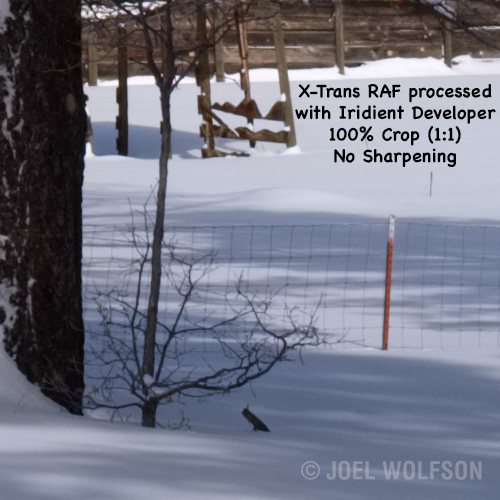
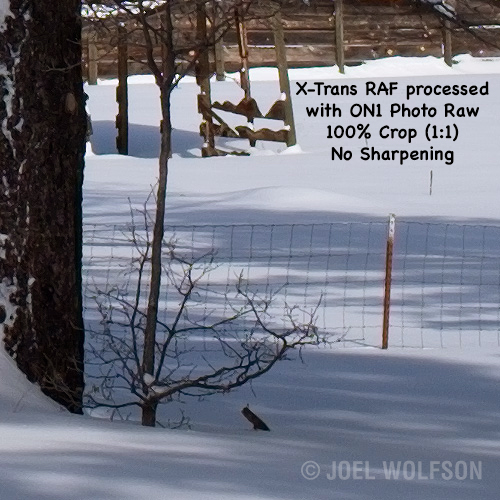
Iridient Developer does render slightly more detail but as I noted in the comparison you can really only see this pixel peeping at 100% view. I also consider the final use (large prints, online, small prints, etc.) and overall workflow for a real world perspective on this (see my section Keeping it all in perspective.) I'm including another 100% crop here so you can see another section of the fence. Some of what you're seeing is the wire in the fence itself, which is actually somewhat jagged. I also provided these crops without sharpening. Normally I do capture sharpening on every image. It looks to me like Photo Raw has a tiny bit of sharpening inherent in the raw extraction so it appears a little bit sharper and the ID version is a little smoother looking. Consequently I would do less capture sharpening with an ON1 Photo Raw processed raw file. As it turns out the default sharpening in ID is just about perfect and in the end, if you're making prints, you're not going to see a difference anyway. I think these samples are an interesting comparison. I'll let everyone know when I do my printing comparison from the different raw processors.

-
I'm happy that it is helpful!
-
I see there have been 150+ views of this so far. Are you finding the shortcuts or info useful? If you don't feel like posting, let me know with the "Like this" button. Thanks! -Joel
-
Right now I'm using ON1 Photo Raw as a plugin though I do sometimes use it standalone. I still like Lightroom for its speedy database capabilities. It also has a great print engine and I often make use of the slideshow, web and book modules. ON1 does have a cataloging/database of sorts through the Favorites. That is another area where I have been providing feedback to the ON1 team. Ultimately it will be capable of replacing LR for many people. But either way it works well. It has a great interface and extensive capabilities- to the point where I rarely use Photoshop any more. I will be posting more about it as I get updates from ON1. The nice thing for Fuji owners is that we now have some capable products for raw conversion from which to choose.
-
Thanks. I'm glad you liked it. I hope to have time in the next few days to add more 100 percent views from the image to show both highlight detail and shadow detail. That should alleviate the need for the original file. After printing fine art for over 30 years I can safely say that there will be little difference among the top 3 (Photo Raw, ID, AP). Perhaps the detail I chose didn't show it clearly enough but at 1:1 the OOC JPEGs and LR aren't as good as the top contenders. I am also going to make large prints and report on the differences. I personally love the JPEGs, especially Acros which I use often but so far I haven't trusted the JPEGs for large prints. They are, however, great for posting online and for visualization (see my other X series articles on my blog )
-
Hi All, Yesterday ON1 sent me an advanced copy of their newest release of Photo Raw due to be out Thursday, Feb 9th. I wrote an article comparing it to several other Fuji Raw processors. It has improved substantially and now handles lossless-compressed files. Enjoy, Joel
-
There's a sale going on right now on the X-Pro2 with a 23mm f2. Here's Fuji's link but you can find it at B&H and many other dealers. It's $250 off. The deal goes through Feb. 18th. Hope this helps! Cheers, Joel
-
Hi All, I thought I'd share a list of useful shortcuts and important considerations for the X-Pro2 I've compiled from personal experience and various resources (recommendations below.) As I'm new to using this forum I hope this isn't redundant and that it will save you all some time and perhaps prevent some aggravation. Shortcuts- in order of importance and frequency of use for me but of course this will be different for each of us Push Trash button for 2 sec, then press rear command dial to bring up card formatting Rear command dial- While in AF or MF press briefly to get the magnified view. Pressing for a full second in MF mode toggles through the focus assist modes (standard, split, focus peaking.) This works whether you are in magnified view or full view. This also works for the Electronic Rangefinder (ERF) Battery life as a percentage by hitting Playback button, then up arrow OR just toggle through the displays using DISP/BACK button Press and hold DISP/BACK button until Fn customizing menu appears and you can make changesOR press and hold any of the individual Fn buttons to change the function for that button. Press the Q key to bring up the Quick menu. Now press the Q button again and hold for 2 seconds: This brings you to the set-up menu to configure your custom camera settings C1 through C7. Press and hold the Q key for 2 seconds while in shooting mode to configure the Quick menu itself. While in this mode you can navigate to any of the 16 positions (use joystick or controller keys) and select any of the 24 functions or NONE for that position (using the MENU/OK button or push in joystick.) If you don't need access to 16 positions/functions you make some of them blank using NONE to clean up your Q menu. Press and hold Menu/OK button for 3 sec to lock all 4 selector/Fn buttons and the Q button. I must admit I never use this one but have included it in case someone out there sees a viable use for it. Important but not obvious: If DR is engaged (that is set to DR200, Auto, or DR400) your minimum Auto ISO won't go below ISO 400 or ISO 800 respectively, even if you've set the minimum for 200. I leave DR off for the most part because I primarily use Raw. If you use DR-AUTO mode, the X-Pro2 will choose between DR100 or DR200 but not DR400. If Face and/or eye detect is on, you can’t lock the AF. You also cannot change metering patterns. This makes no sense at all and I was hoping Fuji would change this when they came out with the 2.0 firmware update but no such luck. Maybe if we all request it, it will happen. One workaround is to assign Face/eye detect to a Fn button so you can quickly change it if you want to us AF-L or switch to spot metering. In addition to figuring some of this out on my own I have used several other resources. A couple of these stand out and I would highly recommend them: 1. Adam Bonn's X-Pro Series Content (not to mention the rest of his blog/site as well as his many poignant posts on this forum) 2. Rico Pfirstinger's X-pert tips- right now you can get 40% off his e-book via the link pinned at the top of this (Fuji X-Pro1/X-Pro2) forum. Cheers, Joel
- 7 replies
-
- 10
-
-
X-Pro2 RAW LR Conversions: Darker than JPEG
AZWolf replied to cdgerston's topic in Fuji X-Pro 1 / Fuji X-Pro 2 / Fuji X-Pro 3
Hi Adam, Also good to hear from you! Yes, it has been awhile. I hope to be more active on the forum now that I'm hiring some new help. I always like reading your posts and hopefully we can catch up one of these days. It sounds like we work similarly. Time permitting I use M, otherwise AP with Auto ISO and use the min SS presets to move around my shutter speed. FWIW, you don't have to be on T to tweak the shutter speeds (in fact I had forgotten that one.) For those who don't know, you can set any shutter speed on the dial and then use the front command dial to move it in one third increments either direction up to 2/3 + or - For example, if you set the SS dial to 1/250 your in-between speeds with the front command dial would be 1/160, 1/200, 1/320, 1/400. Naturally if you want to go to 1/500 or 1/125 you have to physically move the SS dial. So many ways to work with this camera!! -
X-Pro2 RAW LR Conversions: Darker than JPEG
AZWolf replied to cdgerston's topic in Fuji X-Pro 1 / Fuji X-Pro 2 / Fuji X-Pro 3
Hi Adam, I'm guessing you already know this but for others that may not know, you can indeed fine tune in 1/3 increments for shutter speed using the front command dial to vary + or - from what's on the top shutter speed dial. If I understand your scenario correctly, you are essentially locking in aperture (AP) and ISO and then actually compensating exposure (via SS) with the EV dial as opposed to just wanting to set a specific shutter speed to ⅓ increments? Of course in shutter priority and with a fixed ISO, your EV dial will then be changing aperture to go + or - with exposure. Hope I understood you correctly. Cheers, Joel -
Hi All, I'm pretty new to this forum (my second post.) I just updated my review Fuji X-Pro2, A Love-Hate Relationship. Some of my previous beefs with Lightroom have been fixed, hence my update to workflow and other sections. I also just posted Capturing Nature and The XPro2. My ongoing articles are from my perspective as a full time pro using the Fuji X professional system on a daily basis. They include some nice photos with the stories and technical details behind them. I would love to get feedback from y'all. Let me know if you find the Fuji articles in my blog useful, enjoyable, whatever... suggestions are welcome. Thanks! Joel
-
Hi All, I think some of you will be interested in my X-Pro Tour. It's from my perspective as a full time pro using the X-Pro system on location. I have photos with the stories and technical details behind them as well as my thoughts and perspectives from daily use of the X-Pro2. It's all on my blog at XProTour.com but here is a breakdown of individual posts so you can choose those that might interest you: X-Pro Tour Part 1 London, France X-Pro Tour Part 2 Villages of France X-Pro Tour Part 3 Best Days in France X-Pro 2: A Love-Hate Relationship Comments and feedback welcome! Enjoy, Joel