Leaderboard


Popular Content
Showing content with the highest reputation on 03/25/2023 in all areas
-
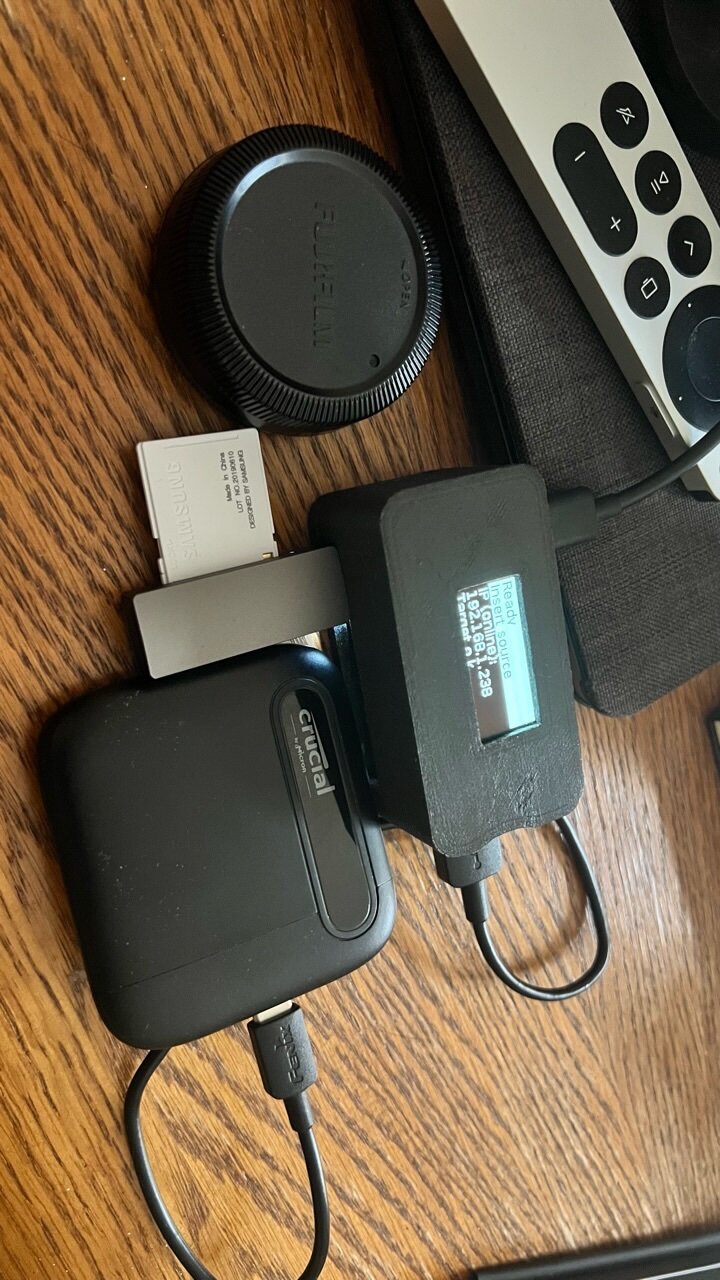
Since I’m going to Spain soon, I wanted a light and effective way to back up my SD cards every day during the trip. There were some old and no longer available devices on the market, but all had limited capacity and rather expensive... or bulky. I came across a neat project that uses a Raspberry Pi zero 2 (this is a much faster version of the old Pi zero) and also supports Wi-Fi. I made one, designed a custom case for it that I 3D printed (I have files for anyone that wants to to this project), and can say it works extremely well. The device is extremely simple, plug in a target storage device (in the pictures I have an extremely tiny crucial 4 terabyte ssd drive - the square thing), plug in a card reader (in the picture it’s that very compact usb stick so no cables needed), and it will automatically back up what’s on the SD card. It won’t overwrite files, only add new ones, and recognizes different SD cards so it makes separate folders for each unique SD card. It has a screen that shows transfer status, and while idle shows you the ip address so you can log into it with a phone and web browser. The thing is, with a portable battery, you can do this without even being near an outlet, and entirely in the field or on the go. pics Lens cap for scale here’s some screen shots if you want to log in You can also get thumbnails of images, but that takes way too long to generate, so I leave that function off the project can be found here - https://github.com/outdoorbits/little-backup-box the hardware portion isn’t entirely concise, if if people make this for themselves I can share what I got and from where. The main parts list are: raspberry Pi zero 2 four port usb hat - https://www.adafruit.com/product/3298?gclid=Cj0KCQjwlPWgBhDHARIsAH2xdNdICMYNwWVgb1i4BRLETI_8Mrep_RZf8hiQgtu4lT8W80hEM3GsQvEaAlU1EALw_wcB and the OLED display (make sure if you get it from adafruit to get the pigtail connector) - https://www.adafruit.com/product/938 the best thing is, you can use any low power ssd storage drive, and if you need more space, just get more drives. for the usb card reader, I got this, that’s in the image - SD Card Reader, uni USB SD Card... https://www.amazon.com/dp/B087QG75L7?ref=ppx_pop_mob_ap_share for the large storage I am using this - Crucial X6 4TB Portable SSD – Up... https://www.amazon.com/dp/B08W1KDM9K?ref=ppx_pop_mob_ap_share I hope this helps someone looking for an on the road backup solution, and is a tinkerer like me.
 1 point
 -
Thanks,it was that simple.🤣1 point
-
fuji XT-5 Fujinon 55-220
1 point
-
Try pushing the "DISP" button and cycle through the screen view iterations.1 point
-
Somehow, the 35 f/1.4's magic never appealed to me, even though I use it regularly. But to my eyes, it's "merely" an incredibly compact, but optically slightly compromised 35mm lens. The (old) 23 f/1.4 and 60 f/2.4, on the other hand, I find absolutely lovely. (Actually, my true magic lens was the Sony RX1's, although mated to a less appealing body. The 23 f/1.4 is the closest I've ever come to recreating that magic.)1 point
-

I’ve found the X-T5 to be a capable camera for motor sports.
CarryLight reacted to Edp for a topic
I’m new to Fuji, coming from a life-long affair with Canon. My only experience with Fuji has been with this X-T5 (which has been pure love from the get go). As far as the Viltrox 75mm goes, it’s going to be an iconic lens for the x-mount (in my opinion of course). Strictly speaking on IQ and build, it’s a must have, but at the price? Then it becomes an absolute no-brainer. I’ll be surprised if the price of 549 doesn’t go up by 100 within a year. It’s a flat out bargain. Thanks for the kind words on the images!1 point -

I cannot get the xt5 command dial to change the aperture
Blue Zurich reacted to IanR for a topic
In Button/Dial Setting have you got Aperture Ring Setting set to Command?1 point