
Search the Community
Showing results for '{acc6.top} acheter un compte Depop d'abonnement'.
-

From the album: Photos
The mountain at top left is Monviso, known as the "Stone King." From its 3,841-meter height, it dominates the surrounding valleys and the entire Piedmont plain. -

X-T5 - Disable PROTECT with the AF-ON button?
paul_r_h replied to Berold's topic in Fuji X-T5 / Fuji X-T50
I started a thread at DPReviw. It seems you can't change the behaviour of the AF-on button during playback. It toggles each photo between protected and unprotected. But there is an un protect all function in the menu. https://www.dpreview.com/forums/threads/x-t5-im-accidentally-protecting-files-help-please.4822652/#post-68520162 -
 Anche io ho avuto problemi, soprattutto con un esemplare di 45-100 che produceva un suono sibilante a frequenza variabile molto fastidioso. L'ho inviato in assistenza in Italia ed è stato sostituito con un esemplare completamente silenzioso...ma ho dovuto aspettare più di un mese per ottenere lo scambio. Il corpo macchina può emettere qualche suono quando si montano obiettivi non FUJI: uso talvolta un Pentax 645 macro ed il rumore che esce dalla macchina è lo stabilizzatore sul sensore.
 -
Secondo me dipende dal modello di obiettivo. Anche io uso un Manfrotto 055 per foto notturne o con filtri: con il 45-100 ho avuto risultati scadenti, perchè molto sbilanciato in avanti e quindi sensibile ad ogni minimo disturbo. Nessun problema con 20-35 (non sbilanciato) e con il leggero 35-70kit. Un suggerimento: per migliorare la stabilità esistono accessori da avvitare alla base della fotocamera con una staffa rivolta in avanti che sorregge meglio l'obiettivo. In ogni caso, il micromosso è sempre in agguato...
-
Ciao l'unico vero problema è la dimensione del file, davvero enorme anche usando il JPEG (superfine). Per ridurre la mole di dati, lascio perdere il 4:3 e faccio foto in 3:2 o 16:9 (il numero di pixel orizzontali non cambia e quindi non si riduce la nitidezza). Dovrai comunque avere un PC potente e avere MOLTA pazienza soprattutto se userai programmi di denoising...
-

From the album: Photos
The Sacra di San Michele is an ancient abbey in Piedmont, located on the top of a mountain in the Susa Valley. -

From the album: Photos
The Sacra di San Michele is an ancient abbey in Piedmont, located on the top of a mountain in the Susa Valley. -
My rear Command dial now only gives 2 shutter speeds, but the Front Command dial allows full shutter speed range. The rear command dial is set to Shutter Speed and top dial is set to'T'...this has worked perfectly for 2 years but now only allows 2 shutter speeds. SS Operation set to ON.Firmware 4.31 Help please
-
Please forgive me for not being more specific… ”The DRIVE SETTING button gives you access to burst shooting, bracketing, single frame, Advanced Filters, and more. On the X-T3, Drive functions are set using the top-plate dial under the ISO settings dial.” https://www.fujifilm-x.com/en-us/quick-start-guides/quick-start-guide-fujifilm-x-t3/ HTH.
-
Thanks, but which top drive dial do you mean? On top of the camera I've got ISO, Shutter speed, on/off, that's all (plus the dial on the right for increasing / decreasing contrast).

-
Is the top drive dial set to one of the advanced or similar settings? These settings are for jpeg only images, so the raw option would be disabled.
-
Hello guys, i just got my new Fuji xs20 and im a bit disappointed. I bought it mainly for the auto scene modes as Sport/Portraits etc and the good focus System. Playing with it yesterday i just realized that when using the scene modes you are forced to use those useless filters on top of the film simulations and also the option for susbject detection focus or eye detections are not usable, they are grayed out. here to ask if im missing something? there is a way to remove the filters and activate the focus detection mode or is this camera a joke? 😂 thanks
-
Hello, My X-T5 uses the AF-ON button to protect images (little lock symbol) when in playback mode. I accidentally press this a lot when shooting. I'd like to disable this, but I can't find a way to change it. It's really annoying as I often accidentally protect random images and then I have to search them out and un-protect them later on my computer when I want to delete them. I've looked at the custom buttons menu, but there doesn't seem to be an option for mapping these in playback mode, and the AF-ON button is just listed at AF-ON for back button focus, which I use. TIA!
-
Hi to everyone, I'm finding this thing very frustrating and don't even understand why it should happen. I'm using two X-T3s and a X-E 3 and it happens on all those cameras (all the firmware are up to date): When in MF I focus with the AF-On (AF-L) button. Then when half pressing the shutter most of the time (but not always!!!) the lens slightly moves the focus motor before being ready to shoot (the focus is always perfect though). The problem is that if I press the shutter button completely it takes that half a second (doing that little noise) before taking the shot. This is so frustrating when I need to capture the moment. I don't even get why the lens should do it if it's already focused...and on top of that it doesn't happen all of the time. If it does it it's until I focus with the button again, if it doesn't it continues not to do it until I focus again in another spot. It looks like it's random at every new focusing This never happens with the 18 1.4 or other fast focusing primes, but happens exactly the same with the 27 f2.8 or the 18 f2.0. It looks like it affects standard motor lenses. Any other experiences on this behaviour? Thanks!
-
 The huge, and for me completely useless, exposure compensation dial could be useful if I could reassign it as an ISO wheel. I use a Leica M11 a lot and a Fuji X-T5 a lot and having the exposure triangle on the top of the camera and back of the lens is the ideal position. Let it be assigned to any function, but ISO would be perfect. Who changes exposure compensation off of 0 often enough to even warrant a big wheel like that? It gets in the way when I have students using the X-T5, they bump up against it and then their photos are too bright or too dark. If Fuji gets into the firmware to assign the exposure compensation dial, also make it possible for us to disable the wheel in firmware on this and every camera that has the dial.
 -
 My issue is one of intense frustration. I'm quite blind in my right eye so use my left eye mainly, I like the EVF and often have the screen swiched on. the issue is my nose seems to activate the af/shot/area touch sensitive item in the top right hand corner, this switches off the auto focus so I loose lots of shots as they're out of focus ! I've had a succession of Fuji cameras love my x100iv but if I can overcome this it's going to have to go 😞 any advice please ?
 -
 Hello all. I have had my x100f for around 5 years and recently it developed some issue with the eye sensor and EVF. The first issue is the responsiveness to the eye sensor. I often shoot in a way where I focus and meter using the evf but then pull away and use the LCD to frame the image. The issue is the eye sensor sometimes doesn't detect I have pulled away for a few seconds and sometimes not at all. The only way for it to detect is to put my finger over the eye sensor and remove it. or point the sensor towards a direct light source (eg the sun). There is a very light scratch on the top of the two little square sensors but I would be surprised if this is causing the issue. The second issue I just noticed today that there is a tiny droplet/stain on image in the EVF . It's not visible in the OVF, nor the LCD or final images so it's not a huge deal, but it is ugly and a little distracting. Am I correct in thinking that perhaps some water/dust got into the EVF? Is it possible to remove the EVF housing and clean it to resolve either or both of these issues. Should I send it to fuji? any ideas what this may cost. I am based in Paris, France. Thanks for any help.
 -
Hi everyone, I have the opportunity to buy a used Fujifilm X-T10 for around €100, possibly even way less than €100, but the body has a defect that I’d like to evaluate before making a decision. Here’s the issue: Whenever you try to manually adjust the shutter speed or aperture, the camera freezes for about 30+ seconds. In around 90% of cases, the photo won’t be taken at all. However, the camera works perfectly fine in fully automatic mode. The lenses have already been tested on another body – they work flawlessly, so it seems the issue is definitely with the body. I haven’t been able to test the camera myself yet, but from what I understand, the problem mainly affects manual adjustments (e.g. via the front or top dials). My questions: Has anyone experienced this issue before? Could it just be a faulty control dial or a bad contact, or am I potentially looking at a more serious electronics issue? Is it worth buying and repairing the camera, or is the risk too high? Edit: Is it a high chance for a mainboard defect? Because if it isn’t the mainboard I eventually would try to fix bad contacts or a broken flex cable for example. Thanks a lot in advance! at
-
Hello all! New here, longtime Fuji shooter. I currently use an X-T3 for product photography, and I'm looking to add a genuine macro lens to my arsenal. I primarily shoot computer equipment like keyboards, mice and the like. I find myself using the 18-55mm kit lens at full zoom, since my other lenses are either too wide or can't focus close enough for my needs. I've been doing some research on macro lenses for the X-mount system, and am really drawn to the Laowa 65mm f/2.8 "Ultra Macro" after testing one at a local shop, since I'd be able to focus as close as I'll ever need with it. Since I photograph entirely static items, having autofocus really isn't a priority for me, and I'd rather save both money and weight with a manual-focus lens. I'm wondering, though, if there are any other options that fit my use case, or if anyone's had serious issues with this lens? I tried adapting a few of my Canon FD lenses in the past, but they were a bit hazy and got some weird distortion/chromatic abberation, so I'd rather stick with something relatively new instead of gambling on older glass. However, I am open to buying used if there's a really good deal. My budget tops out around $500, and I'm located in the U.S. Thanks in advance!
-

No question is too silly!
jerryy replied to Dog mom's topic in Fuji X100VI / X100 / X100S / X100T / X100F / X100V / Fuji X70
No, I was not joking. Reread her post, the first sentence is “The focus mode selector button on the front of the camera has me baffled.” which is what I explained in my answer: the focus mode selector button. My CSM explanation is essentially the standard approach Fujifilm has taken for some time. Explaining the frame rate differences as I did to someone brand new to the camera seems an easier approach to understanding than saying it is 20fps vs 7fps. Not to mention, the following is how Fujifilm describes it: “Continuous AF: Focus is continually adjusted to reflect changes in the distance to the subject while the shutter button is pressed halfway. Use for subjects that are in motion” https://fujifilm-dsc.com/en/manual/x-t5/taking_photo/autofocus/ You have to go to page 166 of the manual to get to a very brief explanation of CH vs CL without any context. High speed capture vs slower speed capture seems appropriate to explain so that someone that had been given the impression the top dials are needed for the csm button would realize how they work. I think it is better than saying put the csm button on S the top dial on CH and mash the shutter button — there is no example of when to use that or why. The X-T5 is a wonderful tool, but sometimes examples, humorous or otherwise, help new users understand it better when the manual does not help or when people tell new users to just leave it alone. -

No question is too silly!
pw-pix replied to Dog mom's topic in Fuji X100VI / X100 / X100S / X100T / X100F / X100V / Fuji X70
The burst speed of the shutter is set by the CL and CH control on top of the camera, it is unrelated to the focus mode setting on the S C M control. The focus speed is not related to the burst speed setting. You might have been joking, but your post adds confusion. -
No question is too silly!
jerryy replied to Dog mom's topic in Fuji X100VI / X100 / X100S / X100T / X100F / X100V / Fuji X70
This switch is for your lens’ auto-focusing. ”C” tells the body to use continuous focusing, either CL (low speed - for slow moving puppies, kittens or kids) CH (high speed - for faster moving puppies, kittens or kids or anything that.moves quickly or frenetically). CH or CL is set using the top dial settings. The subject keeps moving and it may be tricky to keep trying to focus to get the photo using the standard compose / focus/ take the photo technique. ”S” is for single shot focusing, point at the subject, half press the shutter button to compose/ focus, then full press to take the photo. Or just push the shutter button to get the image if the situation is suitable. ”M” is for manual focusing, you twist the ring on the lens to set the focus as you want then press the shutter button to get the shot. The focus is entirely up to you, the camera treats the lens as if it does not have a motor in it. Okay, that is mostly true, there are some very old lenses such as the version one 14mm f2.8 lens that can be set to override this setting and autofous anyway, but Fujifilm has not used that design in many years. Note: There are many aids built into the camera to help you manually focus your shots. https://fujifilm-dsc.com/en/manual/x-t5/taking_photo/autofocus/ https://fujifilm-dsc.com/en/manual/x-t5/taking_photo/manual-focus/ As you can guess, this switch setting does not have to completely match the top dial settings, manual exposure settings are different than manual focusing, I am surprised you were told not to mess with it. p.s. You may want to pose your questions in the dedicated X-T5 section to get quicker responses from the X-T5 users. -
 The focus mode selector button on the front of the camera has me baffled. Yes, I am new to the XT5 and photography. When do I use this little gem and why. I have been given three different explanations by a camera shop. 1. It is for the lens? 2. Don’t touch it if you are a beginner. 3. It should be set to what my dials are set to. Manual - put it to M - Continuous put it to C If I am adjusting the dials on top of the camera why do I need to switch this little dial. Any help in advance will be greatly appreciated. I do have the manual but it doesn’t explain why and when.
 -
 I had lusted for the X100VI for months. I am going to Japan in November, and after lugging my main camera and lenses around Europe for 25 days last month (Hasselblad X2D), and being 71, I decided it was time to get a new, affordable street/documentary camera. I logged on to BH and lo and behold, found a black on immediately. I have had it for three days and have some questions/comments: --I can't foresee ever using the video features. Is there any way to delete them from the menus? --I find the menus to be, to put it nicely, almost impossible to wade through and interpret. Reminds me a lot of my wife's Lexus--great car, poor user interface. So my question is: is there any way to delete some of the data presented on the LCD screen--specifically, along the top where I see "4K29.97" and "5h10m30s"? I assume the "1142" I see just to the right along the top refers to how many images I can record on my SD card? And there is a little window on the right that says "Shot". What does it refer to and can I delete it? --And one more if I may--IBIS. It looks to me like IBIS only works with the Video side of the camera, not still photography. Is that correct? I can't figure out how to activate it for still photography. If I can solve these issues it would be a big help. I've gone through the entire 360-page digital manual but I haven't found answers to these questions. Thanks in advance, Steve
 -
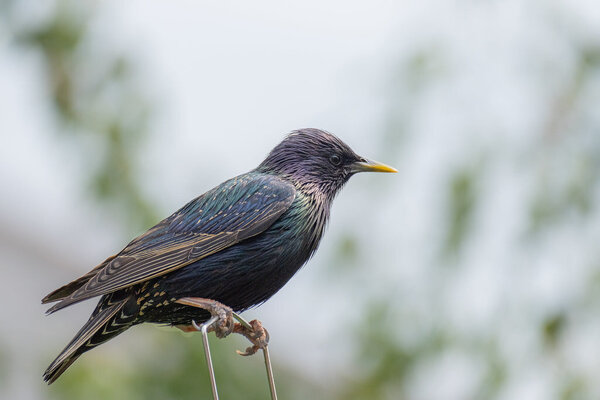
From the album: 2025
Another shot of a bird on top of my bird feeder, in my garden. Taken yesterday.-
- 1
-

-
- fujixs10
- fujixf70-300mm
- (and 1 more)


