Wing0949
-
Posts
66 -
Joined
-
Last visited
Content Type
Forums
Gallery
Store
Everything posted by Wing0949
-
That's probably the closest thing I've seen to a replacement cap (non-Fujifilm) that should work.. it's a little thicker on the cap, though so it would protrude more than the Fujifilm one. Still, as a cap, appears it should fit and work. But, you can call Fujifilm parts & accessories to get the actual one... which I actually have done already.. fyi, the item is part #: BB24156-100. Cost a bit more, but at least I know it's a dead match to the original.
-
Problem with my X Pro2.
Wing0949 replied to vicmay's topic in Fuji X-Pro 1 / Fuji X-Pro 2 / Fuji X-Pro 3
I haven't had any issues with my X-Pro2, either (Knock on wood). Hearing this issue with resetting of custom settings, I did leave my battery in the x-pro2 for 24 hours at least to be sure the internal battery is charged enough to retain custom settings in its memory and it seems fine..custom settings holding. -
So, I guess it's just better to go with pixel based DOF scale for better dof accuracy.
-
I suppose you never used an x-pro1 or x100 before? I hope I can explain well and don't confuse you more.. but, here goes... It just gives you 2 points of reference to guesstimate where you think the actual AF focus point will be when using the OVF. It does not apply to using the EVF. 2 focus squares/boxes are shown in the OVF when corrected AF frame is on. The center most square represents infinity focus and the off center square, usually a bit more towards the lower right corner, represents closest focusing distance. Your actual AF focus point can be anywhere inbetween. When you half press shutter to get an AF lock, a green square/box will appear to confirm the AF focus point. The closer your subject is, the closer that green confirmation square/box will be to the lower right corner. Conversely, the further away your subject is, the closer the green confirmation box will be towards the center square/box which represents infinity. As soon as you get the af confirmation, the frame lines will automatically adjust for parallax correction. The best way to picture using corrected AF frame is to think of the 2 boxes floating in 3D space. An invisible line of focus runs between the lens to infinity.. the infinity box in the center and closest focusing box to the bottom right which if you think about parallax error, is actually somewhere in front of the lens.. and you just imagine where your subject is in 3d space between closest and infinity focus points and try to place your aim in that area. With practice, you can do a pretty good job of guessing where that AF point should be floating between the infinity and close focus squares/boxes. Note, the Corrected AF Frame is not represented the same on all lenses.. it will vary depending on the lens and focal length you are using. Some will have the 2 squares/boxes a lot closer to each other, others will be further apart. Note, using the Corrected AF Frame was the best way to get some reference to AF focus using the OVF in the X-Pro1 & X100 & X100S. It was not until the X100T that electronic rangefinder (ERF) mode was implemented and you could get that small EVF overlay in the bottom right corner in OVF mode to show you exactly what your sensor is seeing 100% and where the focus point actually is. The X-Pro2 has this now, as well. I find the Corrected AF Frame less useful now since you can have the little EVF overlay in the bottom right corner to show you exactly where the focus point is.. no need to guesstimate anymore. Now, some people find that little EVF distracting and not useful.. I don't personally think so and love it. No more guess work and you can use that little EVF overlay to fine tune focus manually after AF lock (if you just want to be extra sure). I will add the beauty of the electronic rangefinder mode is that in manual focusing, that small EVF overlay can be used to focus and the frame lines will adjust in real time and hold position accordingly which really makes it feel as close to a real rangefinder (in digital format) as much as possible. Where as if you used AF, the corrected frame lines in the OVF only show up after you've half pressed the shutter button. it works great still, but at least you have more options now on how to focus and compose your images. BTW, if it doesn't make sense, take a look at this video by Rediscover Film. Don't worry about the problem with the 35mm OVF.. it's something we both found on the x-pro1.. not going to talk about it as the video goes into it more.. but, the basics on how Corrected AF Frame works will be more apparent with this video and some visuals to explain.. probably better than just words here on this forum. https://youtu.be/vn2BY1jpHWY Bottom line.. on the new x-pro2, I would say the corrected af frame is not as useful anymore if you plan to use the electronic rangefinder (ERF) mode with the OVF as it is more accurate and show you exactly your focus point. But, if you don't like ERF, then I would suggest you turn on Corrected AF Frame so at least you have an idea where to guesstimate AF focusing using the OVF. Tips with Corrected AF Frame: 1) If your green confirmation square/box is not over the spot you were guesstimating it would be.. you at least know where the af point is now and can adjust your aim to compensate and retry.. you will find if you adjusted correctly, the green confirmation square/box will be exactly over your intended target 2) The other way to help visually confirm if you've hit your mark with the AF using the OVF is to check the distance scale at the bottom. If it's showing you a distance that is where the subject is from you, then it's a good chance you got the af point where you wanted.. otherwise, if you know the subject is close within a certain distance and the distance scale shows out beyond 10 meters, then you should know it probably missed the mark being it's showing focus so far away. ** Manual Focusing with OVF does not show Corrected AF Frame, meaning you will only get the 1 box in the center which does not represent your true AF focus point, only your infinity point.. you will still have to guesstimate, but you have 1 less box (the close focus box) to reference where to aim and place your focus over. If you get good at guesstimating and confirming focus by taking note of distance scale & seeing how the frame lines adjust, it may not be so bad. One more note about using manual focus with OVF, the green confirmation box only shows up when using AF-S mode with the OVF.. So, if you're in manual focusing and use your AF-L button to try to more quickly acquire focus first before manually dialing in your focus, there will not be a green box that shows up to confirm AF point lock. you will see the frame lines adjust and distance scale update, but that's the only visual clue you will have to confirm focus point.. you'd probably need to zoom with EVF to be 100% certain. It's stupid.. I don't know why they don't just show the green confirmation box when you've locked focus?.. it's bad enough they took away the 2nd box that shows your close focus reference point.
-
haha, thanks. i was just going to write in my findings as well and you are right, you can adjust the auto ISO with comp dial when aperture & shutter are manual. Compared to the x-pro1, this is a great new feature for the x-pro2... where as the x-pro1 will always try to balance exposure in the middle and a few times in tricky lighting, you really don't want to do that. On the x-pro2, this ability really smooths operation and exposure control even more on this camera by not having to manually reset the ISO to over or under expose an image (like you would have to on the x-pro1).
-
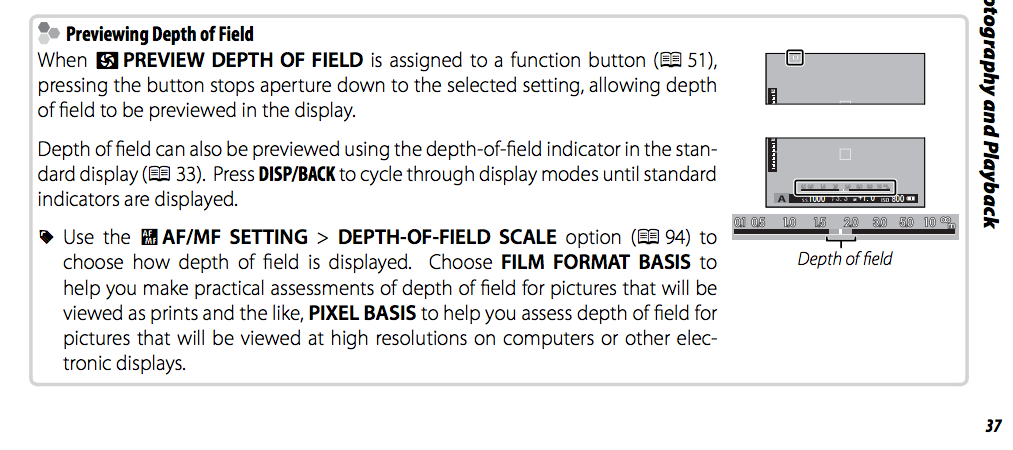
X-Pro2: Depth-Of-Field Scale, Film Format Basis vs. Pixel Basis, What's the difference? I've read what the difference is from the X-Pro2 Owner's Manual, but I still don't quite understand. Frankly, it's an extra option & setting which serves to confuse me a bit.. I've never heard or seen this option on any other camera until now, so not sure how to even use this really? Is there really that big of difference between how your files will render depth of field for print versus on screen? If somebody can shed some insight into this particular feature, thanks! Here's a screen shot of the excerpt from the manual included in this post.

-
I've been looking all over and asked a few people who've had experience with the x-pro2 (but still waiting for reply) about the exposure compensation dial. Here's the question: If you are in full manual exposure (aperture & shutter), but have auto ISO set. Can you adjust for under or over exposing with the exposure comp. dial? I know not all Fuji's can do this.. as far as I am aware, only the X-T1 can adjust the auto ISO value to be over/under exposed using the exposure compensation dial when aperture & shutter are manual. It would be great to know if the x-pro2 is capable of this or not.. I hope so cause it would make such adjustments a lot easier instead of having to manually reset the ISO, needing to do possible several turns to find the desired under or over expose setting versus just using the exposure comp. dial do it with a quick click or two. I should be receiving my x-pro2 today (woo-hoo!) so I will probably find out soon myself anyways, but just thought I'd ask in the mean time to see if I could find out sooner than later and know what to expect regarding this feature (or lack there of). Thanks.
-
... maybe an over-reaction on my part.. FYI, can get the x-pro terminal cap, just have to call customer service parts & accessories to special order it, costs under $7 + shipping. ordered extra 3 just in case while I had the phone to get the part.
-
To be honest, i'm not terribly worried about weather sealing since I never use my stuff in such adverse conditions. BUT, just in case, it would be great to have that FULL weather sealing just to know the camera is as protected against the elements as much as possible. I don't anticipate if the sync terminal cap goes M.I.A. that I would be at high risk of camera failure from that.. I think it's more a mental thing.. 1) I don't want ANY original components from my cameras missing and unavailable & 2) aesthetically it looks better to just have that sync terminal covered. Regardless, I don't like the knowledge once that cap is lost, there's essentially an open hole on the side of the camera. Yes, I could cut a small piece of gaffer or electrical tape to fit over the terminal if the cap gets lost, but I think it looks kind of ghetto.. I don't like the idea of patching and fixing my camera with tape. Anyways, this is a component that Fuji should make available for purchase.. I could understand if it was just on the x-pro1, being over 4 years old, they may not have that part any more, But, this is the X-Pro2, also, which is new and they should have all current parts and accessories available for such a new camera. No excuse not to.. How hard and expensive could that little cap be to mass produce and make available to X-Pro2 (& X-Pro1) customers who have lost their sync terminal cap?
-
That won't work unfortunately.. X-T1 has different terminal style and cap.. uses a screw in type, which is better and more secure.
-
Is that far fetched to assume having the exact same sync terminal and cap on the x-pro1 as on the x-pro2 that it will have potential for same problem? I can assume all I want.. I assume I will have an awesome time with the x-pro2 camera and assume it will be THE camera I will keep and use and probably stop G.A.S. for a long time.. What I do not assume is that I will necessarily be right about all this and then some.. but, I have the right to assume all I want and stand corrected and rethink my position later after I've used it. Still, I believe my concerns are valid, regardless.
-
i know, but, no, the x-t1 has screw in type which is better. I think fuji went with the push in type on the x-pro cause it's smaller and thinner and less profile.. doesn't mess with the surface flatness on the side of the camera as much is my guess, but unfortunately, it's pretty damn easy to lose and very hard to replace. With as many X-Pro's which have been sold and having been out for so long, you would think Fuji would have noticed this issue and offered a proper replacement cap.. but, from what I can see, they never did and don't see one yet.. they should really offer since the x-pro2 will have the same problem.
-
This is essentially an old topic since it dates back to the X-Pro1, but since the X-Pro2 is out, I think it's still a relevant question and potential problem. As X-Pro1 owners already know the cap/cover for the most under-utilized feature on the camera would be that pc sync terminal is unique in that it is push in type and the the typical screw in one.. so, it's damn easy to lose.. just lost mine the other day. Sadly, there never seem to have been any replacement part offered by Fuji... after all this time.. and from what I can see, the X-Pro2 has the same stupid sync terminal that takes a unique push in type cap/cover. Now, I have the X-Pro2 on order and I anticipate this cap/cover to still be an issue.. I wouldn't' be so concerned, but the X-Pro2 is now weather sealed and if you lose the sync terminal cap/cover, and there is no replacement part offered by Fujifilm, then the X-Pro2's weather sealing is permanently compromised?.. Does this make sense to any of you guys/gals? I've sent my concern to Fujifilm via an email.. good luck waiting for a proper response, huh? Still, don't you think this is a major oversight and needs to be addressed?.. Really sucks if an opening and potential breach in weather sealing on such a expensive and high end camera has no quick and easy fix such as offering a replacement cap.. that's all it takes, but some reason Fujifilm doesn't seem to think it's important enough to address and offer.. what do you have to do?.. send in the camera just to get a replacement cap?.. buy another X-Pro just for spare parts just for this one little cap? I believe I've done my homework to see if I could find a replacement cap, but no luck. Anybody know of a suitable replacement cap?
-
Does the X-Pro2 still have a macro mode? .. more specifically, a macro mode you must engage if you wanted to focus at or near closest minimal focusing distance when using the OVF, thus forcing you the VF to switch to EVF so you can get accurate framing? OR, does the X-Pro2, like more recent firmware update to the X-T1, for example, the macro mode is no longer and the lens and camera can focus the full range from infinity to minimal focus distance? The X-Pro2 is not exactly a camera you would buy for macro shooting, BUT, some lenses have difficulty focusing at closer distance and even though it's not a macro shot you are after, it will more successfully focus at closer range when you have the macro mode engaged... but, like on the X-Pro1, when you engage macro mode, it forces a switch to EVF because the parallax error will be really bad assuming that you are focusing really really close... but, admittedly, that kind of sucks when you want to use the OVF and the distance to subject isn't really that close to be considered a macro shot, but you have to engage macro mode because the distance is under and within the macro range, unfortunately... it's just an extra step and process and little more time to have to switch to a macro mode when the shot you want is not macrio and you really don't need it. For example, on my X-Pro1, I like to use the old 18mm f2, but to fill the frame with subject a little more, you have to get in closer, but I find at least 50% I get in just close enough that the AF won't focus unless I go to macro mode, then it will work, but that's extra time and attention diverted away from composing and taking the shot.. not to mention the EVF on the X-Pro1 is laggy (more reason I prefer to use the OVF). And, when you look at the final shot and composition, it's hard to imagine why you have to engage macro mode for just such a shot. I could position myself further away and crop, but that's an option I prefer not to do. Anyways, to reiterate, does the X-Pro2 have a macro mode still to be able to AF on shorter distances to subject?
-
I see this comment about the 35mm F2 parallax correction not working correctly with the X-Pro1 in some reviews (I think it was originally from The Phoblographer, I don't see anyone stating specifically what is wrong or how it does not work correctly. I have latest firmware 3.5... I think, like you said, added support for the 35mm f2.. perhaps the reviewer had not had the latest firmware.. though, his posting (in November I believe) was after he latest update which was in late October. Anyways, I don't find a problem using the 35mm f2 on the X-Pro1, which is great. However, I did notice, to my personal surprise, that the AF Parallax Correction (where you have the 2 offset boxes indicating infinite and minimal focus distance) very different than the 35mm F1.4.. There is a lot of distance between the 2 boxes now. I thought I had moved my AF point or this was some misalignment or off calibration, but I guess that's how it works on the new 35mm F2 now. I have not personally read or noticed anybody who has the X-Pro1 and 35mm f2 combo mention this noticeable change in what's being displayed when using AF-S and AF Parallax Correction. It took a quick moment to get use to, but I think I like this now.. The 2 boxes before with the 35mm f1.4 were very close together and harder to judge where the actual AF point falls between the 2 boxes. This more spread out look gives some space to make a better educated guess where the AF point should approximately be when using the OVF. I only have the oldest lenses such as the 35mm f1.4 and 18mm f2 and they both have similar very closely placed boxes when using OVF with AF Parallax Correction. I have no experience with any of the newer lenses since the initial 3 XF lenses came out other than this latest 35mm f2.. Do any other lenses in the XF lineup (primes primarily interested in) have more space between the 2 boxes while using OVF with AF Parallax Correction like this new 35mm f2 does? I wonder why they can't update the older lenses to have match this newest offering? I think it would help. So, am I asking a question or commenting?.. I guess both.. I guess I just want to be sure what I have and seeing now with the 35mm F2 is correct when using OVF and AF Parallax Correction with AF-S mode. Thanks.