RadBadTad
-
Posts
155 -
Joined
-
Last visited
-
Days Won
7
Content Type
Forums
Gallery
Store
Everything posted by RadBadTad
-
A lot of that comes down to processing techniques. The detail is there, if you're willing to go through the (hopefully temporary) hassle of getting to it. For instance, doing your initial detail processing in another program, like PhotoNinja, and exporting to a TIFF that you then continue to edit in your adobe suite as usual. Even without that step, simply removing all noise reduction and lens correction from Lightroom will bring back a lot of your detail. I'd post an example but I don't want to encroach on a wonderful thread. I can't stop staring at the second photo in this post. Mostly because it reminds me of a very film looking photo from the late 90s maybe? Not the styling, or the girl, but just the way the image itself comes off the page. The way the detail is rendered. I love it. Can I ask what you're doing as far as lighting is concerned? Some of these look to be natural light (which you have an excellent eye for, in my opinion) but others look to be strobes, which I haven't seen many good systems for on the Fuji system. Please keep up the great work, and keep sharing!
-
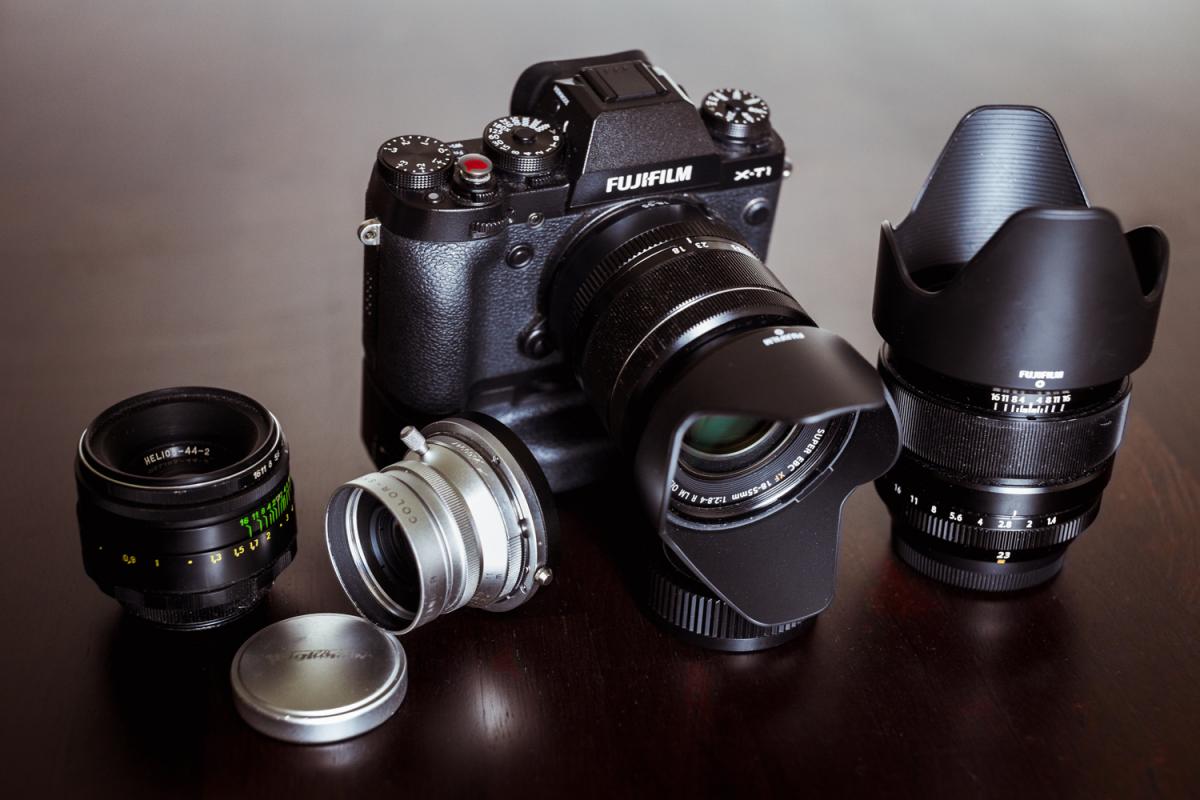
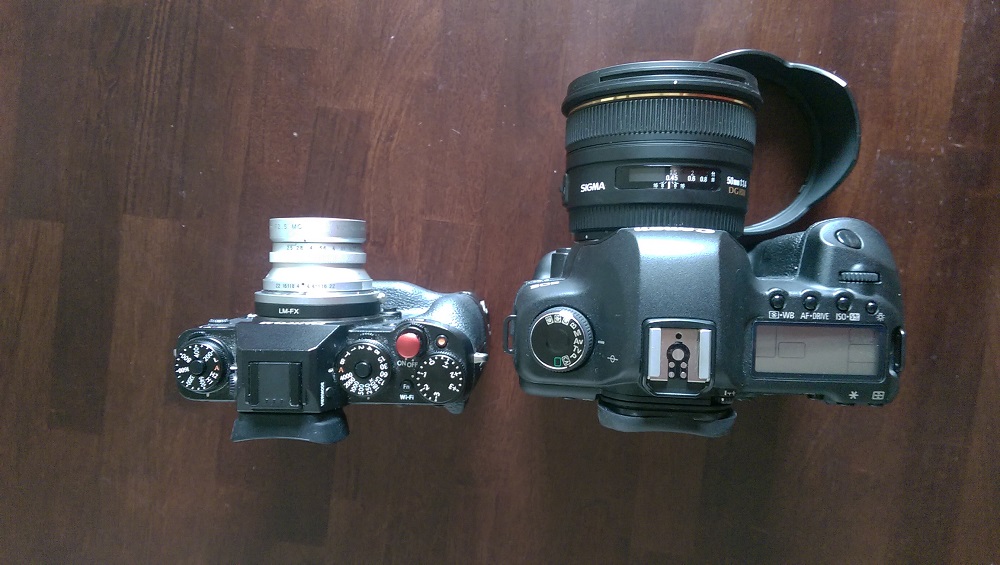
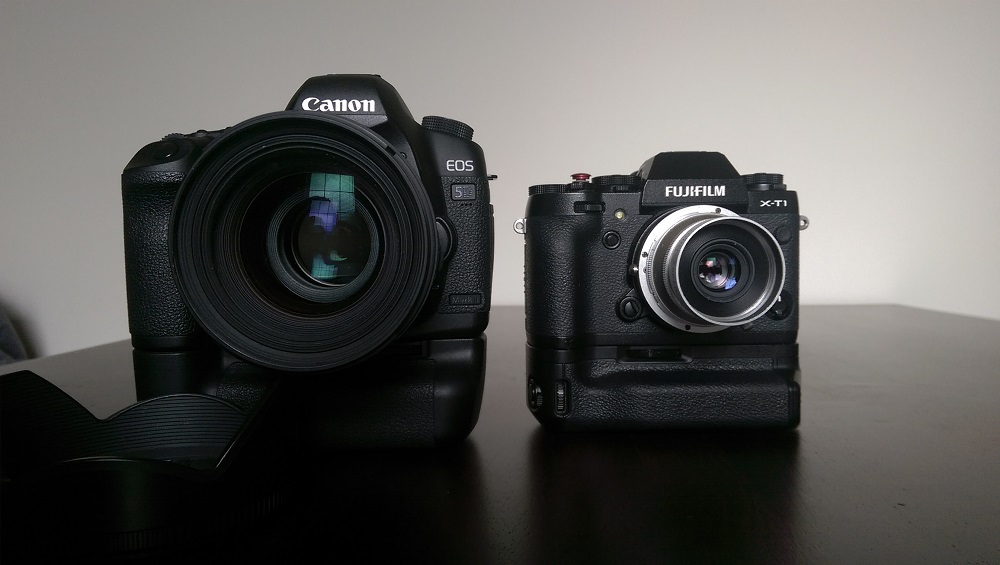
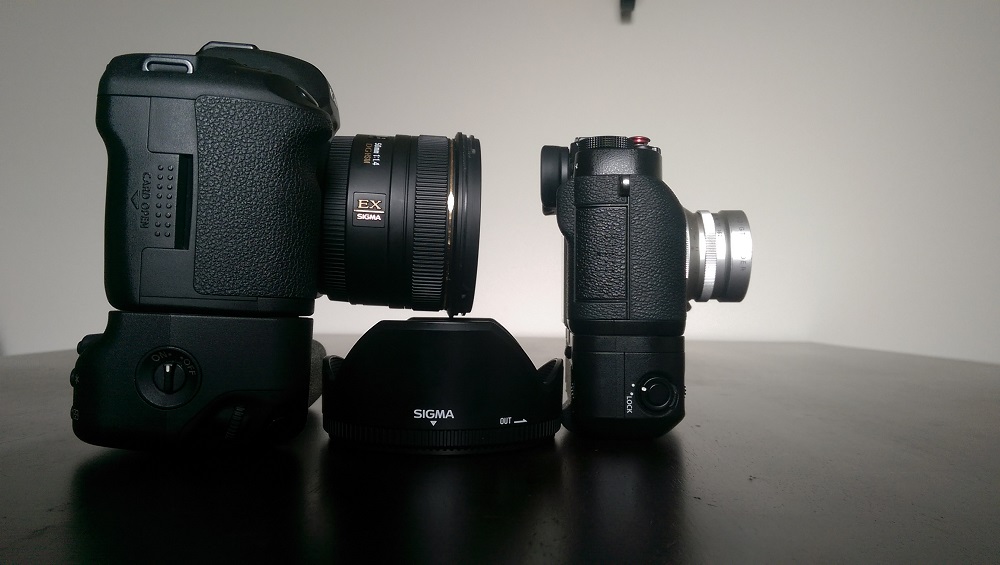
Here you go. The three comparisons are against a gripped 5Dmk2 (taken with my phone, so I'm sorry about the poor image quality) The comparison photos look embarassingly bad, so also, have a "this is my kit" photo I took a couple of months ago In the "kit" photo, you can see the Voightlander, and the thin black ring on the back of the lens is the entire adapter. Much lower profile than anything M42 will come close to.

-
The crop factor will be the usual 1.5x. The adapter is just adding the space that the lens needs to focus correctly. The lens is designed for a camera with a mirror assembly, so the flange distance is longer. If you attached the lens without the extra space, you wouldn't be able to get anything in focus because the lens would be projecting the scene about an inch behind your sensor, no matter where you focus. That's why mirrorless is good for adapting lenses, because no matter the flange distance the lens is designed for, mirrorless needs less space, so you can put in adapters of varying thicknesses to make every lens work. If you want a truly small profile adapted kit, you should look into rangefinder lenses, as they're designed to work with no mirror assembly, and therefore a very small flange distance. I have a Voightlander 35mm that sits very snugly against the body of my X-T1 and makes a very compact package. Meanwhile, My M42 Helios 58mm sits quite far from the body, and is almost awkward to use sometimes.
-
"If you want to take more interesting photos, become a more interesting person" Jay Maisel
-
On, no good point. So not EVEN an X-E2. Darn. Hopefully that will make it really tiny, and inexpensive, I suppose? I know the GR does pretty well as a pocket camera, but my personal priorities mean I would never be able to use a camera without a viewfinder.
-
So is this basically just an X-E2 with a fixed lens then? I guess the only real difference between the X-Pro1 and the X100 is that it's a fixed lens, so that makes sense.
-

X-T1 FW 4.0 BETA: I have it and share my findings soon ;)
RadBadTad replied to Patrick FR's topic in Fuji X-T1 / Fuji X-T10
I've had my X-T1 for about a year and a half now and I've never had it freeze up on me. Even with large bursts. -
X-T1 FW 4.0 BETA: I have it and share my findings soon ;)
RadBadTad replied to Patrick FR's topic in Fuji X-T1 / Fuji X-T10
If we've upgraded with the leak, what's the best way to update to the real firmware when it drops? -
X-T1 FW 4.0 BETA: I have it and share my findings soon ;)
RadBadTad replied to Patrick FR's topic in Fuji X-T1 / Fuji X-T10
Ninja mode? -
X-T1 FW 4.0 BETA: I have it and share my findings soon ;)
RadBadTad replied to Patrick FR's topic in Fuji X-T1 / Fuji X-T10
Just saw that the firmware release got pushed back again. Has anybody noticed any issues with the leaked update that would warrant pushing back the release? All I've seen are positive reviews! -
And the answer should just be to ask PhotoNinja nicely to explain how they did it. Haha On the boards I usually hang on on, the poor handling of Fuji files is usually attributed to the baked-in noise reduction that the camera does, even on raw files, (that PhotoNinja is able to remove, where Lightroom isn't) and strange lens corrections that actually do more damage than good. I'm not actually sure how true that is, but I know that I get the best detail in PhotoNinja when I take the automatic noise reduction all the way down, and it makes the little swirls and smudges go away. I've also noticed that I get much worse "fuji detail issues" with my 23mm than I do with my 18-55, which would suggest a lens correction issue to me. I'm really curious as to how it has taken this long to try to correct though. It's been a fairly well publicized issue for quite a while now.
-
Because I ask a lot more from my programs than simple processing of Fuji files. I also have library management, export to multiple places, tagging, rating, and multiple other cameras from other brands. A slight boost in detail isn't enough to get me to give up all that and use the Fuji program.
-
Thank you for the compliment on the portrait! I still notice a lack of detail in the skin on his face, and the hair in his stubble. I'll agree that what one can pull out of a photo using Lightroom is plenty for almost any purpose, but it doesn't change the fact that you can spend five whole minutes tweaking sliders in Lightroom and still barely come close to the amount of detail that comes with PhotoNinja by default. Though I do agree that the other benefits of lightroom outweigh the slight increase in detail (like color, and dynamic range, as you also mentioned) For most of my work, I stick to Lightroom. When I truly want tons of fine detail, I'll do PhotoNinja, but it doesn't happen too often. Either way, people should know that their files do contain more detail than they think they do, so they don't end up trashing the system and spreading the word that there just isn't a comparable amount of detail in the X-Trans files, when the issue is just the way that Adobe handles the files.
-
Here's a dropbox of the RAF - https://www.dropbox.com/s/p9dhlp8svi0keuq/_DSF1191.RAF?dl=0 It cleans up okay if you add some sharpness, but it doesn't end up coming close to the PhotoNinja file, even at its defaults. These results were with default import settings with B&W added to better show the level of detail. Here it is with added sharpness in lightroom, actively trying to match the default import settings with PhotoNinja. http://imgur.com/5blSlDD The differences are most obvious in the hair, and specifically around the eyes, where lightroom's issues with detail come out and look like strange grain and low resolution, whereas PN looks normal and very nice. Almost TOO sharp.
-
I didn't find any difference between lightroom and iridient either, but lightroom compared to PhotoNinja gave me some very drastic differences, especially in fine detail. See comparison here. http://imgur.com/q4aEyFI This is one of my most drastic examples, but I haven't found an image yet that doesn't get much better detail out of PhotoNinja than Lightroom. Another: http://imgur.com/IWJNgZP The down-side is, I don't like the color rendition as much coming from PhotoNinja, so I only use it when the image really needs detail, or for black and white images.
-
Accurate colors in Lightroom with X100S
RadBadTad replied to crazy-ivory's topic in RAW Conversion Fuji X Photos
I haven't noticed any examples of bad colors in Lightroom with my X-T1 or X100s files. Generally, the only issues I have in lightroom are with the level of detail I can pull out of the files. I'll also ask you to post examples, because you shouldn't be having anything that's more than a little off from what you're getting in JPEG. Unless something is wrong that I can't think of. -
X-T1 Orientation Dependent Focus Points?
RadBadTad replied to RadBadTad's topic in Fuji X-T1 / Fuji X-T10
What's the best way to contact Fuji about ideas? I went to the Fuji site and went into the "contact us" section, but they don't even have a way to leave comments about the X-T1 (It isn't even listed in the cameras you can talk about) -
X-T1 Orientation Dependent Focus Points?
RadBadTad replied to RadBadTad's topic in Fuji X-T1 / Fuji X-T10
Not all of my portrait oriented shots of people include an eye (looking down, face covered by hair, sunglasses, big sun hat covering face, etc) though this method is certainly better than nothing. -
I've been using a 7D for work quite a bit, and have gotten completely accustomed to camera orientation specific focus points (A single center point in landscape orientation, and then when I rotate the camera to portrait orientation for a portrait, my focus point jumps to the top where I would be putting the face in the frame) With the way that Fuji's (and the X-T1 in particular) have an EVF that literally changes when you rotate the camera, I am so shocked to find that this feature isn't available to us. Shocked to the point where I think I might just be dumb for not knowing how to activate the feature? If it doesn't exist, is there a good way to give it as a suggestion to Fuji?