


thelostkiwi
-
Posts
43 -
Joined
-
Last visited
-
Days Won
3
Content Type
Forums
Gallery
Store
Everything posted by thelostkiwi
-
All three of my bodies (X-E2, X-T4, GFX100S II) have shoot without lenses enabled and they have all had it set since I bought them. No harm in it at all. Just remember to set the focal length when you fit a manual lens with no electronics otherwise the IBIS (if you have it) goes nuts. I regularly use vintage film lenses from Minolta, Zeiss, Mamiya, Rollei and others on my X mounts along with more modern manual focus stuff from TTArtisans. I also use Nikon AF-S lenses with a Fringer so the world is your oyster! Vintage lenses can be an absolute bargain too - For example the Zeiss 135 f/35 in M42 is as cheap as chips and very sharp as is the excellent Minolta 35-70 Macro (which is also rebadged Leica).
-
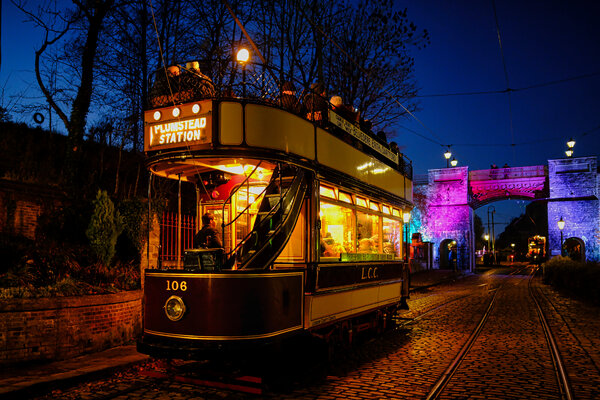
From the album: Lostkiwi's Album
A vintage tram at Crich in Derbyshire. This was taken at their illuminated night where all the trams run in the dark and are lit. GFX100s II with Nikon 24mm f/1.8 hand held.© Alastair Bell. All rights reserved.
-
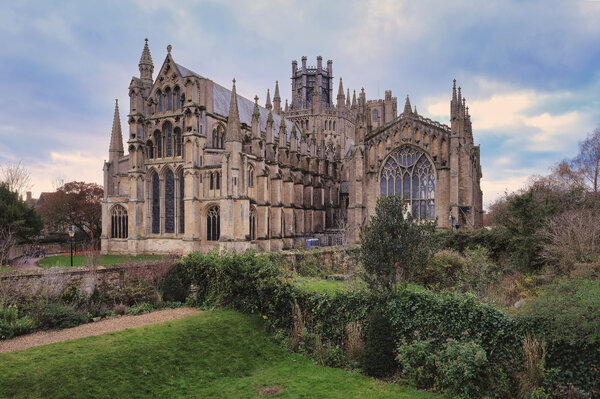
From the album: Lostkiwi's Album
Ely from the outside. A fantastic building that is difficult to grasp the majesty and scale of.© Alastair Bell. All rights reserved.
-
A selection of my images taken on Fujis of various flavours. I have a somewhat eclectic taste in photography and a variety of 'styles'.
-
-
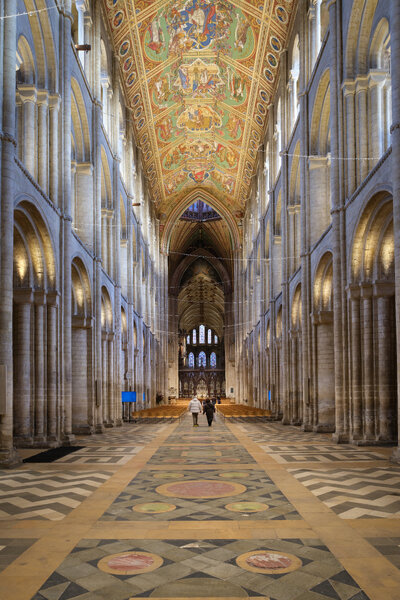
From the album: Lostkiwi's Album
Looking down the length of the cathedral the people give scale to the vastness of this space. GFX100s II with 24mm Nikon f/1.8G on a Fringer adapter.© Alastair Bell. All rights reserved.
-
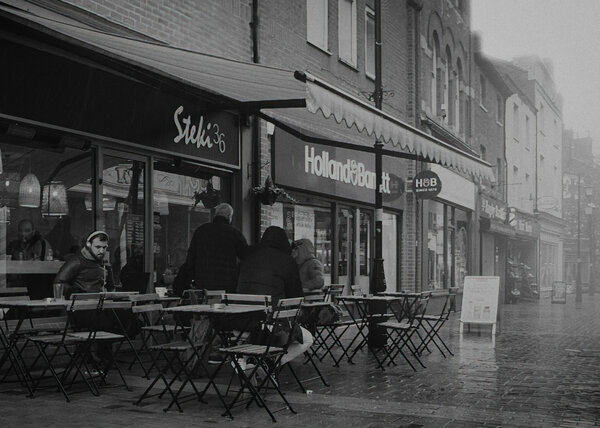
From the album: Lostkiwi's Album
In the darkest of days when its cold and wet the British will still sit outside to drink their tea and coffee. Fuji X-E2 with a terrible Astrahori 18mm f/8 manual focus lens (that I no longer have). The lens was fun while is lasted I guess.© Alastair Bell. All rights reserved.
-

From the album: Lostkiwi's Album
A multi-shot HDR image of the abandoned church at Wolfhampcote. Taken with a 7.5mm TTArtisan fisheye lens on my X-T4© Alastair Bell. All rights reserved.
-
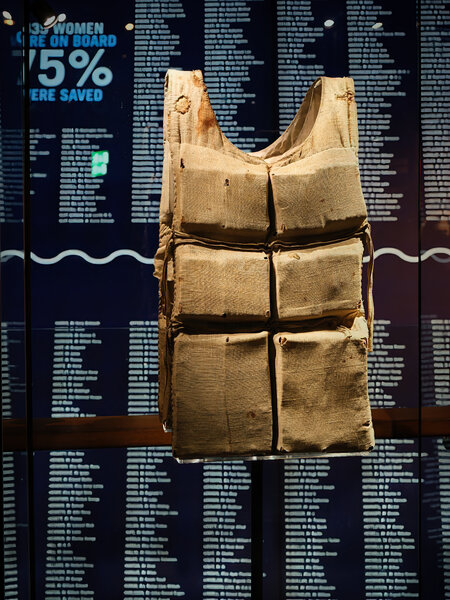
From the album: Lostkiwi's Album
A lifejacket taken from the body of a victim of the Titanic sinking. In the background are some of the names of those who perished. Taken at the Titanic Centre in Belfast. Hand held.© Alastair Bell. All rights reserved
-
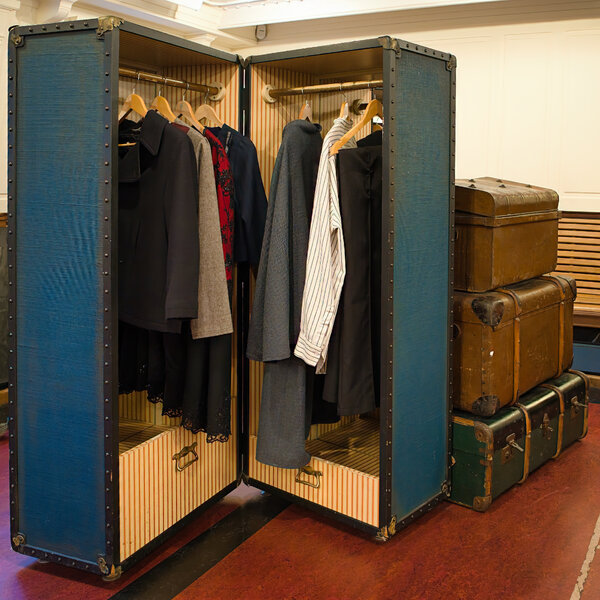
From the album: Lostkiwi's Album
Taken at the Titanic Museum in Belfast this is a sample set of first class passengers luggage. As you can see not exactly travelling light!© Alastair Bell,. All rights reserved.
-
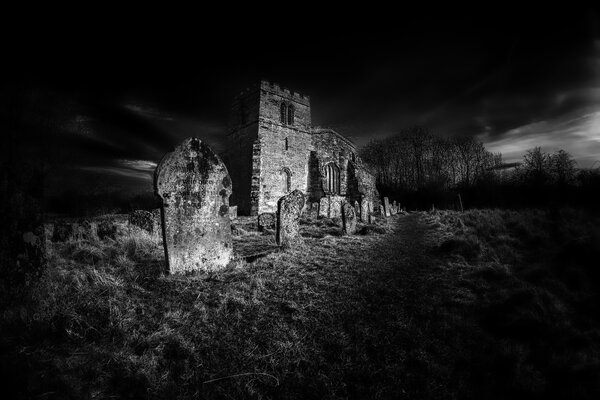
From the album: Lostkiwi's Album
HDR from a single RAF file with some selective lightening, darkening and conversion to B&W. Fuji X-T4 with 18-135 Fuji lens @18mm© Alastair Bell. All rights reserved.
-
I never knew the X70 existed! Looks interesting.
-
Looking for Full Frame lenses to adapt to GFX
thelostkiwi replied to Joeyd's topic in Adapting lenses to Fuji X
More testing of lenses today. Nikon 70-200 f/2.8 IF ED VR (same applies to VR II) - dreadful. Heavy vignette at all focal lengths and apertures. Obvioulsy fine in 35mm mode. Nikon 70-200 f/4 - some vignetting at full frame (similar to 24mm f/1.8 and Sigma 105 f/2.8 so probably correctable or slight crop to 80-90MP). Perfect in 35mm mode. If weight is an issue for you the kit 35-70 Fuji GFX lens is lightweight and better than you might expect but isn't a fast lens at f/4.5-5.6 -
Looking for Full Frame lenses to adapt to GFX
thelostkiwi replied to Joeyd's topic in Adapting lenses to Fuji X
I also use a Nikon to GFX Fringer and it works very well. 24mm f/1.8 vignettes so best used on 35mm mode. 50mm f/1.8 covers the entire frame very well with no issues and is a superb little lens. 105mm Sigma vignettes slightly but is perfectly usable. 300 f/4 likewise the 105. I have a 70-200 f/20+.8 incoming to test so will report back but I'm expecting a little vignetting. Even in 35mm mode the image is still 60MP and if you're prepared to manually crop and correct you can get 80-90 MP images. I also have a C/Y to GFX adapter. The 24mm Sigma Superwide vignettes strongly. Ditto 28-80 Zeiss Sonnar. 80-200 f/4 Sonnar is perfectly usable. All work fine as 35mm mode lenses. I also have an M42 adapter which I tried with the Carl Zeiss Jena 135mm f/3.5 with good results. -
Ely Cathedral, Nikon 24mm f/1.8G ISO3200, 1/4s f/9 handheld. Using 35mm mode.

-
Fringer adapters are brilliant. I use them on both the X and GFX cameras.
-
Update 12/2018: Which Fuji X cameras do you use?
thelostkiwi replied to FX Admin's topic in General Discussion
You're missing some of mine off the list. X-E2, X-T4 and GFX100s II -
Dissastisfied xt20 owner thinking of switching brands
thelostkiwi replied to robdmarsh's topic in General Discussion
I came from Nikon D3 to an X-T4. Yes it was a bit small (almost anything is after a D3) so I added a SmallRig grip. Dramatic improvement in how it felt in the hand. It also added slightly to the height making it all a bit more manageable. I then decided I wanted something very small and compact for street or discrete photography and bought an X-E2. Ergonomically its a bit of a disaster but the images are lovely and I'm happy to forgive it because of that. I can drop it in a pocket and snap off a couple of shots in a few seconds and put it back in a pocket nice and quickly. Since then I've moved on to a GFX100s II and that is simply in a different league. Ergonomics are very good (especially if you are used to PASM dials and finger and thumbwheels for shutter and aperture. Buttons are all programmable and you can customise to your hearts content. The only thing is the joystick control is a bit random in how it operates - especially when pixel peeping and the touchscreen operation is inconsistent - it works with some things but not others. Fort example scrolling an image about or selecting focus points but doesn't work when in the menu system. If you're having issues with the X-T20 try a grip and give it a little more time to get used to. As for whats best for you it depends entirely on what you shoot. For example I'd never use my GFX for street photography or sports photography but conversely I wouldn't use the X-E" for landscapes or wildlife. The X-T4 is a jack of all trades and well suited to sports photography (very high frame rate and crop sensor) where the other two aren't. Horses for courses. -
I recently went from Nikon Dx series -> Fuji X-T4 -> GFX100s II. I've now had the GFX for almost 3 weeks and find it generally to be pretty intuitive and the overall design to be very good. It fits neatly in the hand and although there's a reasonable amount of heft its handling minimises it well. All the buttons are programmable to put the functions you need close at hand and the customised menus are easy to use. The only thing I'm not sure about is the joystick operation and the inconsistent use of the touchscreen - it works for some things but not others. All that being said the image quality is simply astonishing SOOC. As a flexible high resolution system it works very well. You can get adapters to use non-Fuji lenses as if they are native (with some caveats about sensor coverage). For example smart adapters are available to use the GFX with Nikon AF-S or Canon EF-S lenses. Some will give full sensor coverage and some won't but even as a full frame 35mm camera its still 60MP.
-
Some of the post processing options cause this. Clarity, noise reduction etc. check all are off. Also check to see if you've bumped it into HDR mode on the drive selector.
-
If you use an Android phone Snapseed is fantastic. Affinity 2 is a full featured editor that's not overly expensive when there are offers on. Luminar Neo is very good and easy to use but you need to wait till there's an offer on. It can then be extremely good value.
-
Agree on the 18-135 it's a very good one lens fits all with a decent blend of focal length coverage, sharpness, cost and weight with the added benefit it's weather sealed. It's a bit slow at the long end but with OIS and high ISO it's fine for most things. You don't say what you shoot? For myself I use vintage telephoto lenses from Minolta and Zeiss. Great lenses for not much money. Example: 75-200 f4.5 Minolta can be had for under £50 and is the same design as the equivalent Leica R (Leica and Minolta co-developed lenses and bodies for a while). A Zeiss 80-200 can be had for £100 -150 in Contax fitting. Adapters are £20-30. The only issue is you need to manually focus so not easy to use for sports or wildlife.
-
Adapter for a Carl Zeiss T 50mm F1.7 manual lens
thelostkiwi replied to SimonF's topic in Adapting lenses to Fuji X
Plenty on eBay and Amazon. The one I use is a KEF Concepts which works fine. Remember you will have no AF, no feedback of aperture and will need to stop the lens down manually. That all said vintage lenses are a bargain and you can get a very good lens for not much money. For example I paid £15 for a Carl Zeiss Jena 135mm f/3.5 lens in m42 fitment and it is pin sharp even wide open. Likewise Minolta MD 75-200 f/4.5 (£25), Minolta MD III 35-70 f/3.5 Macro (£20) and Rollei (Zeiss) 50mm f/1.8 HFT (essentially a Rollei QBM version of the C/Y 50mm 1.7). Minolta in the 1970s worked with Leica and both the MD lenses above are identical optically to their Leica SLR counterparts at a fraction of the price. Likewise Zeiss worked with both Rollei and Contax (though Rolleinar and Yashica lenses are not the same as the Zeiss ones). -
Check the lenses you have are supported by the adapter. Some aren't, especially third party ones. For example the Tamron SP90 for Nikon is not supported by the Fringer Nikon to Fuji FX adapter.
-
Depending what is going on internally this can be normal with some designs. For example the Yashica MC 35-70 moves freely from 70 to 45 but then internally one set of elements starts to move along with the first set and it stiffens up. It's even worse coming the other way. Tried several and they're all the same. Have a look and see what the internal elements are doing and that could give you a clue.
-
The three steps I went through on the X-T4 were: 1. Go into Menu, Drive Setting, BKT Setting, Film Simulation BKT and select the three simulations. 2. Go back into Menu, Drive Setting, BKT Setting, BKT Select, Film Simulation BKT. 3. Switch the camera to BKT mode Then it took a single image and generated the three images. If you're doing that and it's not working I'm not sure what could be wrong. Does it work on other bracketing modes?


.jpg.a6b3ae61eea7797d5df9b7755b21ea7d.jpg)