stevem44
-
Posts
30 -
Joined
-
Last visited
-
Days Won
2
stevem44's Achievements






-
flash speed is 1/60 sec rather than 1/250 sec with the XT3
stevem44 replied to stevem44's topic in Fuji X-T3 / Fuji X-T30
Thanks. I had to change: Screen settings: preview exp/wb in manual mode: off -
Hi, I am using my XT3 with the EF-X8 flash using a non-Fuji lens in TTL mode: ISO 800 f5.6, shutter speed on A. The pictures come out fine but the shutter speed is only 1/60 sec. I read in the internet that the XT3 can take pictures with flash at 1/250 sec. What adjustments do I have to make to be able to take pictures with flash at 1/250 sec? Thanks
-
Hi, I bought another card for my XT3 and have the raw & jpegs in cards 1 and 2, respectively, as advised in the save data set up. This works fine, but I find that when I make changes using the in-camera raw converter, for example, when I changed the simulation from provia to acros, the acros jpeg appears in card 1 (raw), rather than in card 2 (jpeg). Is there any way that I can change this so that all the in-camera processed jpeg files (like acros) will appear with all the other jpegs in card 2? Any advice would be appreciated. Thanks
-
 Penny Fan reacted to a post in a topic:
auto iso problem - iso is locked at 400 in A mode
Penny Fan reacted to a post in a topic:
auto iso problem - iso is locked at 400 in A mode
-
auto iso problem - iso is locked at 400 in A mode
stevem44 replied to stevem44's topic in Fuji X-T3 / Fuji X-T30
No. I previously posted how I resolved the problem, but thanks for trying to help me. -
auto iso problem - iso is locked at 400 in A mode
stevem44 replied to stevem44's topic in Fuji X-T3 / Fuji X-T30
I found out what the problem was. For some reason I had changed in the button/dial settings: ISO dial setting from auto to command. It should be on auto. -
Dear all, For some reason my xt3 auto iso is locked at a fixed iso of 400. The auto iso range I set is from 200 to 6400 with a minimum shutter speed of 1/125 sec. When I move the iso dial to the A setting, the following image briefly flashes on my screen. This has never happened to me before. Any advice in resolving this problem would be greatly appreciated. Thanks

-
siock51 reacted to a post in a topic:
another q menu problem
-
siock51 reacted to a post in a topic:
another q menu problem
-
Yes, I see that that brightness increased. Thanks again.
-
Thanks very much! Regards, Steve
-
Thanks a lot! I will check this. Regards, Steve
-
Hi, I have difficulty in viewing scenes with my XT-3 through both the LCD and EVF when the sun is very bright sun - the scene appears dark. The relevant parameters that I am using are as follows: EVF brightness: -1, LCD brightness: +3, Natural live view: off (I want a natural view of how the scene looks). In searching for information regarding this matter, I see that some people recommended not using the auto feature, and used negative values for EVF brightness and positive values for LCD brightness; however, this does not seem to help much in very sunny situations. When the scene is not particularly sunny, I see through both the EVF and LCD fine. Any suggestions would be appreciated. Thanks
-
I suggest that you go to IQ and change the setting of each item individually, for example, white balance, color, and sharpness. This will then save these items on your Q menu.
-
I was finally able to arrange it properly. Thanks again for your help. Regards, Steve
-
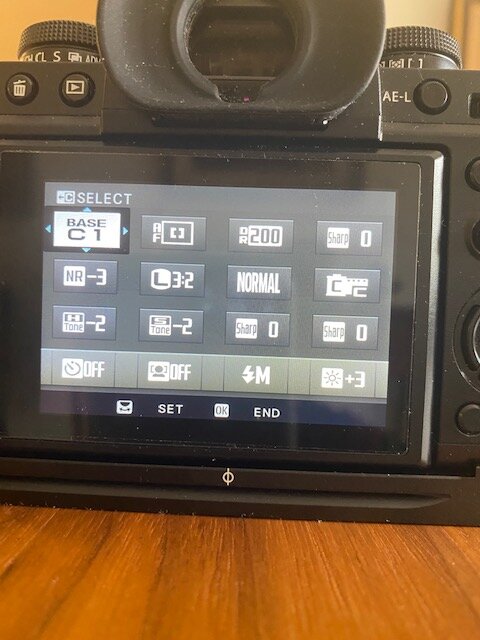
I changed the sharpness value in my q menu but after fiddling with it, as you can see, it now appears 3 times, and 2 previous items are missing. As previously suggested, I went to: Menu => Wrench, Set Up => Button/Dial Setting => Edit/Save Quick Menu. However, this did not help. Any help would be appreciated. Thanks