Rand47
-
Posts
37 -
Joined
-
Last visited
-
Days Won
2
Content Type
Forums
Gallery
Store
Everything posted by Rand47
-
Street Photography With the Fujifilm GFX 50s
Rand47 replied to KeenanRIVALS's topic in Fuji GFX 50R / GFX 50S / GFX 50SII
Weegee shot street with a 4x5 Graflex. The GFX is a midget by comparison. Rand -
I’d go for the lens. The final IQ of the X-T3 won’t be a significant upgrade from your T-2. So, unless you really need one or more of the new features, e.g. the enhanced Eye-AF, or the 30 FPS frame rate, then you’ll “much more” expand your capability overall with another good lens in your kit. Rand
-
Is your Camera RAW up to date in the Adobe CC application? Rand
-
This would be appreciated by several pro photographers
Rand47 replied to MJarry's topic in Fuji X-H1 / Fuji X-H2s / Fuji X-H2
Let me respectfully disagree. In my view it is always the photographer who is responsible for knowing how any given camera sees and adjusting the framing to compensate for the particular use-case of the images. I've been doing this for 50 years with all kinds of different "formats" of film and sensors. Once upon a time almost all "commercial uses" revolved around a 4:3 aspect ratio. With the ubiquity of the 35mm format (2:3) things have evolved over time so that many commercial uses are now 3:2 or even wider aspect ratios. Learning to "see aspect ratios" in the viewfinder, no matter what its native ratio is a valuable skill for professionals. Or you could just buy a GFX! Rand -
As I understand flicker reduction, it is about the "timing of when the shutter fires" to avoid the "pulse" of some light sources. In other words, the camera senses and "waits" a fraction of a second to fire so that the exposure "happens" during maximum intensity of the pulse cycle of the light source. Now, if this is the case (and I'm pretty sure it is), then I don't see a way it could be implemented in video and still have anything like smooth motion capture. Rand
-
Interesting that you cared so little that you felt compelled to tell us how much you don’t care. The lady doth protest too much, me thinks.
-
This is very good advice. It is also a reasonably inexpensive way to explore close-up photography and have some fun AND to assess whether spending some serious money on a good quality macro lens would be worth it. Rand
-
Even if you get Bluetooth connection, it really doesn't do anything other than send GPS data to the camera. You cannot use Bluetooth independent of Wifi for camera control via the app, and you cannot transfer images via Bluetooth (you only mark them for transfer - the actual transfer happens via Wifi). Auto transfer of images is not conveniently implemented, you actually lose control of the camera in some scenarios. I've played with it for quite a while and never had much success or see any value in it. So I just turned Bluetooth off and left it off. In the manual you'll find this at the top of the section on Bluetooth and Wireless connections: "For more information on wireless connections, visit: http://fujifilm-dsc.com/wifi/" When you go there you'll see that Bluetooth implementation is still dependent on working in conjunction with Wifi connection. I will say that all my Fuji cameras (X-T1, T2, and now H-1) have worked flawlessly with the app and Wifi. No problem at all and very reliable. It makes me wonder why they even bothered with Bluetooth, unless the big deal was GPS info (which I don't care about). Rand
-
Bummer. Keep us posted on the repair / replacement process. My first X-H1 was defective and was replaced by the vendor immediately. Rand
-
Yes, you must have some option enabled that keeps you from being able to reconfigure. I have all of mine reconfigured, so I know it is possible. Rand
-
Also note that you can change what appears on the sub menu. It is configurable in the camera's menu system. Page 19 in the camera manual. Rand
-
Sorry, I have no clue about this, so can’t offer any insight, interesting question, though. I don’t own any XC lenses. I’ll bet a quick call to Fuji technical folk could answer your question - or, take you XC lens with you to camera shop and check out what the IS menu says on their store demo body with your XC lens. Rand
-
In playing about, doing a significant amount of menu diving, configuring, and loads of chipmping and zooming in and out of images, I still got 230 frames on a single battery, all in boost mode. I consider that pretty reasonable. Fuji certainly had the opportunity with the X-H1 design to go to a physically larger battery. It is interesting that they didn’t - it isn’t as though they do not realize that battery life is an issue with mirrorless cameras. Perhaps technology is about to take a leap forward in size/performance? That would be nice. As for me, I think Fuji’s own statement ot 310 frames on a battery is reasonable and probably slightly conservative. With the grip that means somewhere in the vicinity of 1,000 frames before need for battery swap out. With four extra batteries (to do a quick grip tray swap out) I just don’t see it as an issue of any sort at all. I suppose for photographers who shoot events or sports and have a real need to “spray and pray” in their shooting, it could be an issue. But being an old guy, I remember the day when even high capacity film backs for sports cameras only held 250 frames of film - and reloading those babies was not for the faint of heart. I think we’re delightfully spoiled in the digital age! :-) Rand
-
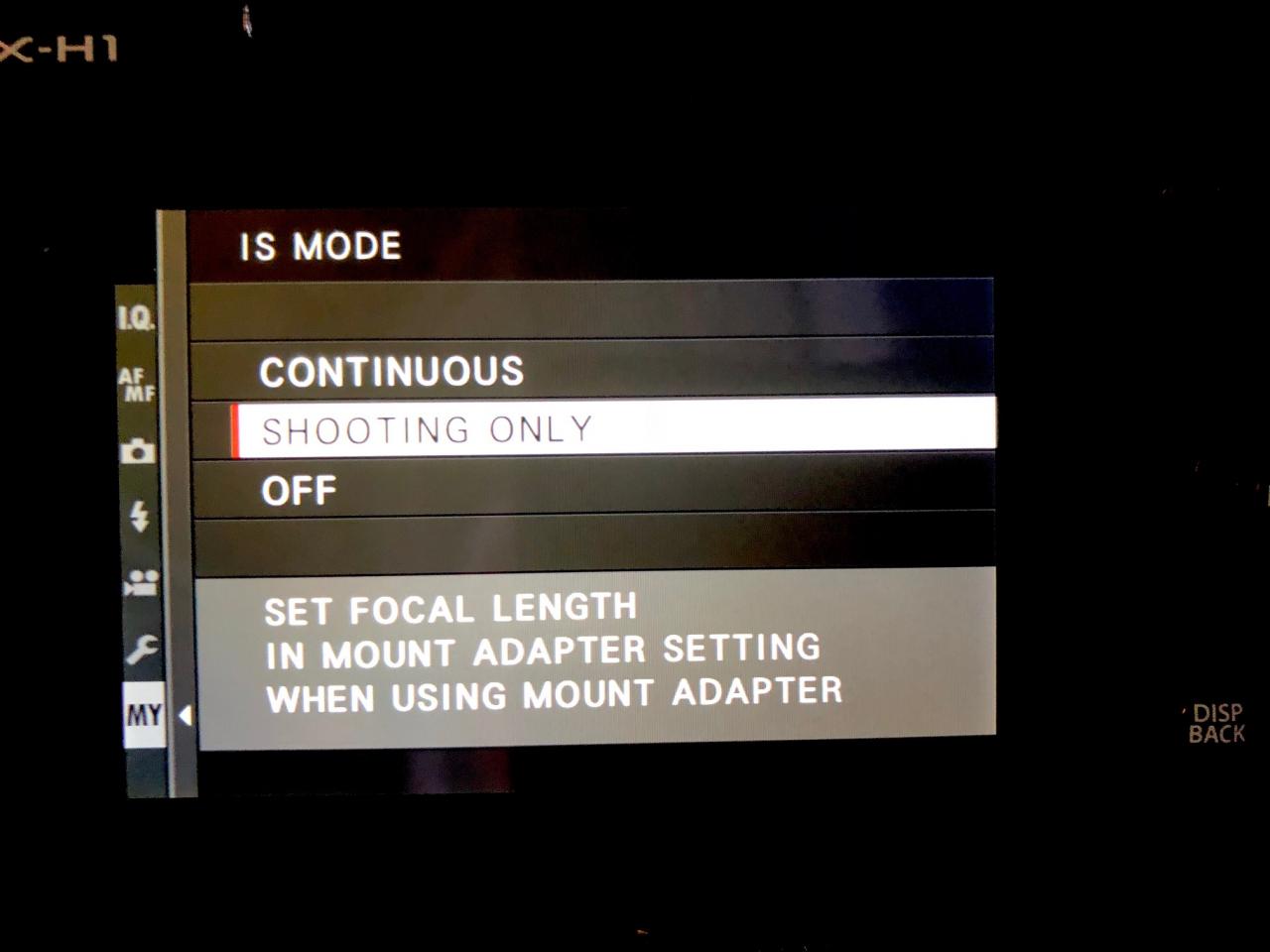
If you have a lens with OIS, then you turn the lens OIS AND body IBIS on and off with the switch on the lens. When a lens without OIS is mounted, then the camera’s IS menu will have the option for “OFF.” In the video above, he has an OIS lens mounted. In my screen shot below, I have a non-OIS lens mounted. I put IS mode in the “MY MENU” so that I can quickly turn it off when tripod mounted with a non-OIS lens mounted. The reason the menu is IS and not IBIS is because it is applicable to both OIS and IBIS and so is only labeled IS as a generic reference to “image stabilization.” It is even such w/ the X-T2 . . . The menu is just IS and not OIS (which is the only “applicable” kind of IS on that camera body). As mentioned above, I don’t think there is any mention of “IBIS” in the user manual at all. In fact, I just did a text search of the PDF manual and IBIS does not come up in the search. Rand

-
I’ve had my X-H1 for a day or so now. All configured they way I like it. I’m very much enjoying this camera. Much better high ISO than my X-T2 (figure a firmware update will make them even again at some point). Grip is MUCH better than X-T2 - that was the only “take down” for me from going from dSLR to Fuji when I bought my X-T1 (large hands). EVF is very detailed and bright. With grip and boost mode there is zero lag/drag in the EVF. And the IBIS is nothing short of excellent. Hand-holding the 16-55 @ 55mm down to 1/8th second is easily doable/repeatable with good camera holding technique. The body feels more rigid/rugged. The grip fitment is more organic, following the lines of the camera much better than the “attached square brick” with the funny vertical “add on” of the X-T2 grip. Shutter button improvement is very nice, indeed. Some complain that it is too soft... but I find it just about perfect. After about one minute using it, finding the half-press, vs the “shoot” press is quite easily dialed in, and makes for very accurate shutter trip w/o inducing camera movement. Shutter is very quiet. I love the e-ink top sub lcd that retains frames remaining, EC settings (or not), and battery status even with the camera off. VERY nice. Some have lamented the loss of the dedicated EC dial. I sure don’t. Setting the EC button to “toggle on and off” (which is remembered even with camera off) makes for very easy EC adjustment with rear command wheel. Since EC setting is visible in EVF, LCD and on sub lcd panel, there’s still obvious indication of EC settings. I like it better and am much less apt to accidentally adjust EC with this set up. The Eterna Film Simulation is really nice, even for stills photos. I’ve not yet ventured into video. I’m very pleased with this machine, it is a worthwhile upgrade to X-T2 based on my own preferences in ergos, the IBIS, the EC implementation, robustness of the body construction, and a lot of other small refinements like the push button (rather than fiddle slide button) for releasing the LCD for vertical tip-out, etc. Rand
-
There’s way more to the H than just video. In fact “Billy” of the Fuji Guys (he’s Fuji manager in Canada) went to some length to explain H as High Performance rather than hybrid as many pundits are saying. More robust body - 25% thicker magnesium alloy and stronger structure. 8H powder coat finish for much better durability. Higher resolution EVF. Larger buttons on back. Relocated rear AF button. Electronic first curtain shutter. (Zero blackout at 7 FPS.) More robust (strengthened) lens mount w/ improved weather sealing. Better low light AF capability. -1 EV Improved AF and AFC performance. Dual processors. Improved grip depth. Improved weather sealing. .... and the IBIS. My take is that this is the rumored high-end, more bullet-proof professional body that was rumored quite a while back and then went silent. I like the new implementation of the EC (it was too often bumped with the dial location). You can set the EC button to either be "on while pressing" or to "toggle off and on." I think this will work out really well in practice and with "toggle off and on" and the front command wheel as the default, it seems it will be a very natural way to implement with the camera to the eye, rather than the awkward thumb movements required to move the EC dial while the camera is at my eye on the T-2. And I like the fully customizable top LCD. It is "sticky" (don't know the proper terminology) so that it is visible when the camera is off. So, rather than a take-down, I see it as an increase. Battery charge, what auto ISO mode I'm in, how many frames remaining, etc., before I even turn the camera on. My pre-order for body w/ grip is in! Rand
-
Clean as a whistle. No "shot noise" at all. Rand
-
I shoot long exposure. I'd suggest that that is exactly what the long exposure noise reduction is for. LOL This one was 3 minutes 15 seconds: Rand
-
It seems obvious in retrospect that Fuji was aware of the "now announced" Sony a9. The new X body would seem to represent a similar direction. I'm all for it and will look forward to what comes. Rand
-
Just get a nice arca Swiss plate and attach to the stock Fuji foot. Rand
-
X-T2 with dual battery grip self discharge?
Rand47 replied to davlewis's topic in Fuji X-T2 / Fuji X-T20
I had to take care of my ill mother, which kept me from photography for about two and a half months. My X-T2, with grip, was stored with three fully charged 126s batteries. When I turned it on, both grip batteries were red, and the in-camera battery was about 1/3 depleted. Rand -
Do you see the banding (color compression) on screen "before" your raw file is exported as a jpeg? If so, it may be a function of your monitors lack of color gamut. The broad (and relatively even) tonality shift from light to dark in a sky is especially prone to showing "compression" on a narrow gamut monitor - AND in being cooked into a jpeg as the broad gamut of the sky is compressed on conversion. What is happening is that the "very many" shades of color (for simplification) in the file don't fit into srgb and get moved (piled up together) to fit. This is what creates the visual bands. A demosaiced raw file viewed on a wide gamut monitor will show none or very little of this effect (most wide gamut monitors approach full AdobeRGB 1998 gamut capability). Unfortunately, if we only display our images on the web, they get "jpeg-ed" and the compression is obvious a lot of the time. One way to minimize this is to make sure that when you apply sharpening that the sky is appropriately masked. If this isn't sufficient, you may actually want to apply some negative clarity to the sky to smooth the blend a bit. As mentioned in the previous post, bit depth also has a significant impact on this. Rand
-
My X-Pro 2 and X-T2 produce identical files, given identical settings. Send your X-T2 back to Fuji. Best of luck getting it sorted out. Rand
-
Glad you're sorted out. Rand
-
My initial problem with the ISO dial wasn't "the dial" - it was seeing where I was going through the little window. THEN, it dawned on me to just look at the LCD ISO indicator while lifting and turning the dial. Doh! No problem at all, now. Rand